JumpEye

JumpEye Summary
JumpEye is a iOS app in the Sports category, developed by 株式会社S-CADE. First released 6 years ago(Aug 2019), the app has 3 ratings with a 4.67★ (excellent) average rating.
Store info: Last updated on App Store on Oct 14, 2025 .
4.67★
Ratings: 3
Screenshots


App Description
JUMP EYE
◆Attention on using slow videos in the camera roll◆
The playback speed of slow videos saved in the camera roll will be edited to normal speed forcibly instead of slow at the beginning and the end of the video. If you load the video as it is, the playback speed at the beginning and end of the video will not be slow in JumpEye as well, so you will not be able to measure the video accurately.
To fix this issue, go to the Photos app, select the video you want to import and tap the Edit button in the upper right corner of the playback screen.
The barcode white lines displayed at the bottom of the video on the edit screen will be narrower at the left and right edges than at the center.
By widening the spacing between the rightmost and leftmost white lines, you can slow down the playback speed of all of your videos.
After editing, please load the video in JumpEye for measurement.
In addition, if you can not start the camera application in JumpEye, please open the settings application and search "JumpEye" in the search window.
Tap "JumpEye" in the search results, you will go to the privacy settings screen of JumpEye.
After that, please give permission for all photos, microphone, camera.
□General Information□
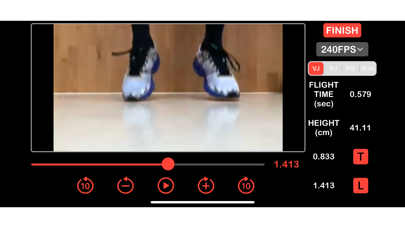
JUMP EYE has been developed to calculate the vertical jump height by using the flight time.
Use your iPhone's high-speed camera to measure the flight time during a vertical jump.
□Procedure□
1. Open JUMP EYE and adjust the camera’s focus on an athlete's feet.
2. Simply record videos of a vertical jump using Slo-Mo (120/240 fps) or import the ones you want from the Photo Library.
3. Once we playback the video, we have to then manually go through frame by frame to identify and mark the takeoff and landing frames (press “start” and “stop”).
4. The formula then automatically calculates the duration of the flight and the jump height.
□Main characteristics□
・Videos are given an automatic file name (hh:mm:ss), which can be edited by holding down on the icon for one second, then we can rename or delete the file.
・After marking the frames, the jump height is automatically labelled after the file name.
・You can also import movies from the Photo Library.
・Manual focus makes feet and floor easily identifiable and precise.
・You can playback the movie in 3 ways (manual slider, frame by frame, and