DoNext - Next Action ToDo List

DoNext - Next Action ToDo List Summary
DoNext - Next Action ToDo List is a with in-app purchases iOS app in Productivity by Fabian Merkle. Released in Dec 2019 (6 years ago). It has 12 ratings with a 4.50★ (excellent) average. Based on AppGoblin estimates, it reaches roughly 49 monthly active users and generates around $<10K monthly revenue (100% IAP / 0% ads). Store metadata: updated Jan 26, 2026.
Store info: Last updated on App Store on Jan 26, 2026 .
4.5★
Ratings: 12
Screenshots


App Description
Get things done with DoNext – your focused todo list for stress-free productivity.
FOCUS ON WHAT TO DO NEXT
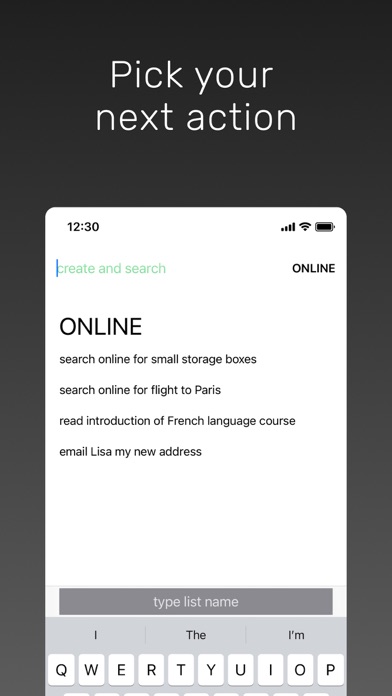
• Decide your next action: Break down goals into actionable first steps, like "search flights to Paris" instead of vague tasks like "plan vacation"
• Quick switch between contexts: Jump instantly to any task list by typing its initials (e.g., "o" for "online") in the search
• See only what matters: View actionable tasks relevant to your current context, eliminating overwhelm
KEY FEATURES
• One-tap completion: Mark next-actions done with a single tap
• Stay fresh: Tasks automatically shuffle so older items don't get ignored
• Lightning-fast navigation: Type list initials or press tab to switch between contexts instantly
• Prevent duplicates: See similar tasks while entering new ones to keep your lists clean
• Automatic cleanup: Completed tasks disappear the next day – no manual maintenance required
• Inbox for quick capture: Jot down thoughts on the go and process them later
• Long-press actions: Edit, delete, or open links in any task
• Siri Shortcuts & Spotlight: Quickly access lists or capture ideas system-wide
HOW DONEXT FITS YOUR WORKFLOW
DoNext works perfectly alongside your existing productivity system:
**Capture Everything**: Add ideas to the DoNext inbox throughout the day
**Process Your Inbox**: Transform each item into a clear, actionable next-action you can do right now
**Make Tasks Actionable**: Replace vague tasks like "organize project" with concrete first steps like "email Sarah for project files"
**Choose the Right Context**: Organize tasks by location (@home), situation (@team-meeting), or person (@partner)
**Use Other Apps for Planning**: Track complex multi-step projects in dedicated project management apps, then add next-actions to DoNext as they become relevant
**Calendar for Deadlines**: Schedule time-specific tasks with due dates in your calendar; use DoNext for everything you want to do ASAP
**Work from Your Lists**: Let DoNext handle sorting and cleanup automatically – no manual reordering or "today view" needed
**Keep It Simple**: Use DoNext exclusively for next-actions; use other apps for notes, reminders, checklists, and long-term planning
**Pro Tip**: Use the "Capture thought" Shortcut to send text to your inbox from any app and Siri
Learn the complete methodology in th