Stickyboard 2 Free Edition: Sticky Notes on a Whiteboard to Brainstorm, Mindmap, Plan, and Organize
Stickyboard 2 Free Edition: Sticky Notes on a Whiteboard to Brainstorm, Mindmap, Plan, and Organize Summary
Stickyboard 2 Free Edition: Sticky Notes on a Whiteboard to Brainstorm, Mindmap, Plan, and Organize is a mobile iOS app in Tools by Qrayon, LLC. Released in Dec 2011 (14 years ago). It has 11 ratings with a 4.91★ (excellent) average. Based on AppGoblin estimates, it reaches roughly 45 monthly active users . Store metadata: updated Apr 6, 2017.
Store info: Last updated on App Store on Apr 6, 2017 .
4.91★
Ratings: 11
Screenshots
App Description
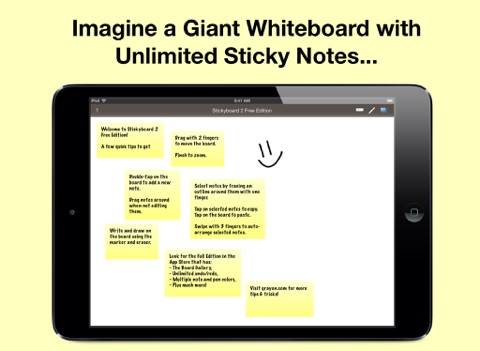
Imagine a giant whiteboard with a never-ending stack of sticky notes, now with Magic Arrange!
LIKE REAL NOTES, ONLY BETTER
Nothing beats a whiteboard and sticky-notes for capturing lots of loose information and seeing the big picture. Stickyboard 2 takes that flexibility and adds the convenience and power of your iPad. Don't worry about losing notes after a meeting again. It's much easier to carry around, and a lot friendlier for the environment.
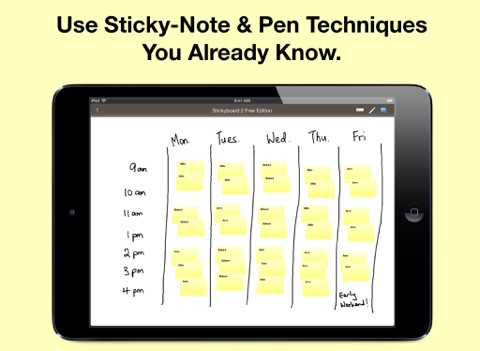
Use your favorite sticky note techniques. Effortlessly move and group your notes - unlike paper sitcky notes, they don't fall off after too may moves.
Think in the way that works best for you, and for the problem at hand.
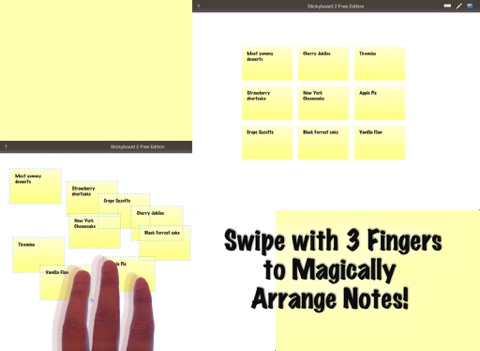
NEATLY ARRANGE NOTES WITH A FLICK OF YOUR FINGERS
The most exciting feature of Stickyboard 2 is something we call Magic Arrange. One of the biggest pains of working with lots of sticky notes is having to arrange and rearrange them. Wouldn’t it be nice if you could just wave your hands and have them neatly arrange themselves? Well, with the magic of the iPad and Stickyboard 2, now you can!
Just select a bunch of notes, then swipe with 3 fingers to instantly arrange them into neat piles, or fan them out into a grid, columns, or rows.
This is going to change the way you work with sticky notes, and you are never going to look at paper notes the same way again!
Try it out for yourself.
FOR ALL YOUR STICKY NOTE NEEDS
Use Stickyboard 2 to:
- Outline a manuscript or screenplay,
- Plan a party,
- Schedule your week,
- Organize your thoughts,
- Brainstorm with your colleagues...
And augment your thinking in the way that suits YOU best.
FULL FEATURED NOTES AND DRAWING
Thank you for all the great feedback! Stickyboard 2 is a major new release completely rebuilt from the ground up. Key features include:
+ Smoother Ink: The ink system in Stickyboard 2 is much improved. It supports multiple colors with stutter-free drawing.
+ Unlimited Copy/Paste: Tap on selected notes to copy/cut them, even to other boards. Working with large amounts of information is easy with Stickyboard 2.
+ Lasso Select: Simply run your finger around or through a group of notes to select them. This allows for much more precision than rectangular selection methods, and feels more intuitive on a multi-touch display.
+ Unlimited Undo/Redo.
+ Automatic spell check.
SIMPLE YET POWERFUL
- Stickyboard 2 sports an elegant