Opsgenie

Opsgenie Summary
Opsgenie is a mobile iOS app in Tools by OpsGenie, Inc.. Released in May 2012 (14 years ago). It has 169 ratings with a 2.08★ (poor) average. Based on AppGoblin estimates, it reaches roughly 665 monthly active users . Store metadata: updated Jan 16, 2026.
Store info: Last updated on App Store on Jan 16, 2026 .
2.08★
Ratings: 169
Screenshots


App Description
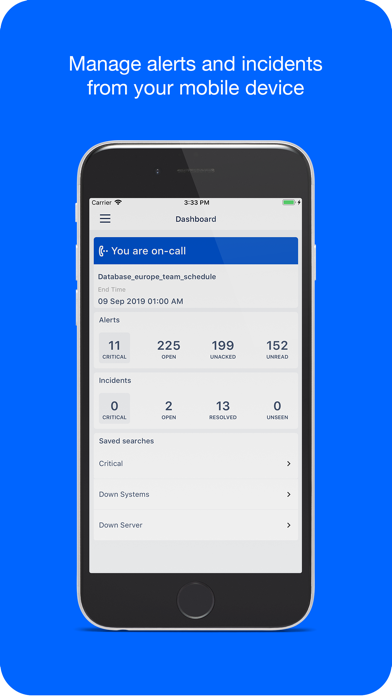
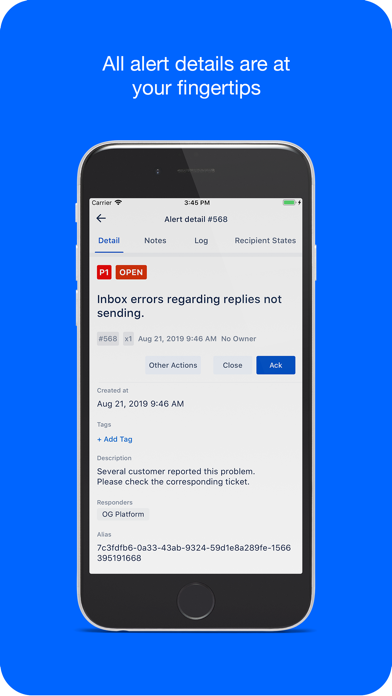
Opsgenie is a modern incident management platform for operating always-on services, empowering Dev & Ops teams to plan for service disruptions and stay in control during incidents. The Opsgenie Application for iOS delivers the power of the solution to your mobile devices. You can receive push notifications when alerts and incidents arise, take action directly from the application, understand the status of all known issues and manage your on-call responsibilities.
Opsgenie for iOS is free for all Opsgenie customers and requires a subscription to Opsgenie service. Your Opsgenie administrator will send an invite via email for you to create an account. Once your account is created, you can log in to Opsgenie service from the iOS app with your Opsgenie username and password.
You can view additional documentation at http://www.opsgenie.com/docs/dashboard/ios-app
Features:
* Customizable dashboards for responding to alerts and incidents faster
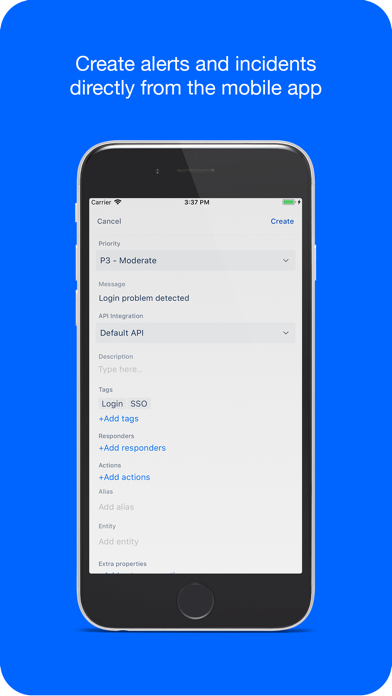
* Ability to create alerts and incidents with ease
* Easy access and response to alerts and incidents (Acknowledge, Close, Escalate to Next, Take Ownership, Snooze and many more)
* Ability to execute custom actions on alerts and incidents (i.e ping, restart server, …)
* Opsgenie-hosted audio & video conferencing (Incident Command Center) to effectively collaborate during incidents
* Service Catalogs to identify and manage service units
* Ability to track each service’s status via dedicated status pages
* Ability to define & add responders and/or stakeholders to incidents
* Ability to select multiple alerts/incidents and execute an action for all
* Alert/Incident list pages supporting native swipe gestures for actions
* Ability to save and reuse the searches previously defined in order to filter alerts and incidents
* Who Is On-Call page which enables viewing all schedules and active rotations of the moment
* User Directory that enables accessing all users and their contact information
* Ability to easily contact users via phone call, SMS, email, and Skype
* Ability to mute/unmute notifications
* Ability to enable/disable notification preferences, notification rules and contact methods