VIB Timer

VIB Timer Summary
VIB Timer is a with in-app purchases iOS app in Business by MNEMONIC JAPAN. Released in Dec 2012 (13 years ago). It has 10 ratings with a 3.10★ (mixed) average. Based on AppGoblin estimates, it reaches roughly 69 monthly active users and generates around $<10K monthly revenue (100% IAP / 0% ads). Store metadata: updated Apr 18, 2017.
Store info: Last updated on App Store on Apr 18, 2017 .
3.1★
Ratings: 10
Screenshots
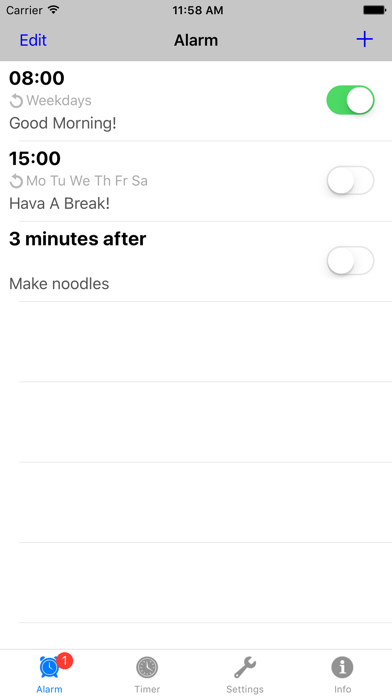


App Description
This is Alarm/Timer Application which only works on vibration (meaning without any sound). This application doesn’t have sound alarm function from the beginning, it eventually prevent from accidently ringing alarm sound.
This application will useful, If you have this situation such as [unwanted waking up your family around you], [unwanted noisy sound when you taking a nap in a working place or library]
※This application doesn’t work on iPad, iPod touch which don’t have vibration function.
【Features】
- Notify by vibration in a specified week and time.
- Notify by vibration on specified period of time after calculating from current time.
- Schedule plural alarm simultaneously
- Customize vibration pattern
- Snooze function(notify again after specified period of time)
- Background notification and notification after application exit
【In-App Purchases Benefits】
- Remove Ad banner
- Add more than 4 alarms
【URL Scheme】
vibtimer://
【Precautions】
When not notified at the alarm time
- Choose Banners, Settings > Notification Center > VIB Timer > ALERT STYLE
- Set On, Settings > Notification Center > VIB Timer > ALERTS > Show in Notification Center
- Set On, Settings > Notification Center > VIB Timer > Show on Lock Screen
※ Notification doesn't work in Do Not Disturb mode. You should turn off Do Not Disturb mode, or set the alarm time outside of scheduled hours.
When not vibrate in spite of notified
- Set On, Settings > Notification Center > VIB Timer > Sounds
- Set On, Settings > Sounds > VIBRATE > Vibrate on Ring
- Set On, Settings > Sounds > VIBRATE > Vibrate on Silent