unzip + zip & send

unzip + zip & send Summary
unzip + zip & send is a mobile iOS app in Productivity by Gianluca Natalini. Released in Apr 2013 (12 years ago). It has 1.00 ratings with a 5.00★ (excellent) average. Based on AppGoblin estimates, it reaches roughly 4.00 monthly active users . Store metadata: updated Apr 16, 2024.
Store info: Last updated on App Store on Apr 16, 2024 .
5★
Ratings: 1.00
Screenshots


App Description
Do you miss WinZip or 7-Zip apps?
Do you need to decompress an email attachment (.zip or .tar) or a compressed file (.zip or .tar) that you find on the web or you've saved on dropbox (using "Open In"), to view its contents?
Do you want to extract the files contained in a compressed archive .zip or .tar and share them with another program installed in Your device (for example, to edit the shared file) or send them to Your friends?
Do you have to compress many files stored in Your device (documents, music, video, pictures, etc…) in only one .zip file and send them with an e-mail, archive them or share with other installed apps, as you normally would when using WinZip or 7-Zip with your MAC or PC?
"unzip + zip & send" is the right application for You!
"unzip + zip & send" is exactly what was missing in order to send a lot of files with an only one email attachment, using a single compressed file (.zip):
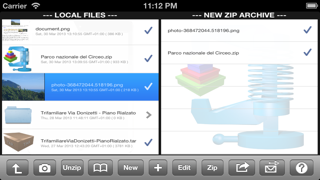
- Add to the "NEW ZIP ARCHIVE" all the files you want to send by email by selecting them from the list "LOCAL FILES" and by pressing the button "+"
- Compress the added files by pressing the button "Zip" (it will create a single compressed .zip file)
- Send the compressed .zip file (containing all the chosen files) with an email attachment
This application allows you to:
- Send many files (of any type) with a single email
- Speed up sending a lot of files
- Save data traffic on the Internet
- Send many documents in a single file (.zip)
- Store your documents organized in compressed archives
- Save memory on the device
Features:
- Extract files from compressed archives .zip and .tar
- Compress files and create compressed archives (.zip), that can be sent by e-mail (a compressed file .zip takes up less disk space of their uncompressed files)
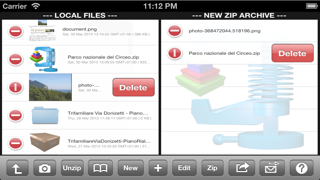
- "Zip Archive Manager" for managing compressed archives (.zip): add files, remove files, compress the files added in the current zip archive, send them by email, share them with dropbox or with other applications installed, explore/view files
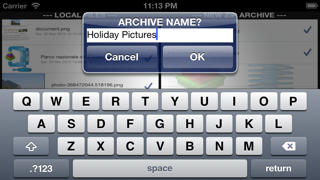
- "Files Archive": creates and stores in the file manager of "unzip + zip & send" an endless number of .zip archives and all your files (for example, some not yet compressed files to be added and compressed in a new archive .zip)
- "Merge" to create a new zip archive using files compressed and stored in other zip archives
- Extract files, folders and subfolders
- Navigation of t