PDFlexor - PDF Editor Tools
PDFlexor - PDF Editor Tools Summary
PDFlexor - PDF Editor Tools is a with in-app purchases iOS app in Tools by Huizhou Jiqu Technology Co., Ltd.. Released in Jun 2024 (1 year ago). It has 1.00 ratings with a 5.00★ (excellent) average. Based on AppGoblin estimates, it reaches roughly 4.00 monthly active users and generates around $<10K monthly revenue (100% IAP / 0% ads). Store metadata: updated Dec 22, 2024.
Store info: Last updated on App Store on Dec 22, 2024 .
5★
Ratings: 1.00
Screenshots


App Description
Master Your PDFs with Our Comprehensive Toolkit
PDFlexor empowers you to effortlessly edit, convert, and manage your PDF documents with a comprehensive suite of features. Whether you need to merge, split, extract pages, reorder, rotate, convert, or crop PDFs, this app ensures your documents are handled with the utmost security.
Local Processing for Maximum Security:
Most PDF operations, such as merging, splitting, extracting, and deleting pages, are processed locally on your device. This design principle ensures that your sensitive documents never leave your device, providing an extra layer of security and privacy. No need to worry about external breaches or unauthorized access, as your documents remain under your sole control.
Secure Office Conversions:
For Office-related conversions (PDF to Word, Excel, PowerPoint, and vice versa), our app takes extra precautions. Files are securely uploaded to our server for processing. We employ state-of-the-art encryption and adhere to strict privacy policies to protect your data during transmission and processing. Once the conversion is complete, files are immediately deleted from our servers, ensuring that your information remains confidential and secure.
Key Features:
Organization:
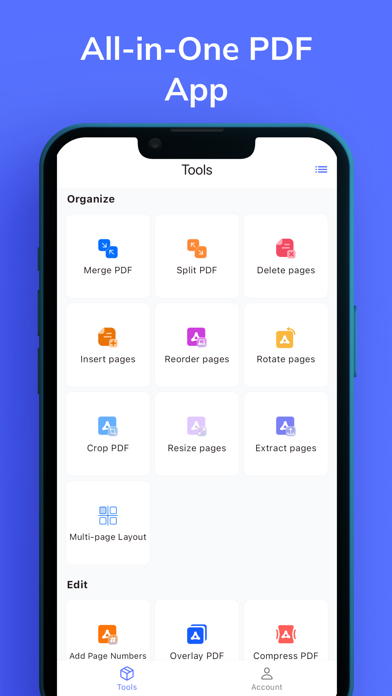
Merge PDFs: Combine multiple PDF files into a single, organized document.
Split PDFs: Divide large PDFs into smaller, more manageable files based on specific page ranges.
Extract Pages: Isolate and save specific pages from a PDF into a new document.
Delete Pages: Remove unwanted pages from your PDFs permanently.
Add Page Numbers: Enhance your documents by adding page numbers for easy reference.
Reorder Pages: Rearrange the sequence of pages in your PDF to fit your needs.
Rotate Pages: Adjust the orientation of pages to ensure they are displayed correctly.
Insert Pages: Add new pages into your existing PDFs at any position.
Multi-page Layout: Create PDFs with multiple pages per sheet for compact viewing.
Viewing and Editing:
Crop PDF Pages: Trim or remove unwanted margins from your PDF pages.
Resize Pages: Change the size of your PDF pages to standard formats like A4 or Letter.
Compress PDF: Reduce the file size of your PDFs for easier sharing and storage.
Edit Metadata: Modify or remove metadata to protect your privacy.
Remove Blank Pages: Automatically detect and delete empty pages from your documents.
Overlay PDF: Superimpose one P