Detective's Voice Recorder

Detective's Voice Recorder Summary
Detective's Voice Recorder is a with in-app purchases iOS app in Tools by HeavensSquare. Released in Aug 2013 (12 years ago). It has 15 ratings with a 3.07★ (mixed) average. Based on AppGoblin estimates, it reaches roughly 67 monthly active users and generates around $<10K monthly revenue (100% IAP / 0% ads). Store metadata: updated Aug 2, 2018.
Store info: Last updated on App Store on Aug 2, 2018 .
3.07★
Ratings: 15
Screenshots

App Description
◆◆◆◆◆ New and Smart Recorder arrived !!! ◆◆◆◆◆
▻ Super Simple !
▻ Super Fast !
▻ Secret Recording in Black Screen !
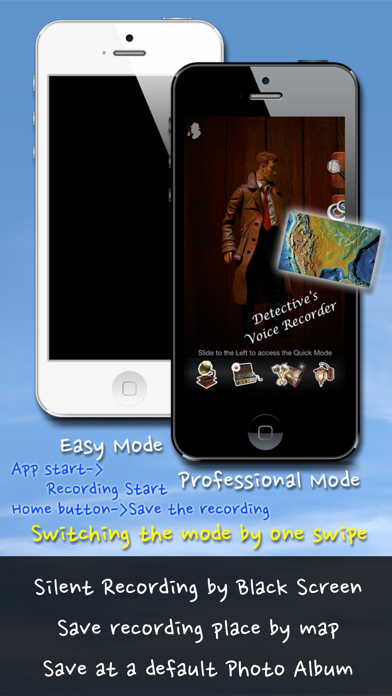
▻ Two Way - Easy, Professional Mode !
▻ Using Swipe, instantly Switch to other Recording Mode!
▻ Sound Detection Recording - Only record valid sound !
(Sound Detection Recording: The feature that only record the sound louder than pre-set volume set by the user)
◉ Sound Detection Recording is very handy and save much storage amount
◉ Save with location map image where you record !
◉ Interruption Auto Pause - Call, Message, Alarm, ETC
◉ Multitasking !
◉ Save to Camera roll !
◉ iTunes File Sharing Support !
◉ Pre-set Time Recording: according to specific date and time or Timer set (Optional)
: Even the app is terminated, On time, notification will inform you
: Sound Detection Recording, Sound Detection Call and Pre-set Time Recording can be working together !
◉ Plus Pack: Satellite map and detailed Recording Quality set up (Optional)
◉ But Tiny limitation : 999999 hours Recording time and 5 minutes Sound Detective Recording
◉ Unlock the limitation: Unlock the recording time limitation forever! (Optional)
Easy Mode>
▻ Super Easy and Fast Recording
▻ App Start => Recording Start (at your choice)
▻ Home Button => Stop Recording and automatic save to camera roll
▻ Sound Detection Recording is Available even on a Easy Mode !!
▻ Multitasking
▻ Recording even in Sleep Mode
▻ Remaining Storage and Battery Check
Professional Mode
▻ Sound Detection/Normal Recording
▻ Save Recording location with recorded audio file
▻ Export to Camera roll with location map
▻ Multitasking
▻ Recording even in Sleep Mode
▻ Remaining Storage and Battery Check
** During Black screen, Recording is preceding so press home-button to finish the recording or swipe to use Professional mode.
** When the application is running, please adjust appropriately at Setting to start the recording straight. The default setting is on a manual recording.
** Please use Professional mode to save the recording location.
** You can only record the sound louder than you want without any noise by adjusting a volume slider at Sound Detection Recording mode.
** Maintain your app in the foreground to use Sound Detection Call(Due to iOS limitation)
** You can use recording features suitable to the situation with