AR Draw: Sketching & Painting
ASO Keyword Dashboard
Tracking 137 keywords for AR Draw: Sketching & Painting in Apple App Store
AR Draw: Sketching & Painting tracks 137 keywords (1 keyword ranks; 136 need traction). Key metrics: 0% top-10 coverage, opportunity 52.8, difficulty 45.2, best rank 102.
Tracked keywords
137
1 ranked • 136 not ranking yet
Top 10 coverage
0%
Best rank 102 • Latest leader —
Avg opportunity
52.8
Top keyword: fun
Avg difficulty
45.2
Lower scores indicate easier wins
Opportunity leaders
- 83.8
fun
Opportunity: 59.0 • Difficulty: 58.2 • Rank —
Competitors: 1,147
- 91.1
new
Opportunity: 59.0 • Difficulty: 63.9 • Rank —
Competitors: 2,341
- 88.4
make
Opportunity: 59.0 • Difficulty: 62.7 • Rank —
Competitors: 1,773
- 83.9
experience
Opportunity: 59.0 • Difficulty: 59.1 • Rank —
Competitors: 1,134
- 83.0
way
Opportunity: 59.0 • Difficulty: 60.3 • Rank —
Competitors: 1,067
Unranked opportunities
fun
Opportunity: 59.0 • Difficulty: 58.2 • Competitors: 1,147
new
Opportunity: 59.0 • Difficulty: 63.9 • Competitors: 2,341
make
Opportunity: 59.0 • Difficulty: 62.7 • Competitors: 1,773
experience
Opportunity: 59.0 • Difficulty: 59.1 • Competitors: 1,134
way
Opportunity: 59.0 • Difficulty: 60.3 • Competitors: 1,067
High competition keywords
new
Total apps: 10,701 • Major competitors: 2,341
Latest rank: — • Difficulty: 63.9
time
Total apps: 8,391 • Major competitors: 1,805
Latest rank: — • Difficulty: 62.9
make
Total apps: 8,094 • Major competitors: 1,773
Latest rank: — • Difficulty: 62.7
like
Total apps: 7,508 • Major competitors: 1,767
Latest rank: — • Difficulty: 63.2
account
Total apps: 5,212 • Major competitors: 1,073
Latest rank: — • Difficulty: 60.5
All tracked keywords
Includes opportunity, difficulty, rankings and competitor benchmarks
| Major Competitors | |||||||
|---|---|---|---|---|---|---|---|
| simply | 58 | 100 | 52 | 73 1,724 competing apps Median installs: 235,888 Avg rating: 4.6 | 102 | 102 | 356 major competitor apps |
| fun | 59 | 100 | 58 | 84 5,061 competing apps Median installs: 275,775 Avg rating: 4.6 | — | — | 1,147 major competitor apps |
| top | 58 | 100 | 59 | 78 2,843 competing apps Median installs: 305,500 Avg rating: 4.6 | — | — | 706 major competitor apps |
| new | 59 | 100 | 64 | 91 10,701 competing apps Median installs: 270,475 Avg rating: 4.6 | — | — | 2,341 major competitor apps |
| share | 58 | 100 | 63 | 82 4,336 competing apps Median installs: 258,138 Avg rating: 4.6 | — | — | 916 major competitor apps |
| friends | 58 | 100 | 62 | 81 3,682 competing apps Median installs: 281,575 Avg rating: 4.6 | — | — | 846 major competitor apps |
| art | 58 | 100 | 47 | 69 1,082 competing apps Median installs: 239,212 Avg rating: 4.6 | — | — | 202 major competitor apps |
| make | 59 | 100 | 63 | 88 8,094 competing apps Median installs: 266,850 Avg rating: 4.6 | — | — | 1,773 major competitor apps |
| phone | 58 | 100 | 59 | 75 2,007 competing apps Median installs: 269,575 Avg rating: 4.6 | — | — | 450 major competitor apps |
| sheet | 57 | 100 | 28 | 40 57 competing apps Median installs: 201,900 Avg rating: 4.7 | — | — | 14 major competitor apps |
| whether | 58 | 100 | 59 | 79 3,139 competing apps Median installs: 267,650 Avg rating: 4.6 | — | — | 715 major competitor apps |
| choosing | 57 | 100 | 38 | 56 306 competing apps Median installs: 252,550 Avg rating: 4.6 | — | — | 60 major competitor apps |
| experience | 59 | 100 | 59 | 84 5,154 competing apps Median installs: 261,775 Avg rating: 4.6 | — | — | 1,134 major competitor apps |
| within | 58 | 100 | 56 | 81 3,722 competing apps Median installs: 259,688 Avg rating: 4.6 | — | — | 740 major competitor apps |
| transparent | 57 | 100 | 43 | 49 145 competing apps Median installs: 181,525 Avg rating: 4.7 | — | — | 22 major competitor apps |
| image | 58 | 100 | 46 | 66 796 competing apps Median installs: 225,225 Avg rating: 4.6 | — | — | 142 major competitor apps |
| save | 58 | 100 | 61 | 81 3,777 competing apps Median installs: 254,125 Avg rating: 4.6 | — | — | 858 major competitor apps |
| payment | 58 | 100 | 58 | 78 2,787 competing apps Median installs: 287,450 Avg rating: 4.6 | — | — | 640 major competitor apps |
| new way | 57 | 100 | 45 | 50 165 competing apps Median installs: 309,875 Avg rating: 4.6 | — | — | 38 major competitor apps |
| way | 59 | 100 | 60 | 83 4,665 competing apps Median installs: 271,100 Avg rating: 4.6 | — | — | 1,067 major competitor apps |
| using | 58 | 100 | 61 | 83 4,473 competing apps Median installs: 247,200 Avg rating: 4.6 | — | — | 924 major competitor apps |
| life | 58 | 100 | 54 | 77 2,518 competing apps Median installs: 234,138 Avg rating: 4.6 | — | — | 503 major competitor apps |
| time | 59 | 100 | 63 | 89 8,391 competing apps Median installs: 259,600 Avg rating: 4.6 | — | — | 1,805 major competitor apps |
| process | 58 | 100 | 45 | 63 624 competing apps Median installs: 224,238 Avg rating: 4.6 | — | — | 122 major competitor apps |
| video | 58 | 100 | 56 | 76 2,262 competing apps Median installs: 268,550 Avg rating: 4.6 | — | — | 467 major competitor apps |
App Description
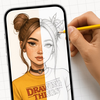
Our art AR Drawing app turns your iPhone into a virtual projector that helps you simply draw with precision. Here’s exactly how the process works:
1. Select an Image
Start by choosing an sketch from the app’s built-in gallery — like a cartoon character, animal, flower.
2. Position Your Paper
Place a blank sheet of paper on a flat surface (like a desk or table) in a well-lit environment. Make sure your phone can see the entire sheet.
3. Activate AR Mode
Open the image in AR mode. Your phone will use its camera to detect the paper and overlay the image directly on top of it through the screen.
4. Adjust the View
Move your phone until the image is perfectly aligned with the paper. You can resize or rotate the image using your fingers to make sure it fits exactly the way you want.
5. Start Tracing the sketch
Now, simply look at your phone screen while keeping your pencil on the paper. The image appears “on the paper” in your screen view, allowing you to trace the lines precisely. It feels like you’re copying a transparent image that’s floating above your paper — but with total control!
6. Finish & Save
Once your outline is done, you can finish the drawing with your own style — add colors, shading, or extra details. If you want, you can record a video of your drawing process, as well as take a photo of your finished work and save or share it directly from the app.
Why It’s So Effective
Traditional tracing requires light tables or printed guides. With AR Drawing, you trace using your eyes and hands guided by real-time AR projection — no special tools, no printing, no setup. Just your iphone, a pencil, and paper.
Discover a fun new way to sketch and paint using Augmented Reality. Whether you’re a beginner or a pro, simply AR Draw App helps you trace anything with precision and ease.
Our app also lets you record your drawing process. Share the video with friends and show off your skills!
Subscription Information:
Unlock the full experience of AR Draw: Sketching & Painting with a subscription.
- Payment will be charged to your iTunes account at confirmation of purchase.
- Subscriptions automatically renew unless canceled at least 24 hours before the end of the current period.
- Renewal charges will apply within 24 hours prior to the end of the current period, indica