WB Digital Base Hybrid

ASO Keyword Dashboard
Tracking 118 keywords for WB Digital Base Hybrid in Google Play
WB Digital Base Hybrid tracks 118 keywords (1 keyword ranks; 117 need traction). Key metrics: 0% top-10 coverage, opportunity 70.6, difficulty 46.5, best rank 181.
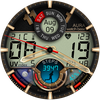
Bold, Modern Hybrid Watch Face for Wear OS. 10 Colors, Rich Info Display.
Tracked keywords
118
1 ranked • 117 not ranking yet
Top 10 coverage
0%
Best rank 181 • Latest leader —
Avg opportunity
70.6
Top keyword: faces
Avg difficulty
46.5
Lower scores indicate easier wins
Opportunity leaders
- 63.6
faces
Opportunity: 75.0 • Difficulty: 40.5 • Rank —
Competitors: 391
- 62.5
analog
Opportunity: 74.0 • Difficulty: 38.5 • Rank —
Competitors: 191
- 60.8
moon
Opportunity: 74.0 • Difficulty: 39.0 • Rank —
Competitors: 306
- 62.8
units
Opportunity: 74.0 • Difficulty: 40.1 • Rank —
Competitors: 428
- 61.6
glance
Opportunity: 74.0 • Difficulty: 43.2 • Rank —
Competitors: 343
Unranked opportunities
faces
Opportunity: 75.0 • Difficulty: 40.5 • Competitors: 391
analog
Opportunity: 74.0 • Difficulty: 38.5 • Competitors: 191
moon
Opportunity: 74.0 • Difficulty: 39.0 • Competitors: 306
units
Opportunity: 74.0 • Difficulty: 40.1 • Competitors: 428
glance
Opportunity: 74.0 • Difficulty: 43.2 • Competitors: 343
High competition keywords
download
Total apps: 341,462 • Major competitors: 17,623
Latest rank: — • Difficulty: 56.2
make
Total apps: 325,888 • Major competitors: 20,137
Latest rank: — • Difficulty: 57.5
find
Total apps: 310,056 • Major competitors: 17,818
Latest rank: — • Difficulty: 58.3
play
Total apps: 209,600 • Major competitors: 20,433
Latest rank: — • Difficulty: 59.7
see
Total apps: 164,031 • Major competitors: 8,168
Latest rank: — • Difficulty: 58.1
All tracked keywords
Includes opportunity, difficulty, rankings and competitor benchmarks
| Major Competitors | |||||||
|---|---|---|---|---|---|---|---|
| modern digital | 72 | 100 | 32 | 51 1,532 competing apps Median installs: 409 Avg rating: 4.3 | 181 | 181 | 27 major competitor apps |
| download | 65 | 100 | 56 | 88 341,462 competing apps Median installs: 2,119 Avg rating: 4.1 | — | — | 17,623 major competitor apps |
| play | 66 | 100 | 60 | 85 209,600 competing apps Median installs: 7,161 Avg rating: 4.0 | — | — | 20,433 major competitor apps |
| changes | 72 | 100 | 45 | 71 27,669 competing apps Median installs: 1,433 Avg rating: 4.0 | — | — | 1,088 major competitor apps |
| order | 67 | 100 | 52 | 82 142,884 competing apps Median installs: 564 Avg rating: 4.1 | — | — | 4,324 major competitor apps |
| try | 69 | 100 | 56 | 78 80,491 competing apps Median installs: 6,977 Avg rating: 4.0 | — | — | 7,923 major competitor apps |
| device | 68 | 100 | 60 | 80 109,194 competing apps Median installs: 3,345 Avg rating: 3.9 | — | — | 6,851 major competitor apps |
| make | 65 | 100 | 57 | 88 325,888 competing apps Median installs: 2,543 Avg rating: 4.0 | — | — | 20,137 major competitor apps |
| phone | 67 | 100 | 60 | 83 153,671 competing apps Median installs: 3,558 Avg rating: 4.0 | — | — | 9,548 major competitor apps |
| digital | 68 | 100 | 51 | 81 126,124 competing apps Median installs: 892 Avg rating: 4.0 | — | — | 4,643 major competitor apps |
| heart | 70 | 100 | 47 | 74 43,067 competing apps Median installs: 1,026 Avg rating: 4.1 | — | — | 1,625 major competitor apps |
| wear | 71 | 100 | 61 | 72 32,857 competing apps Median installs: 382 Avg rating: 4.1 | — | — | 871 major competitor apps |
| analog | 74 | 100 | 39 | 63 8,491 competing apps Median installs: 502 Avg rating: 4.2 | — | — | 191 major competitor apps |
| date | 68 | 100 | 53 | 79 93,942 competing apps Median installs: 806 Avg rating: 4.1 | — | — | 2,944 major competitor apps |
| wear os | 72 | 100 | 60 | 70 24,480 competing apps Median installs: 294 Avg rating: 4.2 | — | — | 301 major competitor apps |
| moon | 74 | 100 | 39 | 61 6,640 competing apps Median installs: 1,506 Avg rating: 4.2 | — | — | 306 major competitor apps |
| control | 67 | 100 | 54 | 82 137,706 competing apps Median installs: 1,853 Avg rating: 3.8 | — | — | 7,582 major competitor apps |
| modern | 69 | 100 | 49 | 78 79,795 competing apps Median installs: 1,203 Avg rating: 4.1 | — | — | 3,610 major competitor apps |
| people | 68 | 100 | 54 | 80 104,501 competing apps Median installs: 2,901 Avg rating: 4.0 | — | — | 5,798 major competitor apps |
| find | 65 | 100 | 58 | 87 310,056 competing apps Median installs: 2,793 Avg rating: 4.1 | — | — | 17,818 major competitor apps |
| swipe | 72 | 100 | 49 | 69 22,791 competing apps Median installs: 4,148 Avg rating: 4.1 | — | — | 1,666 major competitor apps |
| note | 71 | 100 | 48 | 72 32,187 competing apps Median installs: 4,198 Avg rating: 4.1 | — | — | 1,695 major competitor apps |
| process | 70 | 100 | 48 | 76 57,128 competing apps Median installs: 1,005 Avg rating: 3.9 | — | — | 1,940 major competitor apps |
| touch | 69 | 100 | 52 | 76 63,582 competing apps Median installs: 1,860 Avg rating: 4.0 | — | — | 3,758 major competitor apps |
| account | 68 | 100 | 54 | 79 94,938 competing apps Median installs: 2,055 Avg rating: 3.9 | — | — | 5,001 major competitor apps |
App Description
Bold, Modern Hybrid Watch Face for Wear OS. 10 Colors, Rich Info Display.
______________________
Get all your essential info at a glance with our modern hybrid watch face for Wear OS, featuring a bold look and 10 vibrant color options. Download this feature-packed watch face now!
ⓘ Features:
- 10 Color Skins
- AOD display
- Month, Date & Day of the Week
- Analog & Digital Time
- Analog & Digital Seconds Indicator
- AM/PM Indicator
- Battery Indicator
- Moon Phases Indicator
- Temperature
- UV Index
- Steps Tracker
- Heart Rate
________
* NOTE
WB Digital Base watch face automatically adjusts temperature units (Celsius or Fahrenheit) to match your watch/phone settings. No manual changes needed - just set your preference in your device settings.
________
ⓘ How to:
To customize your watch face, touch and hold on the screen, then tap on customize.
________
ⓘ Installation
How to install: https://watchbase.store/static/ai/
After installation: https://watchbase.store/static/ai/ai.html
If you have any issues installing the watch face, please note that we have no control over the installation process or any other Google Play / Watch processes. The most common issue that people face is after they buy the watch face and install it, they can't see/find it.
In order to apply the watch face after you install it, touch and hold on the main screen (your current watch face) the swipe left to look for it. If you can't see it, tap on the " + " sign at the end (add a watch face) and find our watch face there.
We use a companion app for the phone to make the installation process easier. If you buy our watch face, tap on the install button (on the phone app) you must check your watch.. a screen will appear with the watch face.. tap install again and wait for the installation to finish. If you already bought the watch face and it still asks you to buy it again on the watch, don't worry you will not be charged twice. This is a common synchronisation issue, just wait a little or try to restart your watch.
Another solution for installing the watch face is to try to install it from a browser, logged with your account (google play account that you use on the watch).
______________
JOIN WatchBase.
Facebook group (General watch faces group):
https://www.facebook.com/groups/1170256566402887/
Facebook page:
https://www.facebook.com/WatchBase
Instagram:
https://www.instagram.com/watch.base/
TikTok:
https://www.tiktok.com/@live.wowpapers
SUBSCRIBE to our YouTube channel:
https://www.youtube.com/c/WATCHBASE?sub_confirmation=1
https://www.youtube.com/c/WATCHBASE