ICOA PRO


ICOA PRO Summary
ICOA PRO is a mobile Android app in Music And Audio by Adam Hall Group. Released in Sep 2025 (5 months ago). It has about 288+ installs Based on AppGoblin estimates, it reaches roughly 55 monthly active users . Store metadata: updated Dec 3, 2025.
Recent activity: 19 installs this week (76 over 4 weeks) showing strong growth View trends →
Store info: Last updated on Google Play on Dec 3, 2025 .
0★
Ratings: 0
Screenshots



App Description
Fast and intuitive Setup via Bluetooth for ICOA PRO
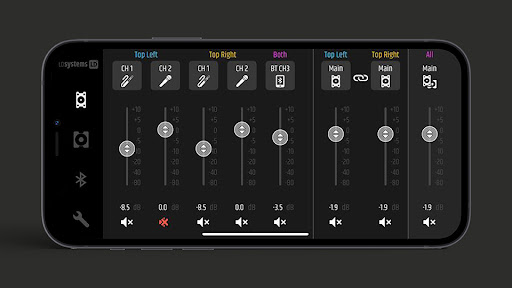
With the free ICOA PRO app, you can wirelessly connect and control any ICOA PRO speaker from LD Systems. Configure up to two top speakers and four subwoofers simultaneously, and control all functions directly from your smartphone or tablet.
Fast & intuitive setup
The app automatically scans for available ICOA PRO speakers in your vicinity. In the Speaker Setup, you can visually reproduce your own speaker setup and transfer suitable presets in a flash using ready-made scenes (e.g. "2× Sub + Stereo" or "Stack Cardioid + Stereo"). Thanks to the Wink LED function, you can directly localize individual speakers.
All settings under your control
Convenient access to all your ICOA PRO speakers' DSP functions:
- 4-band parametric EQ for each channel
- Switchable mic/line inputs
- Master EQ adjustments for tops and subs
- Delay settings (up to 50 m)
- Application presets (TOP): full-range, satellite, monitor low-latency, flat
- Application presets (SUB): 80 Hz, 100 Hz, 120 Hz, cardioid, monitor low-latency (100 Hz / cardioid)
Bluetooth & TWS (true wireless stereo)
You can control the speakers' TWS pairing and mono/stereo switching in the Bluetooth overview. A stereo setup with Bluetooth streaming and up to two tops and four subs is ready for use in just a few seconds. (The audio signal for the subs is transmitted by cable via the MIX OUT of the top speakers.)
Real-time control
All ICOA PRO DSP functions are mirrored in real time, so you can configure your system anytime, anywhere – even when it is being flown or is difficult to access.
Offline demo mode
Test all the app functions, even without real speakers. Simulated ICOA PRO speakers are available in demo mode, allowing you to try out your setup, make adjustments, and familiarize yourself with its operation. You can also use the demo mode as an offline editor to create your own presets .