A9 Mini Camera Wifi App Guide

ASO Keyword Dashboard
Tracking 104 keywords for A9 Mini Camera Wifi App Guide in Google Play
A9 Mini Camera Wifi App Guide tracks 104 keywords (no keywords rank yet; 104 need traction). Key metrics: opportunity 69.8, difficulty 51.9.
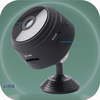
This A9 camera comes in a mini form but can still produce high quality images
Tracked keywords
104
0 ranked • 104 not ranking yet
Top 10 coverage
—
Best rank — • Latest leader —
Avg opportunity
69.8
Top keyword: charge
Avg difficulty
51.9
Lower scores indicate easier wins
Opportunity leaders
- 67.9
charge
Opportunity: 73.0 • Difficulty: 46.3 • Rank —
Competitors: 1,120
- 65.6
mini
Opportunity: 72.0 • Difficulty: 52.9 • Rank —
Competitors: 1,392
- 66.3
seconds
Opportunity: 72.0 • Difficulty: 48.0 • Rank —
Competitors: 962
- 64.1
applied
Opportunity: 72.0 • Difficulty: 45.7 • Rank —
Competitors: 470
- 71.1
switch
Opportunity: 72.0 • Difficulty: 79.6 • Rank —
Competitors: 2,096
Unranked opportunities
charge
Opportunity: 73.0 • Difficulty: 46.3 • Competitors: 1,120
mini
Opportunity: 72.0 • Difficulty: 52.9 • Competitors: 1,392
seconds
Opportunity: 72.0 • Difficulty: 48.0 • Competitors: 962
applied
Opportunity: 72.0 • Difficulty: 45.7 • Competitors: 470
switch
Opportunity: 72.0 • Difficulty: 79.6 • Competitors: 2,096
High competition keywords
help
Total apps: 123,065 • Major competitors: 14,840
Latest rank: — • Difficulty: 66.0
information
Total apps: 101,893 • Major competitors: 7,805
Latest rank: — • Difficulty: 58.6
unique
Total apps: 81,369 • Major competitors: 12,160
Latest rank: — • Difficulty: 60.7
please
Total apps: 75,311 • Major competitors: 7,632
Latest rank: — • Difficulty: 58.3
various
Total apps: 74,125 • Major competitors: 9,464
Latest rank: — • Difficulty: 57.7
All tracked keywords
Includes opportunity, difficulty, rankings and competitor benchmarks
| Major Competitors | |||||||
|---|---|---|---|---|---|---|---|
| friends | 67 | 100 | 65 | 83 68,351 competing apps Median installs: 52,912 Avg rating: 3.0 | — | — | 10,409 major competitor apps |
| mode | 69 | 100 | 65 | 78 35,564 competing apps Median installs: 53,723 Avg rating: 3.1 | — | — | 5,505 major competitor apps |
| better | 69 | 100 | 57 | 79 39,640 competing apps Median installs: 36,260 Avg rating: 3.0 | — | — | 4,807 major competitor apps |
| images | 69 | 100 | 59 | 78 37,077 competing apps Median installs: 30,933 Avg rating: 2.9 | — | — | 3,614 major competitor apps |
| information | 66 | 100 | 59 | 86 101,893 competing apps Median installs: 23,675 Avg rating: 2.6 | — | — | 7,805 major competitor apps |
| educational | 70 | 100 | 49 | 74 22,073 competing apps Median installs: 26,231 Avg rating: 2.5 | — | — | 2,042 major competitor apps |
| built | 71 | 100 | 64 | 71 15,037 competing apps Median installs: 30,161 Avg rating: 3.0 | — | — | 1,552 major competitor apps |
| life | 68 | 100 | 60 | 81 51,898 competing apps Median installs: 37,300 Avg rating: 2.9 | — | — | 6,276 major competitor apps |
| provide | 67 | 100 | 55 | 82 61,536 competing apps Median installs: 28,348 Avg rating: 2.7 | — | — | 5,453 major competitor apps |
| key | 68 | 100 | 57 | 79 40,681 competing apps Median installs: 35,653 Avg rating: 3.0 | — | — | 4,828 major competitor apps |
| help | 65 | 100 | 66 | 87 123,065 competing apps Median installs: 36,787 Avg rating: 3.0 | — | — | 14,840 major competitor apps |
| various | 67 | 100 | 58 | 83 74,125 competing apps Median installs: 40,134 Avg rating: 2.8 | — | — | 9,464 major competitor apps |
| watch | 69 | 100 | 69 | 78 38,532 competing apps Median installs: 39,176 Avg rating: 3.0 | — | — | 5,315 major competitor apps |
| pro | 71 | 100 | 64 | 72 16,544 competing apps Median installs: 52,159 Avg rating: 3.1 | — | — | 2,522 major competitor apps |
| mini | 72 | 100 | 53 | 66 6,935 competing apps Median installs: 71,389 Avg rating: 3.1 | — | — | 1,392 major competitor apps |
| around | 68 | 100 | 68 | 80 47,754 competing apps Median installs: 40,524 Avg rating: 3.0 | — | — | 6,815 major competitor apps |
| smart | 68 | 100 | 63 | 80 46,851 competing apps Median installs: 34,670 Avg rating: 2.9 | — | — | 5,609 major competitor apps |
| power | 69 | 100 | 59 | 76 29,892 competing apps Median installs: 40,812 Avg rating: 3.1 | — | — | 3,881 major competitor apps |
| seconds | 72 | 100 | 48 | 66 7,582 competing apps Median installs: 40,910 Avg rating: 3.0 | — | — | 962 major competitor apps |
| complete | 67 | 100 | 56 | 83 73,791 competing apps Median installs: 37,773 Avg rating: 2.9 | — | — | 8,679 major competitor apps |
| angle | 70 | 100 | 41 | 57 2,052 competing apps Median installs: 47,046 Avg rating: 2.9 | — | — | 282 major competitor apps |
| quality | 67 | 100 | 61 | 82 61,778 competing apps Median installs: 31,412 Avg rating: 2.8 | — | — | 6,617 major competitor apps |
| bring | 69 | 100 | 60 | 77 32,601 competing apps Median installs: 42,726 Avg rating: 3.0 | — | — | 4,623 major competitor apps |
| suitable | 71 | 100 | 49 | 74 20,163 competing apps Median installs: 33,595 Avg rating: 2.8 | — | — | 2,141 major competitor apps |
| always | 67 | 100 | 59 | 82 65,220 competing apps Median installs: 32,990 Avg rating: 2.9 | — | — | 7,264 major competitor apps |
App Description
This A9 camera comes in a mini form but can still produce high quality images
Instructions
H.264 -1080P remote wireless hidden camera
The camera A9 uses a unique ultra-portable design, it can be applied in various fields, it is very convenient, safe and bring a colorful life for you, please set your camera correctly in accordance with the guidelines of the quick steps.
Point key ON/OFF button to turn on, long press ON/OFF button for 3 seconds to turn off. (The MODE key is the reset button. Press and hold for 5 seconds in the power-on state to restore the factory settings after automatic restart)
The blue light is the power indicator. The power is always on. The green light is the Wi-Fi indicator and the red light is the charge indicator. When the lamp is fully charged after charging.
Specific models are as follows
1. Ad hoc mode: Slow Green light flashing
2. Router mode: Green light flash
3 After you have configured remote camera: Green light
Under clear what mode, the camera can be reset at switch to point mode. This must be reset at a red light flash or slow flash when you press the reset built to be useful! Press the reset built around five seconds off the whole machine lights let go until the camera starts to complete (about 30 seconds).
Disclaimer:
i8 pro max is an educational application that will help friends better understand the i8 pro max smart watch guide, not an official application. The information we provide comes from various trusted sources.