Gluggy


Gluggy Summary
Gluggy is a mobile Android app in Productivity by Alan Green. Released in Jul 2021 (4 years ago). It has about 3.00+ installs Store metadata: updated Jul 13, 2021.
Store info: Last updated on Google Play on Jul 13, 2021 .
0★
Ratings: 0
Screenshots

App Description
A business app for managing and scheduling your customer jobs with ease
The ideal solution for small businesses and sole-traders such as Window Cleaners, Pool Cleaners, Gardeners, Housekeepers / Cleaners, Roof Washers, Driveway & Patio Washers, Wheelie Bin Cleaners, Dog Walkers, Pet Sitters or any other service based business.
Dashboard
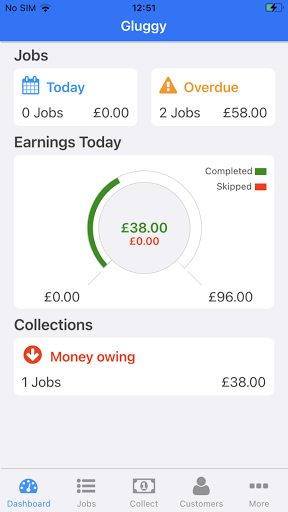
- See an instant overview of your days work including todays jobs, overdue jobs and money owing.
- Gauges display how much you've earned and what has been skipped.
- Tap the Jobs, Overdue or Money Owing buttons to drill in and see more detail about the jobs and payments to be collected.
Jobs
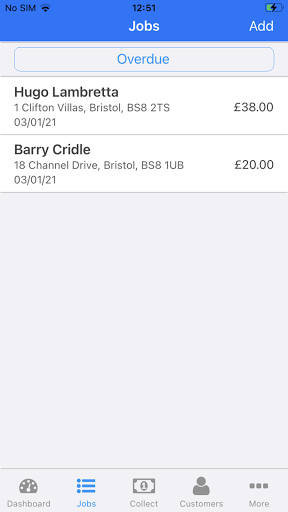
- Use the Jobs filter button to see the jobs booked for today, tomorrow, this week, next week and more.
- Work jobs in any list marking them as complete, skipped, paid or un-paid.
- Bring jobs forward without affecting their schedule.
- Push jobs back without affecting their schedule.
- Send text and email notifications when a job is completed.
- Add new customers and jobs in a single step.
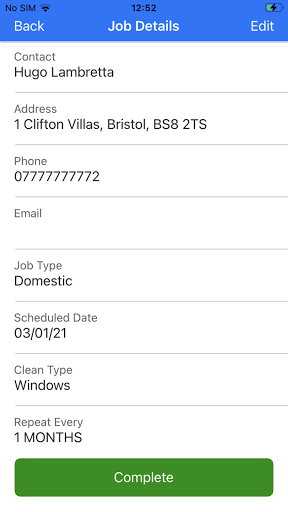
- Change a jobs schedule, type, class, price or any other details.
- Call customers directly from the job record by tapping their phone number.
- Navigate directly to a customer job by tapping their address.
Collections
- Manage outstanding payments to ensure you never miss collecting from a customer.
- Search the list of jobs awaiting collection by name, address, phone or email address.
- Send email or text payment reminders directly to the customer.
- Call customers directly from the collection screen by tapping their phone number.
- If you need to collect in person navigate directly to a customer by tapping their address in the collections record.
Customers
- View all your customers in the Customer manager.
- Search customers by name, address, phone number or email address.
- See each individual customers job history and scheduled jobs.
- Edit and update customer details.
- Add extra jobs for any customer.
- Accidentally marked a job as completed or paid? Use the Change Job Status tools to reset completion or payment details for any job.
More
- Change Gluggy regional settings to match where you work or live. Gluggy supports dd/mm/yyyy and mm/dd/yyyy date formats and £, €, $ and ¥ currencies.
- Add your banking details so that customer can pay direct to your account.
- Completely customise the Service Types to fit your business.
- Run reports against your data to see how we