Text Time Watch Face
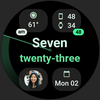

Text Time Watch Face Summary
Text Time Watch Face is a mobile Android app in Productivity by amoledwatchfaces™. Released in Sep 2024 (1 year ago). It has about 991+ installs Based on AppGoblin estimates, it reaches roughly 45 monthly active users . Store metadata: updated Jul 30, 2025.
Recent activity: 4.00 installs this week (15 over 4 weeks) showing below average growth View trends →
Store info: Last updated on Google Play on Jul 30, 2025 .
0★
Ratings: 0
Screenshots


App Description
Colorful, customizable, & multilanguage watch face with text-based time display.
Only for Wear OS 4+ devices
// Not suitable for rectangular watches
Powered by Watch Face Format
amoledwatchfaces.com
BUY ONE GET ONE OFFER!
amoledwatchfaces.com/bogo
CUSTOM COMPLICATION APPS
amoledwatchfaces.com/apps
FEATURES
• Watch Face Format 1 / 2
• text-based time (1st line = hours, 2nd line = minutes) with multi language support
• compatible with latest Wear OS devices (Galaxy Watch7 / Pixel Watch 3)
• flavors feature support (Wear OS 5)
• 4 custom complication slots
• hidden app shortcut slot (text time)
• optional am-pm, seconds & unread notifications badge
• dual phone/watch battery support*
• phone notifications complication support*
• true black background @ optional mesh background
• material color themes & design
• make it your own, combine theme & subTheme
• sweep seconds indicator
• battery friendly
* Requires Phone Battery Complication app
https://play.google.com/store/apps/details?id=com.weartools.phonebattcomp
** Is your language missing? Join our translation team! Email support@amoledwatchfaces.com for the strings.xml file.
USER CONFIGURATIONS
• Material Theme (60+)
• Material SubTheme (60+)
• Seconds Indicator (None, Wave Hand, Wave)
• Badge Indicator (None, Am-Pm, Unread Notification Count)
• Mesh Background (Toggle)
• Seconds Badge (None, Default, Inverted)
• Ambient Mode (Dimmed, Text Only)
Installation and troubleshooting guide
amoledwatchfaces.com/guide
Please send any issues reports or help requests to our support address
support@amoledwatchfaces.com
Join our Telegram group for live support and discussion
t.me/amoledwatchfaces
Newsletter
amoledwatchfaces.com/contact#newsletter
amoledwatchfaces™ - Awf