Just Weather: Watch Face

Just Weather: Watch Face Summary
Just Weather: Watch Face is a Android app in the Weather category, developed by amoledwatchfaces™. First released 1 year ago(Jul 2024), the app has accumulated 653+ total installs
Recent activity: 2 installs this week (29 over 4 weeks) showing exceptional growth View trends →
Store info: Last updated on Google Play on Dec 1, 2024 .
0★
Ratings: 0
Screenshots

App Description
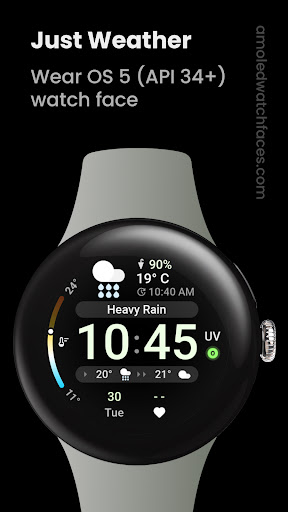
Current weather, conditions, forecast, chance of rain, UV & two complications.
Only for Wear OS 5+ devices
Powered by Watch Face Format 2
amoledwatchfaces.com
BUY ONE GET ONE OFFER!
amoledwatchfaces.com/bogo
CUSTOM COMPLICATION APPS
amoledwatchfaces.com/apps
WEATHER DATA
• current temperature
• current weather condition (localized)
• chance of rain
• the highest / lowest temperature for the day (thermometer bar)
• current UV index
• current chance of precipitation (0-100 %)
• 2-hour weather forecast (temperature + condition icon)
• weather data last update time
FEATURES
• Watch Face Format 2
• new weather data source (The Weather Channel)
• weather data refresh interval - OEM specific (Samsung = 60 minutes)
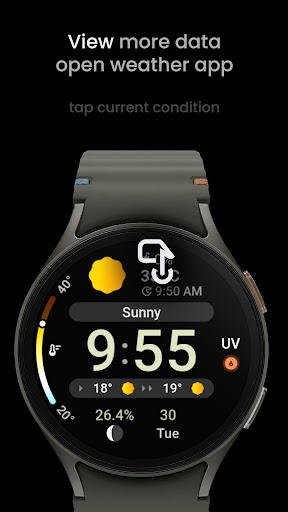
• tap on main weather condition to open system default Weather app (Google Weather, Samsung Weather)
• two weather icon packs (Default, Google Weather)
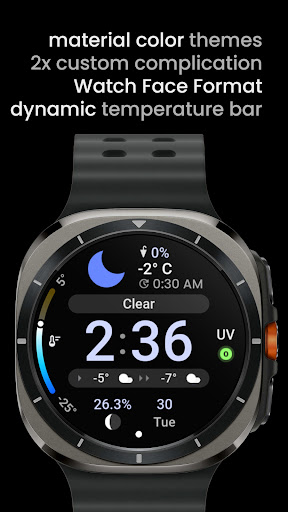
• dynamic temperature gradient (changes colors based on min-max values)
• fully compatible with latest Wear OS 5 devices (Galaxy Watch7 / Ultra)
• burn-in protection
• unique material color themes
• true black background
• two custom complication slot to fill with additional data sources
• watch face presets (Flavors) included
USER CONFIGURATIONS
• AOD (Style - 2x)
• Weather Icon Pack (2x)
• Material Theme (60+)
• Custom Complication (2x)
NOTE: UV SourceType is currently not working properly on Samsung devices. Watch face is using Samsung Weather UV complication data source instead. This is only temporary solution until the issue is fixed by Samsung.
Installation and troubleshooting guide
amoledwatchfaces.com/guide
Please send any issues reports or help requests to our support address
support@amoledwatchfaces.com
Join our Telegram group for live support and discussion
t.me/amoledwatchfaces
Newsletter
amoledwatchfaces.com/contact#newsletter
amoledwatchfaces™ - Awf