Pinyiner Premium


Pinyiner Premium Summary
Pinyiner Premium is a Android app in the Books And Reference category, developed by Astratech. First released 11 years ago(Feb 2014), the app has accumulated 534+ total installs and 40 ratings with a 4.18★ (good) average rating.
Recent activity: 1.00 installs this week (1.00 over 4 weeks) showing steady growth View trends →
Store info: Last updated on Google Play on Aug 31, 2023 .
4.18★
Ratings: 40
Screenshots


App Description
Read Chinese with ease!
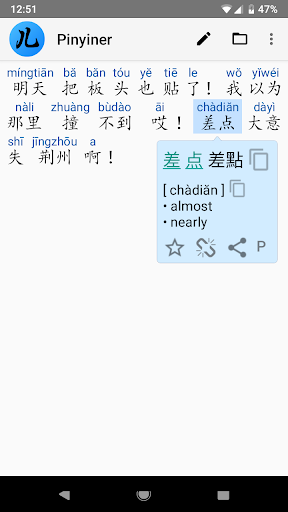
Reading Chinese is extremely important, if you live in a Chinese speaking country, plus it's the best way to learn the language. But reading raw characters has always been difficult. Pinyiner makes it easy. It breaks the characters into words, shows Pinyin above and displays the English meaning if you click on a word. Just copy&paste some text, "Share" it from another app or open a file.
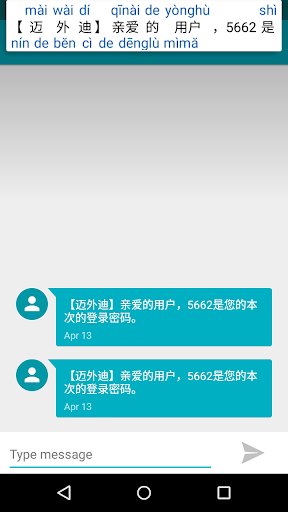
Perfect for reading messages from your friends, Chinese texts on the Web and even whole books. You can also use it as a Simplified/Traditional converter.
Check out the FREE version!
Note: on Android Oreo the Clipboard monitoring might not always work because of the "Battery optimization". In this case, go to Settings -> Apps & Notifications -> Advanced-> Special app access -> Battery optimization -> Select "All apps" at the top -> find Pinyiner, click on it and select "Don't optimize" -> Done.
FEATURES
+ No ads
+ Clipboard monitoring: any copied text containing Chinese characters is automatically annotated in the notification area
+ Works fully offline and very fast
+ Paste the text or use "Share" in another app to annotate with Pinyin
+ Edit the text
+ Convert between Simplified and Traditional characters
+ Open and annotate text files, even large books (UTF-8 encoded)
+ Save text and its Pinyin into a file. If saving both, you can read the resulting TSV file with e.g. MS Excel (Data->From text->Delimited->Tab)
+ Mark interesting words and export them to Pleco / Anki / AnkiDroid Flashcards for effective learning
+ Add bookmarks to the text
+ Integrates with other dictionaries: GoldenDict, ColorDict, Pleco, Hanping, etc
+ Rearrange how the characters are grouped into words
+ Pinch-zoom in/out, configure color, pinyin style
+ One great short story is included (to realize that reading Chinese is actually easy and fun!)