Elegant Teleprompter Pro


Elegant Teleprompter Pro Summary
Elegant Teleprompter Pro is a mobile Android app in Tools by Ayman Elakwah. Released in Aug 2019 (6 years ago). It has about 49.2K+ installs and 1.4K ratings with a 4.68★ (excellent) average. Based on AppGoblin estimates, it reaches roughly 995 monthly active users . Store metadata: updated Jan 3, 2026.
Recent activity: 168 installs this week (568 over 4 weeks) showing steady growth , and 6.00 new ratings this week View trends →
Store info: Last updated on Google Play on Jan 3, 2026 .
4.68★
Ratings: 1.4K
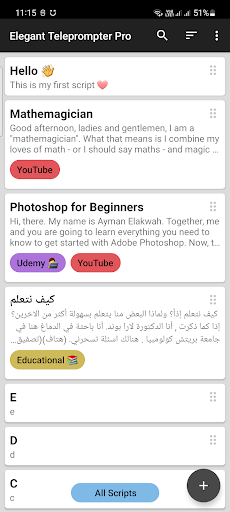
Screenshots



App Description
Elegant Teleprompter helps you speak fluently in front of cameras.
Speak confidently on camera without memorizing your script. Elegant Teleprompter Pro displays scrolling text that works with physical teleprompter devices or in a floating window alongside any camera app – perfect for YouTubers, broadcasters, live streamers, and public speakers.
✨ PRO-EXCLUSIVE FEATURES
• No ads – ever
• Import Word documents (.docx) with formatting preserved – headings, lists, bold, italic, and colors
• Import Markdown (.md) files with formatting support
• Customize text and background colors to match your setup
• Choose your font type (sans-serif, monospace, serif, and more)
• Full text styling: bold, italic, underline, highlight, and text color
• Adjustable floating window opacity
• Unlimited labels for better script organization
• Custom sort: drag and drop scripts to reorder them
• Quick Settings: pinch to resize, swipe to adjust – see changes instantly
• Import from clipboard: copy text anywhere and tap the bubble to import (Android 9 and below)
• Temporary scroll speed via remote control
📋 ALL FEATURES
• Floating window mode – use with any camera or streaming app
• Mirror text for physical teleprompters
• Import from storage or Google Drive
• Bluetooth remote support with customizable key mapping
• Adjustable scroll speed, text size, line spacing, width, and focus
• Progress bar to jump to any position
• Per-script settings: save speed, size, and focus for each script
• Loop mode: restart automatically at the end
• Center text horizontally
• Tap anywhere to play/pause
• Accept text shared from other apps
Supported file types: .txt, .docx, and .md (Markdown)
Questions or suggestions? I'd love to hear from you.