BT Basketball Scoreboard

ASO Keyword Dashboard
Tracking 157 keywords for BT Basketball Scoreboard in Google Play
BT Basketball Scoreboard tracks 157 keywords (1 keyword ranks; 156 need traction). Key metrics: 0% top-10 coverage, opportunity 70.6, difficulty 48.3, best rank 14.
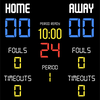
One of the most beautiful basketball scoreboard apps on the market.
Tracked keywords
157
1 ranked • 156 not ranking yet
Top 10 coverage
0%
Best rank 14 • Latest leader —
Avg opportunity
70.6
Top keyword: colored
Avg difficulty
48.3
Lower scores indicate easier wins
Opportunity leaders
- 62.5
colored
Opportunity: 74.0 • Difficulty: 41.7 • Rank —
Competitors: 492
- 65.8
grade
Opportunity: 74.0 • Difficulty: 51.2 • Rank —
Competitors: 572
- 63.5
calling
Opportunity: 74.0 • Difficulty: 61.6 • Rank —
Competitors: 744
- 65.7
green
Opportunity: 74.0 • Difficulty: 44.2 • Rank —
Competitors: 687
- 64.3
double
Opportunity: 74.0 • Difficulty: 49.0 • Rank —
Competitors: 977
Unranked opportunities
colored
Opportunity: 74.0 • Difficulty: 41.7 • Competitors: 492
grade
Opportunity: 74.0 • Difficulty: 51.2 • Competitors: 572
calling
Opportunity: 74.0 • Difficulty: 61.6 • Competitors: 744
green
Opportunity: 74.0 • Difficulty: 44.2 • Competitors: 687
double
Opportunity: 74.0 • Difficulty: 49.0 • Competitors: 977
High competition keywords
free
Total apps: 322,124 • Major competitors: 22,301
Latest rank: — • Difficulty: 60.0
find
Total apps: 307,165 • Major competitors: 16,288
Latest rank: — • Difficulty: 59.7
experience
Total apps: 291,024 • Major competitors: 15,362
Latest rank: — • Difficulty: 58.0
like
Total apps: 289,444 • Major competitors: 20,631
Latest rank: — • Difficulty: 62.7
best
Total apps: 255,713 • Major competitors: 16,877
Latest rank: — • Difficulty: 58.8
All tracked keywords
Includes opportunity, difficulty, rankings and competitor benchmarks
| Major Competitors | |||||||
|---|---|---|---|---|---|---|---|
| scoreboard | 71 | 100 | 31 | 50 1,409 competing apps Median installs: 824 Avg rating: 1.7 | 14 | 14 | 51 major competitor apps |
| free | 65 | 100 | 60 | 88 322,124 competing apps Median installs: 4,278 Avg rating: 2.3 | — | — | 22,301 major competitor apps |
| play | 66 | 100 | 62 | 85 206,958 competing apps Median installs: 6,219 Avg rating: 2.3 | — | — | 18,529 major competitor apps |
| best | 66 | 100 | 59 | 86 255,713 competing apps Median installs: 3,150 Avg rating: 2.1 | — | — | 16,877 major competitor apps |
| investing | 73 | 100 | 39 | 58 4,678 competing apps Median installs: 2,811 Avg rating: 2.1 | — | — | 298 major competitor apps |
| right | 67 | 100 | 58 | 83 159,331 competing apps Median installs: 1,585 Avg rating: 2.0 | — | — | 8,091 major competitor apps |
| try | 69 | 100 | 58 | 78 79,784 competing apps Median installs: 5,732 Avg rating: 2.3 | — | — | 7,164 major competitor apps |
| tv | 72 | 100 | 53 | 71 28,223 competing apps Median installs: 4,906 Avg rating: 2.1 | — | — | 2,181 major competitor apps |
| support | 67 | 100 | 55 | 83 170,973 competing apps Median installs: 1,240 Avg rating: 2.0 | — | — | 7,327 major competitor apps |
| audio | 69 | 100 | 53 | 77 67,250 competing apps Median installs: 3,259 Avg rating: 2.1 | — | — | 3,223 major competitor apps |
| experience | 65 | 100 | 58 | 87 291,024 competing apps Median installs: 1,456 Avg rating: 2.0 | — | — | 15,362 major competitor apps |
| within | 68 | 100 | 52 | 80 102,786 competing apps Median installs: 1,281 Avg rating: 1.9 | — | — | 3,681 major competitor apps |
| clean | 70 | 100 | 49 | 74 47,405 competing apps Median installs: 978 Avg rating: 1.8 | — | — | 2,030 major competitor apps |
| team | 69 | 100 | 53 | 79 85,638 competing apps Median installs: 1,274 Avg rating: 2.0 | — | — | 3,959 major competitor apps |
| used | 68 | 100 | 55 | 81 116,194 competing apps Median installs: 2,383 Avg rating: 2.0 | — | — | 4,649 major competitor apps |
| save | 67 | 100 | 59 | 83 156,908 competing apps Median installs: 2,697 Avg rating: 2.1 | — | — | 9,506 major competitor apps |
| control | 67 | 100 | 55 | 82 135,996 competing apps Median installs: 1,524 Avg rating: 1.9 | — | — | 6,843 major competitor apps |
| created | 70 | 100 | 48 | 76 55,816 competing apps Median installs: 1,592 Avg rating: 2.0 | — | — | 1,989 major competitor apps |
| connection | 69 | 100 | 54 | 77 63,825 competing apps Median installs: 2,077 Avg rating: 2.0 | — | — | 2,975 major competitor apps |
| using | 66 | 100 | 58 | 85 221,966 competing apps Median installs: 2,289 Avg rating: 2.0 | — | — | 10,965 major competitor apps |
| find | 65 | 100 | 60 | 87 307,165 competing apps Median installs: 2,265 Avg rating: 2.1 | — | — | 16,288 major competitor apps |
| call | 70 | 100 | 56 | 74 47,550 competing apps Median installs: 2,865 Avg rating: 2.1 | — | — | 2,699 major competitor apps |
| convenient | 69 | 100 | 50 | 78 75,566 competing apps Median installs: 1,289 Avg rating: 1.9 | — | — | 3,064 major competitor apps |
| menu | 71 | 100 | 54 | 73 40,588 competing apps Median installs: 612 Avg rating: 1.9 | — | — | 1,228 major competitor apps |
| option | 70 | 100 | 50 | 74 47,424 competing apps Median installs: 2,258 Avg rating: 2.1 | — | — | 2,351 major competitor apps |
App Description
One of the most beautiful basketball scoreboard apps on the market.
Download the free BT Controller app to remotely control this scoreboard. Open the connect menu on the BT Controller app, the scoreboard is automatically detected, hit the WiFi or Bluetooth button next to the scoreboard name on the BT Controller app to connect.
BT Scoreboard Features:
- Clean design, no ads
- Intuitive direct tap and swipe controls
- Remotely control scoreboard with WiFi or Bluetooth using free BT Controller App
- Convenient Presets (International, US Pro, College, High School, and more...)
- Convenient timers: pregame timer, period timer, rest timer, timeout timer, overtime, etc.
- Fully customizable game in the settings
- Practice modes configured in settings is great for running practices
- Audio buzzers for shotclock violation, end of period, substitutions, etc.
- Warning beep near end of pregame, timeout, or rest times (customizable)
- BT Scoreboard App can also act as a controller similar to BT Controller App
For the best experience, use the application on a large tablet, or hook your phone/tablet up to a large display or video projector. You'll feel like you have just bought a professional scoreboard!
Synchronize the scoreboard with our BT Shotclock app to run a full-blown basketball game with scoreboard and shotclocks.
The BT Scoreboard app was created by The Basketball Temple Company. The Basketball Temple Company focuses on high quality basketball academies, basketball leagues, and technologies that are used to support those academies and leagues. We open our technology to the public so everyone in the basketball community can experience the same technologies that we use within our institutions.
YouTube Tutorial Video
# Quick Start Documentation:
Score Controls:
- Tap score to increase quickly
- Swipe up/down score to increase/decrease
- Hold down on team names to adjust name and color of teams
Time Controls:
- Tap period timer to start/pause
- Tap pregame, timeout, rest timers to early transition to next stage
Shotclock Controls:
- Tap shotclock to reset/go
- Swipe shotclock up/down to reset/go to short shotclock
Timeout Controls
- Tap timeout number to call timeout
- Swipe up/down timeouts to adjust numbers
- Red indicates violation when calling timeout with no timeouts left
Fouls Controls
- Swipe up/down fouls to adjust numbers
- Red indicates bonus situation (customizable in settings)
- Purple indicates double bonus situation (customizable)
Scoreboard as a Remote Controller
IMPORTANT: only needed when using the scoreboard as a controller for shotclocks and other devices, if you are using the BT Controller app to remote control the scoreboard then the steps below should be done on the BT Controller instead:
- Tap on top-left icon to open connect menu
- Hit "Refresh" to find devices
- Tap on WiFi or Bluetooth icon to connect, green icon indicates connected
- If unable to connect or having connection errors try one of the following:
1) please ensure all devices are on the same WiFi network
2) please ensure bluetooth is turned ON on all devices
3) lastly, try to restart the app on all devices
Time and Game Settings:
- Tap on top-right icon to open settings menu
- Edit and save the many settings available
Audio Buzzer:
- There are two faint colored bell icons next to the period number
- Tap to play buzzer or energy horn