OTPx – Secure OTP Sharing


OTPx – Secure OTP Sharing Summary
OTPx – Secure OTP Sharing is a mobile Android app in Business by BizFin. It has about 1.9K+ installs Based on AppGoblin estimates, it reaches roughly 377 monthly active users .
Recent activity: 44 installs this week (199 over 4 weeks) showing declining growth View trends →
0★
Ratings: 0
Screenshots


App Description
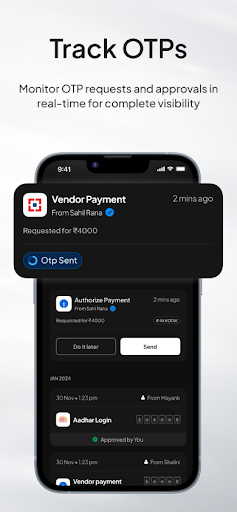
Tired of sharing OTPs on WhatsApp? Sync via SMS with reports & control.
OTPx – SMS Sync & Secure OTP Sharing Across Devices
OTPx is a simple, secure SMS syncing app designed to streamline how professionals and teams manage OTPs (One-Time Passwords). Whether you're handling GST filings, banking transactions, or TDS submissions, OTPx helps you access OTPs instantly—across devices or with authorized teammates—without using WhatsApp or manually copying messages.
Key Highlights
🔄 Cross-Device OTP Syncing
Automatically sync incoming OTPs from your phone to other devices or users based on your rules. No manual forwarding needed.
👥 Team Sharing Made Easy
Share OTPs with teammates securely—ideal for businesses and professionals working across accounts or platforms.
📊 Generate Reports
Keep track of OTP history and access logs for audit or compliance needs.
⚡ Runs in Background
Works silently without needing to open the app every time an OTP arrives.
⏱ Quick Setup
Get started in under a minute with an easy, user-friendly interface.
Permissions
- READ_SMS & RECEIVE_SMS → To detect and sync OTPs.
- Overlay Permission → To show quick approval popups for OTP requests.
- OTPx never sets itself as the default SMS app and does not access or share personal messages.
Financial Data Tracking
- View a summary of total payment OTPs approved via OTPx.
- See the total debited amount for easy reconciliation.
How to Get Started
1. Open OTPx App.
2. Login using your phone number
3. Grant SMS Permissions (READ_SMS & RECEIVE_SMS) so OTPx can detect OTPs automatically.
4. Allow Overlay Permission to enable approval popups when OTP requests arrive.
5. Invite Your Team Members
- Share an invite link with teammates who will request OTPs.
6. Set Sharing Permissions
- By default, no permissions are granted.
- Assign sharing permissions as per your needs.
7. Teammate Access via WhatsApp Bot
- Your team members can request OTPs through OTPx’s WhatsApp bot.
8. Approve or Deny OTP Requests
- When a teammate requests an OTP, you’ll receive a secure approval prompt.
- Decide instantly whether to share or deny.
👉 With OTPx, you no longer need to share OTPs over insecure channels. It’s the easiest way to sync OTPs, reduce hassle, and ensure your team always has access—when it matters most.