SmartScan PDF


SmartScan PDF Summary
SmartScan PDF is a ad-supported Android app in the Tools category, developed by HajariBook: Labour, Staff Attendance, Pagar App. First released 2 years ago(Jul 2023), the app has accumulated 29+ total installs
Recent activity: 6 installs this week (6 over 4 weeks) showing exceptional growth View trends →
Store info: Last updated on Google Play on Jul 13, 2023 .
0★
Ratings:
Screenshots


App Description
Convert JPG to PDF, scan docs & add digital signatures. Fast & offline PDF maker
Convert images to PDF, scan documents, and sign files instantly with Image to PDF (SnapSignPDF).
Turn your smartphone into a powerful document scanner and PDF converter. Whether you need to send a receipt, save a contract, or convert a photo album to a single file, our app makes it simple, fast, and free.
Key Features:
📄 Image to PDF Converter Effortlessly convert JPG, PNG, JPEG, and snapshots into high-quality PDF files. Perfect for converting ID cards, receipts, invoices, and whiteboards into professional digital documents.
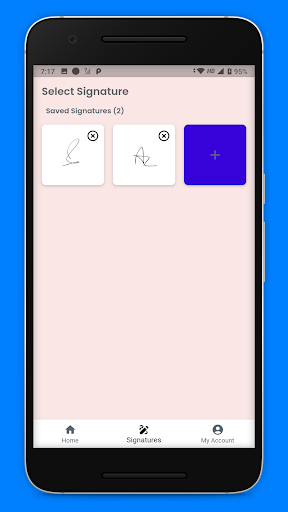
✍️ Digital Signature Maker Need to sign a document fast? Create your unique digital signature directly in the app. Customize the color, size, and style, then place it on any PDF or image. Sign contracts and forms without printing!
📷 Document Scanner Use your camera to scan paper documents and instantly turn them into clear PDF files. Our smart cropping ensures your documents look professional and ready to share.
📂 Efficient PDF Manager
Quick Search: Find any file in seconds with our smart search bar.
Easy Sharing: Share PDFs via email, WhatsApp, or cloud storage with one tap.
Organize: Rename, delete, or manage your files to keep your library clean.
Offline Mode: Convert images to PDF without an internet connection.
Why Choose SnapSignPDF?
100% Free & Unlimited: No hidden fees or conversion limits.
Privacy First: All conversions happen locally on your device. Your data never leaves your phone.
Lightweight: Saves storage space on your device.
How it Works:
Select images from your gallery or take a new photo.
Arrange the order of your pages.
Add your e-signature if needed.
Tap "Convert" to create your PDF instantly!
Download Image to PDF - PDF Maker today and streamline your document work. The ultimate JPG to PDF converter and electronic signature tool for Android.