Focusrite Control 2

Focusrite Control 2 Summary
Focusrite Control 2 is a Android app in the Music And Audio category, developed by Focusrite Audio Engineering. First released 1 year ago(Oct 2024), the app has accumulated 19.6K+ total installs and 68 ratings with a 3.65★ (average) average rating.
Recent activity: 339 installs this week (2.1K over 4 weeks) showing steady growth , and 1 new ratings this week (3 over 4 weeks) with declining momentum. View trends →
Store info: Last updated on Google Play on Aug 29, 2025 .
3.65★
Ratings: 68
Screenshots


App Description
Remotely control your Scarlett
TAKE FULL CONTROL
Introducing Focusrite Control 2, the perfect companion app for your Scarlett 4th Gen interface. Designed for musicians, producers, and audio engineers, this powerful app gives you the freedom to remotely control your Scarlett's inputs and direct monitoring mixes from anywhere within your recording space. You no longer have to stay at your desk — experience the true flexibility and convenience of wireless control.
KEY FEATURES:
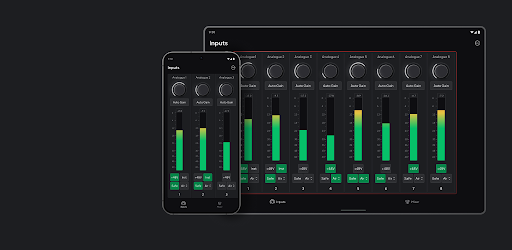
- Seamless wireless pairing: Seamlessly pair the app to Focusrite Control 2 on your desktop computer and enjoy wireless control. Adjust inputs and direct monitoring mixes whilst being free to roam around your recording space.
- Set the perfect gain: Control your Scarlett's preamps, including Auto Gain, from wherever you are in in your recording space. It’s perfect for recording alone, allowing you to stay in your recording position without needing to move.
- Multiple device control: Dial in headphone mixes with ease with control of the level, pan, mute, and solo for each channel. And if you're recording multiple musicians, they each have control of their own headphone mix so they can focus on capturing a great performance.
COMPATIBILITY:
- Focusrite Control 2 is compatible with all Scarlett 4th Gen interfaces. Make sure the desktop version of Focusrite Control 2 is installed on the computer your Scarlett is plugged in to, and your iPhone or iPad is connected to the same wireless network.
- Focusrite Control 2 cannot control your Scarlett when it is connected via USB to your mobile/tablet