GRBL2 Digital Watch Face
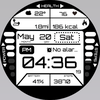

ASO Keyword Dashboard
Tracking 84 keywords for GRBL2 Digital Watch Face in Google Play
GRBL2 Digital Watch Face tracks 84 keywords (no keywords rank yet; 84 need traction). Key metrics: opportunity 70.6, difficulty 48.4.
13 themes, calories, distance, battery, steps, and two bars / app is for Wear OS
Tracked keywords
84
0 ranked • 84 not ranking yet
Top 10 coverage
—
Best rank — • Latest leader —
Avg opportunity
70.6
Top keyword: api
Avg difficulty
48.4
Lower scores indicate easier wins
Opportunity leaders
- 66.0
api
Opportunity: 74.0 • Difficulty: 42.9 • Rank —
Competitors: 358
- 64.1
browser
Opportunity: 74.0 • Difficulty: 58.2 • Rank —
Competitors: 744
- 60.5
graphic
Opportunity: 74.0 • Difficulty: 43.2 • Rank —
Competitors: 534
- 60.0
mainly
Opportunity: 74.0 • Difficulty: 37.3 • Rank —
Competitors: 120
- 62.9
heart rate
Opportunity: 74.0 • Difficulty: 41.5 • Rank —
Competitors: 140
Unranked opportunities
api
Opportunity: 74.0 • Difficulty: 42.9 • Competitors: 358
browser
Opportunity: 74.0 • Difficulty: 58.2 • Competitors: 744
graphic
Opportunity: 74.0 • Difficulty: 43.2 • Competitors: 534
mainly
Opportunity: 74.0 • Difficulty: 37.3 • Competitors: 120
heart rate
Opportunity: 74.0 • Difficulty: 41.5 • Competitors: 140
High competition keywords
designed
Total apps: 261,871 • Major competitors: 7,629
Latest rank: — • Difficulty: 53.9
every
Total apps: 260,294 • Major competitors: 13,289
Latest rank: — • Difficulty: 56.9
play
Total apps: 206,179 • Major competitors: 18,547
Latest rank: — • Difficulty: 62.1
want
Total apps: 192,216 • Major competitors: 10,455
Latest rank: — • Difficulty: 54.7
take
Total apps: 189,812 • Major competitors: 10,730
Latest rank: — • Difficulty: 56.9
All tracked keywords
Includes opportunity, difficulty, rankings and competitor benchmarks
| Major Competitors | |||||||
|---|---|---|---|---|---|---|---|
| play | 66 | 100 | 62 | 85 206,179 competing apps Median installs: 6,324 Avg rating: 2.2 | — | — | 18,547 major competitor apps |
| weather | 72 | 100 | 57 | 70 23,535 competing apps Median installs: 2,569 Avg rating: 2.2 | — | — | 1,432 major competitor apps |
| phone | 67 | 100 | 62 | 83 151,879 competing apps Median installs: 2,662 Avg rating: 2.0 | — | — | 8,546 major competitor apps |
| heart | 71 | 100 | 47 | 74 42,373 competing apps Median installs: 813 Avg rating: 1.7 | — | — | 1,452 major competitor apps |
| wear | 71 | 100 | 63 | 72 32,469 competing apps Median installs: 363 Avg rating: 1.6 | — | — | 813 major competitor apps |
| wear os | 72 | 100 | 61 | 70 24,185 competing apps Median installs: 297 Avg rating: 1.5 | — | — | 288 major competitor apps |
| designed | 65 | 100 | 54 | 86 261,871 competing apps Median installs: 726 Avg rating: 1.7 | — | — | 7,629 major competitor apps |
| image | 70 | 100 | 51 | 76 55,673 competing apps Median installs: 2,671 Avg rating: 1.9 | — | — | 2,927 major competitor apps |
| menu | 71 | 100 | 54 | 73 40,670 competing apps Median installs: 606 Avg rating: 1.8 | — | — | 1,229 major competitor apps |
| api | 74 | 100 | 43 | 66 13,950 competing apps Median installs: 415 Avg rating: 1.8 | — | — | 358 major competitor apps |
| complication | 73 | 100 | 66 | 58 4,432 competing apps Median installs: 363 Avg rating: 1.5 | — | — | 32 major competitor apps |
| rate | 70 | 100 | 48 | 75 50,100 competing apps Median installs: 2,182 Avg rating: 1.9 | — | — | 2,057 major competitor apps |
| swipe | 72 | 100 | 51 | 69 22,302 competing apps Median installs: 3,417 Avg rating: 2.1 | — | — | 1,528 major competitor apps |
| install | 70 | 100 | 50 | 76 58,944 competing apps Median installs: 2,495 Avg rating: 2.0 | — | — | 2,542 major competitor apps |
| mi | 72 | 100 | 64 | 53 2,262 competing apps Median installs: 2,285 Avg rating: 2.0 | — | — | 152 major competitor apps |
| store | 69 | 100 | 55 | 78 81,143 competing apps Median installs: 1,335 Avg rating: 1.9 | — | — | 3,958 major competitor apps |
| watch | 68 | 100 | 58 | 80 103,752 competing apps Median installs: 1,031 Avg rating: 1.9 | — | — | 5,218 major competitor apps |
| take | 66 | 100 | 57 | 84 189,812 competing apps Median installs: 1,936 Avg rating: 2.0 | — | — | 10,730 major competitor apps |
| format | 73 | 100 | 46 | 68 19,565 competing apps Median installs: 2,093 Avg rating: 2.0 | — | — | 946 major competitor apps |
| hour | 73 | 100 | 43 | 67 15,201 competing apps Median installs: 1,066 Avg rating: 1.9 | — | — | 651 major competitor apps |
| face | 69 | 100 | 51 | 76 63,162 competing apps Median installs: 1,097 Avg rating: 1.9 | — | — | 3,427 major competitor apps |
| minutes | 72 | 100 | 47 | 70 26,223 competing apps Median installs: 2,370 Avg rating: 2.1 | — | — | 1,505 major competitor apps |
| want | 66 | 100 | 55 | 84 192,216 competing apps Median installs: 2,835 Avg rating: 2.0 | — | — | 10,455 major competitor apps |
| always | 67 | 100 | 54 | 82 142,761 competing apps Median installs: 1,488 Avg rating: 1.9 | — | — | 6,069 major competitor apps |
| complications | 73 | 100 | 67 | 59 5,196 competing apps Median installs: 374 Avg rating: 1.6 | — | — | 37 major competitor apps |
App Description
13 themes, calories, distance, battery, steps, and two bars / app is for Wear OS
Features:
1. Supports AM/PM
2. Steps counter
3. Hour with seconds
4. Steps counter
5. Date
6. Always on display
7. Two changeable complications (1. mainly designed for weather widget)
8. Two bars for steps progress and battery status
9. Distance (!!! KM when 24H format is on, MI whe 12H format is on!!!)
10. Calories
11. Heart rate (measured every 10 min.)
!!!Calroies and distance are counted based on the steps made. Those complications don't take data from any app!!!
PLEASE KEEP IN MIND THAT THE COMPANION APP DOESN'T INSTALL WATCHFACE ON THE WATCH. PLEASE READ INSTRUCTIONS BELOW.
There are two ways to install this watchaface:
From PLAY STORE APP:
1. Use the drop-down menu and select the target
device on the PLAY STORE APP:
after a few minutes the watch face will transferred on
watch.
2- ACTIVATE WATCH FACE:
Once installed, you need to activate the watch face.
Long press screen, swipe left and tap "ADD WATCH
FACE" to activate it.
From PLAY STORE WEBSITE:
1 - Go to the watch face link through a Web Browser on
PC / Mac such as Chrome, Safari (etc.). You can search
the watch face name on Play Store.
Click on "Install on more devices" and select the target
device:
after a few minutes the watch face will transferred on
watch.
2- ACTIVATE WATCH FACE:
Once installed, you need to activate the watch face.
Long press screen, swipe left and tap "ADD WATCH
FACE" to activate it.
Please keep in mind that any issues on this side are
not caused by the developer/watchface. I have no
control over Google's issues.
Before drop a negative feedback (1 star) on Play Store
for these reasons, please read the guide carefully or
contact me:
grubel.watchfaces@gmail.com
for API 28+
Remember , if you want your watch to show phone's battery status, you should install Phone Battery Complication app
Feature Graphic Image by vecstock on Freepik