GYA009: Analog watchface

GYA009: Analog watchface Summary
GYA009: Analog watchface is a Android app in the Personalization category, developed by GY.watchface. First released 2 years ago(Oct 2023), the app has accumulated 5.8K+ total installs and 42 ratings with a 4.80★ (excellent) average rating.
Recent activity: 77 installs this week (262 over 4 weeks) showing below average growth View trends →
Store info: Last updated on Google Play on Dec 28, 2025 .
4.8★
Ratings: 42
Screenshots

App Description
Simple & Pure Minimalist Style
[Simple & Minimal: Your Moment of Calm]
In a complicated world, your watch should be clear and effortless. Escape the noise with a minimalist design that focuses on what truly matters: your time.
🕒Design Highlights
* Minimalist Concept: “Stop the complexity.” We removed unnecessary clutter to create a clean, organized layout that brings peace to your wrist.
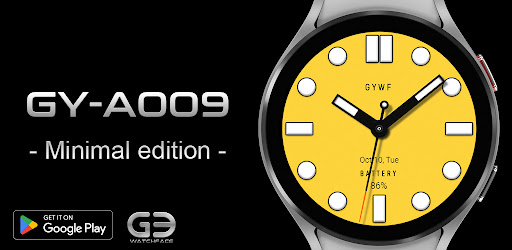
* Emotional Pastel Themes: Featuring a soft pastel yellow dial and 30 curated color palettes to perfectly match your mood and daily style.
* Ultimate Readability: Bold hands and sharp indexes are engineered for instant time-checking, ensuring clarity at a single glance.
🛠 Key Features
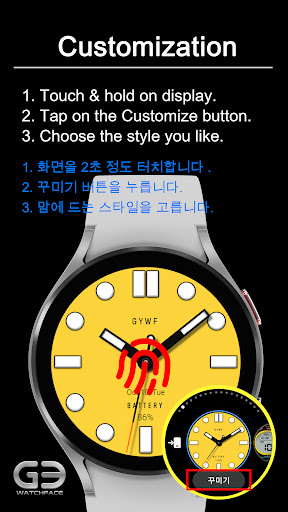
* 30 Premium Pastel Themes: A wide range of colors to complement your watch strap and fashion every day.
* 3 Custom Complications: Personalize your dial at the 12, 3, and 9 o'clock positions with info like weather, heart rate, steps, and more.
* Intuitive Data Display: Essential info like date and battery status is neatly placed for a balanced, functional look.
🌙Optimized AOD Mode
* Maintains its sophisticated minimalist identity while maximizing battery efficiency, keeping your watch stylish even when the screen is dimmed.
⌚ Supported Devices: Supports all devices running Wear OS 3.0 or higher (Samsung Galaxy Watch 4, 5, 6, 7, Ultra, Google Pixel Watch, etc.).
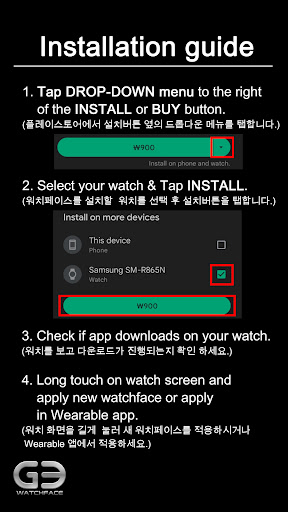
💡 Please Check Before Installing! If the installation does not proceed, tap the drop-down arrow next to the 'Install' button in the Google Play app on your smartphone and ensure your watch device is selected.
✨Follow our journey.
*Instagram:
https://www.instagram.com/gywatchface
* Facebook:
https://www.facebook.com/gy.watchface
* When developers update their watch faces, the watch face screenshots in the smartphone app may differ from the watch face actually installed on the watch.