GYA016 Classic Chrono

GYA016 Classic Chrono Summary
GYA016 Classic Chrono is a Android app in the Personalization category, developed by GY.watchface. First released 1 month ago(Dec 2025), the app has accumulated 2.5K+ total installs
Recent activity: 357 installs this week (2.5K over 4 weeks) showing exceptional growth View trends →
Store info: Last updated on Google Play on Jan 1, 2026 .
0★
Ratings:
Screenshots


App Description
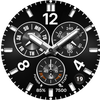
Classic chronograph design with high-visibility Lume AOD
### Basic version of GYA016 ###
🕒 Design Highlights
1) Bold Typography: Large Arabic numerals at 12, 4, and 8 o'clock provide maximum contrast against the deep black dial for ultimate readability.
2) Intricate Chrono Layout: Three sub-dials display the day, heart rate, and seconds (alongside battery & step goals) with a realistic mechanical hand feel.
3) Premium Circular Date Window: A sleek circular date window positioned between 4 and 5 o'clock adds utility without disrupting the design balance.
🌙 Innovative AOD (Always On Display) Mode
1) Mint Luminous (Lume) Effect: Experience a striking mint-colored glow that shines even brighter in the dark.
2) Battery Optimization: Maintain a brilliant glowing effect while minimizing power consumption for worry-free, all-day use.
🛠 Features
1) Analog time display (Hour, Minute, Second)
2) Day of the week (Left sub-dial)
3) Heart rate (Right sub-dial)
4) Step goal progress (Right gauge in the bottom sub-dial)
5) Step count (Displayed on the right at the 6 o'clock position)
6) Battery level indicator (Left gauge in the bottom sub-dial)
7) Battery percentage (Displayed on the left at the 6 o'clock position)
8) Date display window (4~5 o'clock position)
🔥 Want More Features? (PRO Version Available)
If you enjoy the this version, complete your collection with "GYA016 Classic Chrono PRO"! If you purchase the Pro version, you can use the features below.
1) 30 Premium Theme Colors: Freely change the index colors to match your strap and daily fashion.
2) 5 Custom Complications: Personalize your dial with weather, altitude, SMS, calendar, and more.
3) 3 App Shortcuts: Access your most-used apps instantly with a single tap on the screen.
⌚ Supported Devices: Supports all devices running Wear OS 3.0 or higher (Samsung Galaxy Watch 4, 5, 6, 7, Ultra, Google Pixel Watch, etc.).
💡 Please Check Before Installing! If the installation does not proceed, tap the drop-down arrow next to the 'Install' button in the Google Play app on your smartphone and ensure your watch device is selected.