Q365 App


Q365 App Summary
Q365 App is a mobile Android app in Productivity by ILMASOFT. Released in Nov 2021 (4 years ago). It has about 309+ installs Based on AppGoblin estimates, it reaches roughly 17 monthly active users . Store metadata: updated Aug 26, 2025.
Recent activity: 1.00 installs this week (7.00 over 4 weeks) showing below average growth View trends →
Store info: Last updated on Google Play on Aug 26, 2025 .
0★
Ratings: 0
Screenshots


App Description
Q365 is a queue management system for managing large no. of customers visiting.
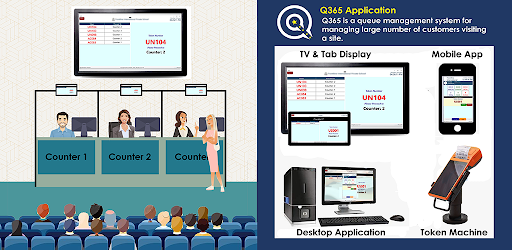
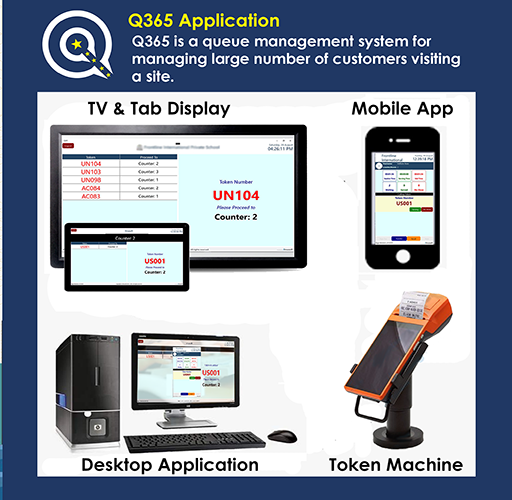
Q365 is a queue management system for managing a large number of customers visiting a site.
It is a complete system with all modules in a single application interconnected together using different sign-in.
1- Token issuing module with multiple department tokens
2- User module used to check the queue and call, serve and transfer etc. options
3- Counter display to show the token number for that counter
4- TV display for larger token display, announcement, and digital marketing signage
5- Admin portal for management, reports, and analytics.
The queue token can be issued with a prefix for different departments and numbers. E.g. ACC001 or VIP001
Supports multiple counters in multiple departments.
Print Token numbers with timestamps on built-in or any Bluetooth printer.
Send Token through SMS to the visitor phone number for touchless service
Management and reports are done through online portal contact on sales@ilmasoft.com
Setup:
1- Signup as a business unit with simple information from the application or web portal.
2- Install this application on the Android TV or large table for customer queue calling and digital signage
3- Install this application in user (servicing employee) mobile for calling customers in the queue for service.
4- Install this app in small wifi tablets for displaying the token numbers on a particular counter and take feedback after serving.