Pixel Analog Watchface 01

Pixel Analog Watchface 01 Summary
Pixel Analog Watchface 01 is a mobile Android app in Personalization by JustWatch - Premium Watch Faces. Released in Mar 2026 (recently released ago). Store metadata: updated Mar 9, 2026.
Store info: Last updated on Google Play on Mar 9, 2026 .
0★
Ratings:
Screenshots


App Description
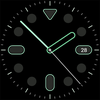
Minimalist analog watch face for Wear OS with 13 customizable color schemes.
Experience the perfect harmony of traditional watchmaking and digital precision. Whether you're at a formal event or going about your daily routine, this watch face offers a clean, premium look for every occasion.
🚀 Key Features
Fluid Motion: Enjoy Smooth Analog Motion for a high-end, traditional watch feel.
High Visibility: High-contrast markers designed for effortless reading in any lighting.
Efficiency: Advanced Always-On Display (AOD) support to keep you informed while saving battery.
Performance: Lightweight and highly optimized for a lag-free experience on your wearable.
🎨 Customization Options
13 Distinct Color Themes: Switch between a variety of professional and vibrant styles.
Easy Personalization: Change your look directly from your wrist or via the companion app on your phone.
📥 Step-by-Step Installation & Setup
Via Your Watch:
Open the Google Play Store on your Wear OS device.
Search for "Modern Pixel Analog Face".
Tap Install.
Via Your Smartphone:
Find the watch face on the Play Store app.
Click the dropdown arrow on the "Install" button and ensure your watch is selected as the destination device.
Activation:
Once installed, open your Wearable app (Galaxy Wearable or Pixel Watch app) on your phone.
Navigate to the Watch Faces section and select Modern Pixel Analog to enable it.
Style Selection:
Long-press the watch face on your wrist and tap "Customize" to browse the 13 color themes and find your perfect match.