Floatee - Floating All In One


Floatee - Floating All In One Summary
Floatee - Floating All In One is a ad-supported, with in-app purchases Android app in the Productivity category, developed by MA I KA. First released 3 years ago(Nov 2022), the app has accumulated 953.4K+ total installs and 8.2K ratings with a 3.47★ (mixed) average rating.
Recent activity: 6.8K installs this week (19.8K over 4 weeks) showing below average growth , and 66 new ratings this week View trends →
Data tracking: SDKs and third-party integrations were last analyzed on Feb 20, 2026. The app's network data flows (API traffic to/from the app and its SDKs) were last crawled on Jan 17, 2026.
Store info: Last updated on Google Play on Feb 24, 2026 (version 132).
Floatee - Floating All In One was last scanned for SDKs 2026-02-20. Below is the overview of third party companies detected in the app. The full list of raw SDKs, app permissions and unknown SDKs is available here.
 AdMob
AdMob Firebase
 Unity
Unity Google
 Bumptech
 Square
3.47★
Ratings: 8.2K
Screenshots

App Description
Floatee: All In One Floating App - AI, Browse, Screen Translate, Music & More.
Make multitasking easier and faster with Floatee, your all-in-one floating app that combines the best tools in one place. Whether you need to ask ChatGPT quickly, screen translation, browsing in a floating window, or even use Google Lens without screenshot. Floatee has everything you need!
[Why use Floatee?]
Floatee simplifies your mobile experience with an innovative floating design. No more switching between apps—access everything you need instantly with just one tap!
[Top Features]
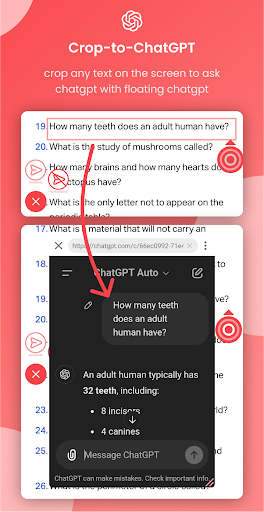
• Crop to ChatGPT: Easily crop any text on your screen and send it to ChatGPT for instant responses in a floating window.
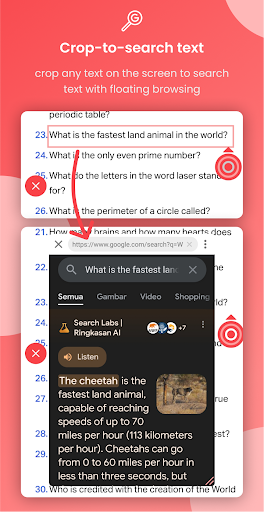
• Crop to Search: Crop any text on your screen and send it to Google using a floating browser, right from your screen.
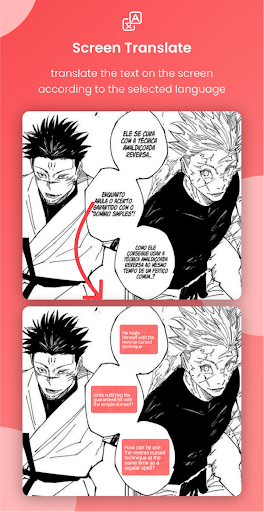
• Screen Translate: Real-time translation of any text on your screen.
• Search Image: Use Google Lens to search for images without taking a screenshot.
• Open Music Shortcuts : Quickly access your favorite music from internal storage with 13 slots menu
• Custom Floating Apps : You can use floating apps based on the application of your choice
[More Features]
• Tap text to dictionary (definitions, examples, synonyms, antonyms)
• Another Crop Feature (copy, translate, subtitle, search image, text to speech, save/share image, screen record)
• Another Open Shortcuts (app, link, file, system settings)
• Assistive touch (back, recent, home, lock screen, open notification, open quick setting, screenshot(save, share, search image), screen recorder, rotate screen, open power dialog, change volume, change brightness, split screen)
• Floating Apps (calculator, dictionary, translate, browser, custom apps)
• Auto Clicker (tap, long press, swipe)
Our application may use the Accessibility Service API to help users perform some assistive touch features(go back, recent, open notification, split screen, etc) and auto clicker. This application neither captures your personal data nor violates your privacy.