Aozora Bunko Reader with TTS

Aozora Bunko Reader with TTS Summary
Aozora Bunko Reader with TTS is a mobile Android app in Books And Reference by Manpuku Ichiro. Released in Oct 2025 (4 months ago). It has about 94+ installs Based on AppGoblin estimates, it reaches roughly 23 monthly active users . Store metadata: updated Feb 20, 2026.
Recent activity: 7.00 installs this week (28 over 4 weeks) showing above average growth View trends →
Store info: Last updated on Google Play on Feb 20, 2026 .
0★
Ratings: 0
Screenshots


App Description
Read, listen to, and explore Aozora Bunko classics. TTS and offline support.
A viewer for reading Japanese literary classics from Aozora Bunko (Japan's public domain digital library) on your phone. Note: the available texts are primarily in Japanese.
UI languages: English, Japanese, Simplified Chinese, Traditional Chinese, Korean, Thai, Vietnamese, French, Indonesian, German, Spanish, Portuguese, Italian, Hindi, Russian, Turkish, Polish, Ukrainian, Malay, and Dutch (20 languages)
[Search]
Supports kana and romaji input, allowing you to quickly find works and authors even when titles are in kanji. Full-text search across saved works and in-book text search while reading are also available. Search history is saved for easy reuse.
[Text-to-Speech (TTS)]
Built-in TTS with adjustable speed (0.5x to 3.0x). Supports conversion of classical kana to modern pronunciation, making it ideal for listening during commutes or before bed. Double-tap to quickly start or stop playback.
[Display Customization]
Adjust font (Gothic / Mincho), font size, font weight, ruby (furigana) display, line spacing, lines per page, and margins via drag controls. Six background themes are available, including light (white, sepia, green) and dark (dark, gray, AMOLED black) options for comfortable extended reading.
[Library Management]
Favorite authors and works, and organize saved works into author folders. Download works for offline reading, with your reading position saved automatically. Batch download of all works by an author is also supported.
[Navigation]
Auto-generated table of contents with chapter jump, auto page turn (5 to 60 second intervals), SpeedFlip slider for rapid page navigation, and volume button page turning. Long-press to select text for copy, share, or web search.
[Catalog and Filtering]
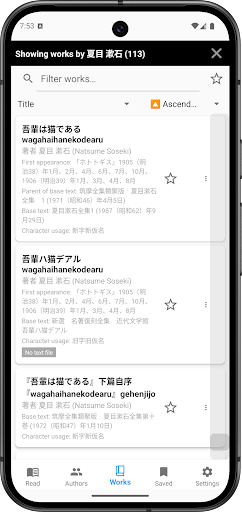
Update the Aozora Bunko catalog with a single tap from within the app. Use NDC (Nippon Decimal Classification) genre filters and sort by first publication date, source edition date, download count, and more to discover works from the extensive catalog.
[Work Information]
View author birth/death years, work counts, and bibliographic details such as first publication, source edition, and parent edition. Bibliographic info display can be toggled on or off in settings.
[Accessibility]
Tap direction reversal, screen reader support, and an in-app tips guide ensure comfortable operation for all users.
[Privacy]
Uses only the minimum required network permissions. No unnecessary network traffic or analytics logging. All data is stored locally on your device.
Read, listen, search, and collect -- experience Aozora Bunko literature all in one app.