Certificate Generator
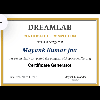

Certificate Generator Summary
Certificate Generator is a ad-supported Android app in the Art And Design category, developed by DREAM LAB. First released 1 month ago(Jan 2026), the app has accumulated 183+ total installs
Store info: Last updated on Google Play on Jan 7, 2026 .
0★
Ratings: 0
Screenshots

App Description
certificate Maker & PDF Generator is a powerful yet simple tool designed
App Name: Certificate Maker & PDF Generator
Short Description
Create professional, printable certificates in seconds directly from your Android device. Instant PDF export!
Full Description
Certificate Maker & PDF Generator is a powerful yet simple tool designed to help you design and generate professional certificates on the go. whether you need to acknowledge a course completion, a workshop participation, or an employee of the month, this app handles it all with ease.
Forget complex design software—simply enter the details, view the changes in real-time, and export a high-quality PDF ready for printing or sharing.
🌟 Key Features:
Instant Live Preview: See exactly how your certificate looks as you type. No guesswork required!
Fully Customizable:
Company/Organization Name: Add your branding.
Participant Name: Personalize it for the recipient.
Custom Message: Define exactly what the certificate is for (e.g., "Successfully completed," "Participated in," "Awarded for excellence").
Course/Achievement: Specify the specific accomplishment.
Authority & Signature: Add the issuer's name for authenticity.
High-Quality PDF Export: Generates industry-standard A4 Landscape PDFs suitable for professional printing or digital emailing.
Professional Design: Includes a pre-designed, elegant layout with gold borders and classic typography.
Auto-Date: Automatically fills in the current date, with the option to change it manually.
📱 How to Use:
Fill in the Details: Enter the organization name, recipient name, and course details in the easy-to-use form.
Customize the Text: Change the "Completion Text" to suit the occasion (e.g., change "completed the course" to "attended the seminar").
Check the Preview: Look at the bottom of the screen to see the certificate generated in real-time.
Save as PDF: Tap the "Save as PDF" button.
Print or Share: Open the saved file to print it out or send it via email/messaging apps.
🛠 Technical Highlights:
Built with native Android (Java).
Uses Android Canvas API for pixel-perfect dynamic drawing.
Offline Capability: No internet required to generate certificates.
AdMob Integrated: Supports Banner and Interstitial ads.