AMOLED Terminal Watch face

ASO Keyword Dashboard
Tracking 0 keywords for AMOLED Terminal Watch face in Google Play
Developer: Malith Wimalarathna Category: productivity
AMOLED Terminal Watch face doesn't have tracked keywords yet.
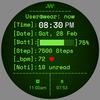
Terminal Style AMOLED Digital Watch Face for Wear OS
No keywords tracked yet
We could not generate keyword insights for this app. Add more metadata or refresh the crawl to populate ASO keywords.
App Description
Terminal Style AMOLED Digital Watch Face for Wear OS
AMOLED Terminal Watch face
Digital Terminal Style Watch Face for Wear OS
Turn your smartwatch into a modern PC terminal.
AMOLED Terminal Watch face brings a command-line inspired, hacker-style digital watch face designed for developers, programmers, engineers, and tech enthusiasts.
Clean. Minimal. Futuristic. Battery Efficient.
💻 Terminal Inspired Design
Inspired by classic Linux and PC command-line terminals, this digital watch face delivers:
• Structured terminal layout
• Monospace command-line aesthetic
• CRT scanline effect
• Minimal and modern UI
• Cyberpunk / hacker vibe
Perfect for:
• Developer watch face lovers
• Programmer watch face users
• Hacker style smartwatch fans
• Linux terminal enthusiasts
• Tech and IT professionals
• Cyber security geeks
⌚ Core Features
• Digital time display (12h / 24h format)
• Date display
• Steps counter
• Heart rate monitor (BPM)
• Notifications counter
• Advanced battery bar indicator
• 2 Custom complications
• Multiple color themes
• Always-On Display (AOD)
• Super battery efficient design
• AMOLED optimized (true black background)
🔋 Smart Battery Color System
Dynamic battery indicator changes color automatically:
• 🟢 Green (100–70%)
• 🟡 Yellow (69–50%)
• 🟠 Orange (49–30%)
• 🔴 Red (29–0%)
Instant visual battery status at a glance.
🎨 Customization Options
• Choose from multiple terminal color themes:
Classic Green Terminal
Amber Retro Mode
Cyan Cyber Mode
Over 20 colors to chose from
• Customize information text color
• 2 Custom complication slots for:
Weather
Calendar
Steps
Heart rate
Battery
App shortcuts
Personalize your smartwatch like a real terminal dashboard.
🌑 AMOLED Optimized
Designed specifically for AMOLED screens:
• True black background
• High contrast text
• Power efficient layout
• Minimal battery drain
Ideal for Wear OS smartwatches.
🔍 Optimized For Users Searching
This watch face is perfect if you're looking for:
• Terminal watch face
• AMOLED watch face
• Digital watch face Wear OS
• Hacker watch face
• Developer watch face
• Coding watch face
• Linux watch face
• Command line watch face
• Cyberpunk watch face
• Minimal black watch face
• Tech smartwatch face
• Geek watch face
• Futuristic digital watch face
• Battery efficient watch face
• Modern digital watch face
📱 Compatibility
Compatible with Wear OS smartwatches including:
• Pixel Watch
• Samsung Galaxy Watch (Wear OS versions)
• Fossil Gen 6
• TicWatch Pro
• All Wear OS 3+ devices
Not compatible with Apple Watch or non-Wear OS devices.
Digital Terminal Style Watch Face for Wear OS
Turn your smartwatch into a modern PC terminal.
AMOLED Terminal Watch face brings a command-line inspired, hacker-style digital watch face designed for developers, programmers, engineers, and tech enthusiasts.
Clean. Minimal. Futuristic. Battery Efficient.
💻 Terminal Inspired Design
Inspired by classic Linux and PC command-line terminals, this digital watch face delivers:
• Structured terminal layout
• Monospace command-line aesthetic
• CRT scanline effect
• Minimal and modern UI
• Cyberpunk / hacker vibe
Perfect for:
• Developer watch face lovers
• Programmer watch face users
• Hacker style smartwatch fans
• Linux terminal enthusiasts
• Tech and IT professionals
• Cyber security geeks
⌚ Core Features
• Digital time display (12h / 24h format)
• Date display
• Steps counter
• Heart rate monitor (BPM)
• Notifications counter
• Advanced battery bar indicator
• 2 Custom complications
• Multiple color themes
• Always-On Display (AOD)
• Super battery efficient design
• AMOLED optimized (true black background)
🔋 Smart Battery Color System
Dynamic battery indicator changes color automatically:
• 🟢 Green (100–70%)
• 🟡 Yellow (69–50%)
• 🟠 Orange (49–30%)
• 🔴 Red (29–0%)
Instant visual battery status at a glance.
🎨 Customization Options
• Choose from multiple terminal color themes:
Classic Green Terminal
Amber Retro Mode
Cyan Cyber Mode
Over 20 colors to chose from
• Customize information text color
• 2 Custom complication slots for:
Weather
Calendar
Steps
Heart rate
Battery
App shortcuts
Personalize your smartwatch like a real terminal dashboard.
🌑 AMOLED Optimized
Designed specifically for AMOLED screens:
• True black background
• High contrast text
• Power efficient layout
• Minimal battery drain
Ideal for Wear OS smartwatches.
🔍 Optimized For Users Searching
This watch face is perfect if you're looking for:
• Terminal watch face
• AMOLED watch face
• Digital watch face Wear OS
• Hacker watch face
• Developer watch face
• Coding watch face
• Linux watch face
• Command line watch face
• Cyberpunk watch face
• Minimal black watch face
• Tech smartwatch face
• Geek watch face
• Futuristic digital watch face
• Battery efficient watch face
• Modern digital watch face
📱 Compatibility
Compatible with Wear OS smartwatches including:
• Pixel Watch
• Samsung Galaxy Watch (Wear OS versions)
• Fossil Gen 6
• TicWatch Pro
• All Wear OS 3+ devices
Not compatible with Apple Watch or non-Wear OS devices.