Poke Pixel Retro Watch Face

ASO Keyword Dashboard
Tracking 164 keywords for Poke Pixel Retro Watch Face in Google Play
Poke Pixel Retro Watch Face tracks 164 keywords (no keywords rank yet; 164 need traction). Key metrics: opportunity 70.6, difficulty 49.1.
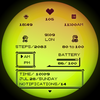
A Pixel Art watchface inspired by other iconic 90s designs for Wear OS devices!
Tracked keywords
164
0 ranked • 164 not ranking yet
Top 10 coverage
—
Best rank — • Latest leader —
Avg opportunity
70.6
Top keyword: iconic
Avg difficulty
49.1
Lower scores indicate easier wins
Opportunity leaders
- 63.6
iconic
Opportunity: 75.0 • Difficulty: 46.4 • Rank —
Competitors: 698
- 63.7
refer
Opportunity: 75.0 • Difficulty: 39.6 • Rank —
Competitors: 329
- 62.7
bad
Opportunity: 74.0 • Difficulty: 58.9 • Rank —
Competitors: 708
- 62.8
fix
Opportunity: 74.0 • Difficulty: 46.4 • Rank —
Competitors: 778
- 61.5
glance
Opportunity: 74.0 • Difficulty: 44.1 • Rank —
Competitors: 317
Unranked opportunities
iconic
Opportunity: 75.0 • Difficulty: 46.4 • Competitors: 698
refer
Opportunity: 75.0 • Difficulty: 39.6 • Competitors: 329
bad
Opportunity: 74.0 • Difficulty: 58.9 • Competitors: 708
fix
Opportunity: 74.0 • Difficulty: 46.4 • Competitors: 778
glance
Opportunity: 74.0 • Difficulty: 44.1 • Competitors: 317
High competition keywords
new
Total apps: 368,929 • Major competitors: 21,444
Latest rank: — • Difficulty: 59.8
easy
Total apps: 327,701 • Major competitors: 14,519
Latest rank: — • Difficulty: 57.3
free
Total apps: 322,124 • Major competitors: 22,301
Latest rank: — • Difficulty: 60.0
like
Total apps: 289,444 • Major competitors: 20,631
Latest rank: — • Difficulty: 62.7
help
Total apps: 282,188 • Major competitors: 14,387
Latest rank: — • Difficulty: 59.7
All tracked keywords
Includes opportunity, difficulty, rankings and competitor benchmarks
| Major Competitors | |||||||
|---|---|---|---|---|---|---|---|
| free | 65 | 100 | 60 | 88 322,124 competing apps Median installs: 4,278 Avg rating: 2.3 | — | — | 22,301 major competitor apps |
| play | 66 | 100 | 62 | 85 206,958 competing apps Median installs: 6,219 Avg rating: 2.3 | — | — | 18,529 major competitor apps |
| best | 66 | 100 | 59 | 86 255,713 competing apps Median installs: 3,150 Avg rating: 2.1 | — | — | 16,877 major competitor apps |
| new | 65 | 100 | 60 | 89 368,929 competing apps Median installs: 2,547 Avg rating: 2.1 | — | — | 21,444 major competitor apps |
| 69 | 100 | 50 | 77 69,407 competing apps Median installs: 2,060 Avg rating: 2.1 | — | — | 2,876 major competitor apps | |
| customization | 73 | 100 | 46 | 68 17,720 competing apps Median installs: 3,314 Avg rating: 2.2 | — | — | 1,111 major competitor apps |
| art | 70 | 100 | 51 | 75 50,365 competing apps Median installs: 2,032 Avg rating: 2.0 | — | — | 2,977 major competitor apps |
| change | 68 | 100 | 53 | 79 90,509 competing apps Median installs: 3,508 Avg rating: 2.2 | — | — | 5,877 major competitor apps |
| right | 67 | 100 | 58 | 83 159,331 competing apps Median installs: 1,585 Avg rating: 2.0 | — | — | 8,091 major competitor apps |
| price | 71 | 100 | 49 | 71 30,298 competing apps Median installs: 2,242 Avg rating: 2.0 | — | — | 1,526 major competitor apps |
| try | 69 | 100 | 58 | 78 79,784 competing apps Median installs: 5,732 Avg rating: 2.3 | — | — | 7,164 major competitor apps |
| device | 68 | 100 | 63 | 80 107,978 competing apps Median installs: 2,602 Avg rating: 2.1 | — | — | 6,164 major competitor apps |
| easy | 65 | 100 | 57 | 88 327,701 competing apps Median installs: 1,985 Avg rating: 2.0 | — | — | 14,519 major competitor apps |
| step | 69 | 100 | 51 | 78 83,940 competing apps Median installs: 1,246 Avg rating: 1.9 | — | — | 3,809 major competitor apps |
| support | 67 | 100 | 55 | 83 170,973 competing apps Median installs: 1,240 Avg rating: 2.0 | — | — | 7,327 major competitor apps |
| wear | 71 | 100 | 63 | 72 32,642 competing apps Median installs: 359 Avg rating: 1.6 | — | — | 811 major competitor apps |
| wearos | 72 | 100 | 32 | 53 2,058 competing apps Median installs: 188 Avg rating: 1.3 | — | — | 11 major competitor apps |
| date | 68 | 100 | 53 | 79 93,268 competing apps Median installs: 699 Avg rating: 1.8 | — | — | 2,736 major competitor apps |
| design | 68 | 100 | 53 | 80 99,532 competing apps Median installs: 1,618 Avg rating: 1.9 | — | — | 4,519 major competitor apps |
| wear os | 72 | 100 | 61 | 70 24,337 competing apps Median installs: 294 Avg rating: 1.5 | — | — | 289 major competitor apps |
| information | 65 | 100 | 55 | 86 267,617 competing apps Median installs: 1,023 Avg rating: 1.9 | — | — | 7,567 major competitor apps |
| setting | 72 | 100 | 51 | 70 23,365 competing apps Median installs: 3,040 Avg rating: 2.1 | — | — | 1,229 major competitor apps |
| used | 68 | 100 | 55 | 81 116,194 competing apps Median installs: 2,383 Avg rating: 2.0 | — | — | 4,649 major competitor apps |
| way | 66 | 100 | 57 | 85 206,164 competing apps Median installs: 1,630 Avg rating: 2.1 | — | — | 10,421 major competitor apps |
| working | 70 | 100 | 51 | 74 43,001 competing apps Median installs: 1,428 Avg rating: 1.9 | — | — | 1,671 major competitor apps |
App Description
A Pixel Art watchface inspired by other iconic 90s designs for Wear OS devices!
Introduction
This is a native, standalone Wear OS watchface. This means that it can be installed on many smartwatches running this OS (like Samsung, Mobvoi Ticwatch, Fossil, Oppo and more).
It has many customization options, a lot of color schemes and is completely handcrafted to be unique.
Features
The watchface includes:
◉ 30 color schemes
◉ Customizable frame, working battery light
◉ Many different customizations (1000+ possible combinations)
◉ 12/24 hours format support, auto date format
◉ A lot of information at a glance
◉ Clean, pixel perfect (literally) style
◉ Inspired to the retro consoles and games
◉ Easy to use (and removeble of course) companion app
Installation
The installation is pretty easy and straightforward, don't worry!
Here's the procedure, step by step and a quick Q&A:
◉ Install this app in your smartphone
◉ Open it, and connect your WearOS smartwatch to your device
◉ If the watch is correctly connected, you will be able to tap the "view and install on smartwatch" button. (if not, refer to the Q&A below)
◉ Check your watch, you should see my watchface and the install button (if you see the price instead of the install button, refer to the Q&A below)
◉ Install it on your smartwatch
◉ Long press on your current watchface
◉ Swipe until you see a "+" button
◉ Look for the new watchface, tap on it
◉ Done. If you want, you can safely uninstall the companion app on your smartphone now!
Q&A
Q - I'm being charged twice! / The watch is asking me to pay again / you're a [derogatory adjective]
A - Keep calm. This happens when the account you’re using on the smartphone is different from the account used on the smartwatch. To avoid being charged twice, you have to use the same account (else, Google has no way to know that you already bought the watchface).
Q - I can't press the button in the companion app even if my smartwatch is connected, why?
A - Most probably, you're using an incompatible device, like the old Samsung smartwatches or any other non-WearOS smartwatch/smartband. You can easily check on Google if your device runs WearOS before installling any watchface. If you're sure you have a WearOS device and still you can't press the button, just open the Play Store on your watch and search for my watchface manually!
Q - I have a WearOS device, I swear, but it's not working! I'm gonna leave a one star review 😏
A - Stop right there! Most definitely is an issue on your side while following the procedure, so please just send me an email (i usually reply during the weekends) and don't damage me with bad and misleading reviews!
Q - The [name of a feature] is not working!
A - Try setting another watchface and then set mine again, or try allowing the permissions manually (on the watch obviously). If it still doesn't work, there's an handy "email button" in the companion app!
Support
If you need help or you have a suggestion/bug report, feel free to send me an email, I'll do my best to reply and help.
I usually reply during the weekend because I'm just one person (not a company) and I have a job, so please be patient!
This app is constantly supported and updated to fix bugs and add new features. The overall design won't change obviously, but it will surely be improved over time!
I know that the price isn't the lowest, but I worked a lot of hours on each watchface and the price also includes the support and the updates, if you think about it. And i assure you, I'll invest any earning on useful things and to help my family. Oh, and thanks for reading the full description! Nobody does it!