XpRemotePanel


XpRemotePanel Summary
XpRemotePanel is a with in-app purchases Android app in Simulation by SenecaFlyer. Released in Jul 2022 (3 years ago). It has about 664+ installs Based on AppGoblin estimates, it reaches roughly 26 monthly active users and generates around $<10K monthly revenue (100% IAP / 0% ads). Store metadata: updated Sep 30, 2025.
Recent activity: 16 installs this week (61 over 4 weeks) showing above average growth View trends →
Store info: Last updated on Google Play on Sep 30, 2025 .
4.07★
Ratings: 0
Screenshots


App Description
X-Plane Touch Instrument Panel
Pilot your aircraft with a finger tip - This app provides an intuitive touch interface to frequently used gauges and avionics in X-Plane. Instead of mimicking the turning of dials you can directly interact with the instruments, for example by dragging the heading bug to the desired direction on the compass rose.
It has the following instruments for general aviation as well as airliner use:
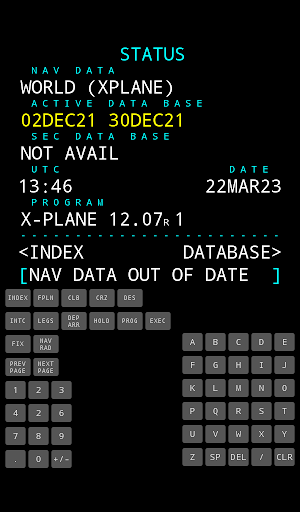
- FMS with CDU touch display (for default X-Plane B737 and B737-800X Zibo Mod)
- Directional Giro with heading bug, drift indication and syncing
- KFC 200 style Autopilot with push and hold up/down buttons
- Altimeter with altitude preselect, barometer setting and autopilot buttons
- Airspeed indicator with speed bug, v-speed indication and true airspeed display
- COM Stack with Active / Standby switch and frequency entry keypad
The following instruments are available with the Navpack In-App purchase:
- HSI with heading bug and course selection, as well as autopilot buttons
- CDI for NAV1 and NAV2 with course selection
- GCU 478 style keypad for G1000. Allows easy flightplan entry for all planes with default G1000
- CDU alphanumeric keys
- NAV Stack with Active / Standby switch and frequency entry keypad
More functions will be added to match the already existing iOS version.
Multiple layouts are available based on the size of your screen. You can also show different instruments on different devices to increase the immersion.
This app requires Laminar Research X-Plane 11 or 12 and uses its standard network data interface.
For the CDU display, a plugin for X-Plane must be installed. Instructions inside the app.