Picture Collage Maker Pic Grid


Picture Collage Maker Pic Grid Summary
Picture Collage Maker Pic Grid is a ad-supported Android app in the Photo And Video category, developed by SJH infotech. First released 1 year ago(Jun 2024), the app has accumulated 1.8K+ total installs
Recent activity: 236 installs this week (464 over 4 weeks) showing exceptional growth View trends →
Store info: Last updated on Google Play on Jun 17, 2024 .
0★
Ratings:
Screenshots



App Description
Create stunning collages with ease using our Picture Collage Maker application.
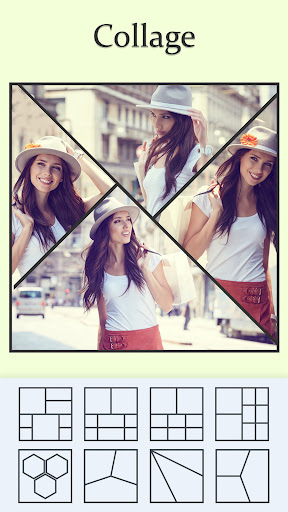
The Photo Collage Maker is an application which allows you to create stunning collages using your photos. This app offers a wide range of features and customization options to make your collages unique and visually appealing. You can choose from a variety of layouts and decorate the collage with unique backgrounds, filters, picture frames, stickers, text, and much more.
The picture grid app also allows you to choose from various layout options, such as grids, freestyle, or templates. In addition to layout options, pic frame maker usually provide tools for editing your photos within the app itself. You can adjust things like brightness, contrast, saturation, and apply filters to enhance your images. It also offers advanced editing features like cropping, rotating, and adding text to your photos.
In photo collage builder, grid layouts divide the canvas collage into sections where you can place your photos, while freestyle layouts gives you the freedom to arrange photos however you like. Templates such as birthday, love, PIP, 3D, and many more have pre-designed frames for quick and easy photo creation. However, once you’ve arranged your photos and customized the collage, then you can easily save your collage as an image to share on social media or use as a digital wallpaper.
Key Features:-
-Remix up to 12 photos to create unique pic collage
-Choose from a variety of frames, grids, templates, and freestyle options
-Customize grid size, borders, and backgrounds
-Edit with cropping, filters, and text options
-Easily share on social media like WhatsApp, Instagram, and Facebook
➤ Grids / Layout -
The photo grid layout option in photo frame maker allows you to arrange multiple images or elements in a structured format, which is beneficial for creating collages or organizing visuals.
➤ Photo Editor -
A picture editor is a tool for enhancing and modifying digital images, including tasks like cropping, adjusting, rotating, and adding filters, text, and stickers.
➤ Freestyle / Scrapbook -
Choose your images, and they'll seamlessly blend into a full-screen canvas for a freestyle collage. Add stickers, text, and more, and then easily share it on Instagram, Facebook, and other platforms.
➤ Spiral Photo -
A spiral photo is a picture with a twisty pattern, made using special effects or found naturally, showing off the cool shapes spirals can make in photos.
Overall, the Picture Montage Maker is a versatile application that offers a wide range of layouts and templates to users. Whether you want to create a simple collage photo frame to share memories or design a visually appealing complex collage, this app provides the flexibility to bring your creative vision to life.
Aftercall feature: This creative photo editing app offers a unique after-call feature that instantly gives you access to handy photo tools right when your call ends. Whether you were discussing picture ideas, planning a collage, or talking about edits, you can jump straight into creating or adjusting your photos the moment the call finishes. It keeps your creative process smooth, effortless, and perfectly timed to your inspiration.
Download the Photo Collage app now to explore the world of photo montage and effortlessly create stunning collages!