SplitBlink — Split bills


SplitBlink — Split bills Summary
SplitBlink — Split bills is a ad-supported, with in-app purchases Android app in the Tools category, developed by Monjila App. First released 11 months ago(Feb 2025), the app has accumulated 2.8K+ total installs
Recent activity: 6 installs this week (26 over 4 weeks) showing below average growth View trends →
Store info: Last updated on Google Play on Feb 10, 2025 .
0★
Ratings: 0
Screenshots



App Description
Split bills fast — rent, dinners, trips & daily shared costs
SplitBlink helps college students, flatmates and friends split everyday bills in seconds — rent, dinners, trips and daily shared expenses. Create groups, add an expense and SplitBlink automatically shows each person’s share so you avoid awkward math and messy spreadsheets.
Features
• One-tap group creation for roommates, trips and events.
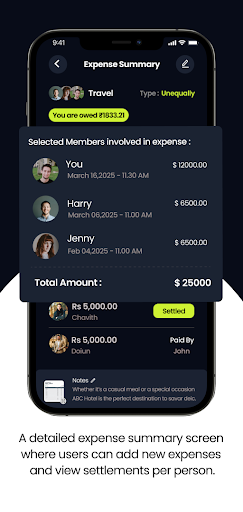
• Fast expense entry: amount, payer, equal/unequal or percent splits.
• Multiple split types: equal, custom amounts or percentages.
• Easy invites via share link or QR code — get people in with one tap.
• Clear balances & full transaction history per group.
• Offline support — create expenses without a connection and sync later.
• Lightweight and fast — designed for low-end phones and quick use.
• Privacy first — no bank access required; records only.
Who uses SplitBlink
• College students sharing rent, utilities and meals.
• Friends traveling together splitting hotels, transport and food.
• Flatmates managing household bills and groceries.
• Groups splitting restaurant or event costs.
How it works (3 quick steps)
Create a group and add members.
Add an expense (amount, who paid, how to split).
Everyone sees their share — mark items as settled when paid.
Download SplitBlink to make shared bills simple and stress-free.