SQL Play — Learn SQL

SQL Play — Learn SQL Summary
SQL Play — Learn SQL is a with in-app purchases Android app in the Tools category, developed by CreativesHi. First released 5 years ago(Aug 2020), the app has accumulated 119.2K+ total installs and 234 ratings with a 2.54★ (poor) average rating.
Recent activity: 572 installs this week (3K over 4 weeks) showing steady growth View trends →
Store info: Last updated on Google Play on Nov 13, 2024 .
2.54★
Ratings: 234
Screenshots


App Description
Learn & practice SQL on the go
Learning and Practicing SQL couldn't be Easier!
Presenting you with a beautiful SQL Runner App for all your devices - SQL Play.
Say goodbye to installing heavy software like MySQL or Microsoft SQL Server on your computers, just to get SQL running.
You don't have to spend hours figuring out what commands to type:
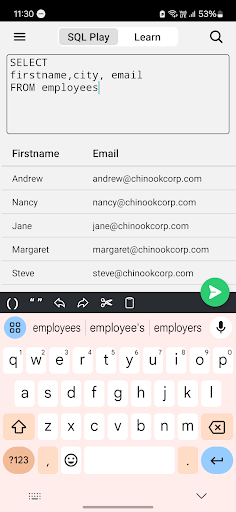
- Just to write a simple SELECT query
- How to use the WHERE clause
- Group data using HAVING clause
- What are the data types to be used
- And many more
Guess what?
You don't even need to make your own tables and insert bunch of data by yourself just to test your queries.
We already have 10+ inbuilt tables just for you to get your hands dirty with SQL faster than ever.
It includes: Albums, Artists, Customers, Employees, Genres, Invoices and more.
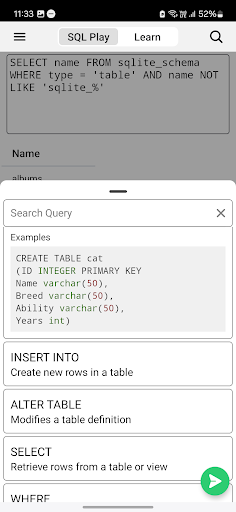
You get 45+ syntaxes along with their description and easy-to-follow examples in order of their execution, which will guide you firsthand.
You don't have to keep scrolling for the commands, you can simply start typing your command and the desired command with syntax will show up.
It covers DDL (Data definition language), DML (Data manipulation language) and DQL (Data query language)
If you prefer dark mode we have got you covered, SQL Play theme matches your system theme. So that your eyes get the deserved rest.
You are not tied to our app with your data, you can export any of your tables into CSV (Comma separated values) using the Export Data feature.
Your data goes with you, whether it be Excel, Google Sheets or any other spreadsheet editor or the database of your choice.
/// Go down the memory lane
Every time you run your query, it gets saved locally in your device which can be accessed by pressing the Up and Down arrow button.
You also get auto-complete from history as you type your query, so that you don't have to keep repeating yourself.
TLDR; Saves you a lot of time
Popular SQL supported databases:
• IBM DB2
• MySQL
• Oracle DB
• PostgreSQL
• SQLite
• SQL Server
• Sybase
• OpenEdge SQL
• Snowflake