TextTool Pro

TextTool Pro Summary
TextTool Pro is a ad-supported Android app in Tools by SocioTech Media. Released in Jun 2025 (8 months ago). It has about 80+ installs Based on AppGoblin estimates, it reaches roughly 7.00 monthly active users and generates around $<10K monthly revenue (0% IAP / 100% ads). Store metadata: updated Sep 13, 2025.
Store info: Last updated on Google Play on Sep 13, 2025 .
0★
Ratings: 0
Screenshots



App Description
All-in-one Text Utility: Batch Replace, Convert, Clean, Sort, Diff & more
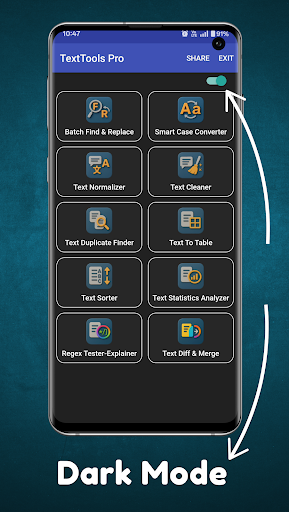
Introducing TextTools Pro, the ultimate toolkit for everything text. With 10 built-in utilities, you can edit, clean, analyze and compare text in just a few taps—now in a sleek, easy-to-use interface with full dark mode support.
🔍 Batch Find & Replace
• Search across one or many text blocks and replace in bulk
• Save & reuse complex patterns for lightning-fast edits
🔤 Smart Case Converter
• UPPERCASE, lowercase, Title Case, Sentence case, and more
• Intelligent handling of acronyms, hyphens & apostrophes
♻️ Text Normalizer
• Standardize whitespace, convert “smart” quotes to straight quotes
• Normalize line breaks and Unicode diacritics
🧹 Text Cleaner
• Strip HTML tags, Markdown syntax, control characters & stray formatting
• Perfect for cleaning up copy-pastes from web pages or PDFs
🔎 Text Duplicate Finder
• Detect exact or near-duplicate lines, phrases or paragraphs
• Adjustable “fuzziness” to catch copy-paste repeats
📋 Text To Table
• Parse CSV, TSV or pipe-delimited text into a neat, editable table
• Live preview with custom delimiter support; export as CSV
↕️ Text Sorter
• Sort lines alphabetically, numerically or by custom rules
• Ascending or descending order—ideal for lists, logs or keywords
📊 Text Statistics Analyzer
• Instant word, character & line counts
• Frequency distribution and basic readability metrics
🛠️ Regex Tester-Explainer
• Live regex editor with real-time match highlighting
• “Explain this pattern” breakdown to demystify complex expressions
🔄 Text Diff & Merge
• Comparison with insertions/deletions
• Three-way merge support for reconciling edits in seconds
Key Features
Simple, Intuitive Design: Clean layout puts every tool at your fingertips.
Dark Mode: Easy on the eyes—switch instantly between light and dark themes.
Stay tuned—more powerful tools are coming in future updates!