TMZ Watch Face Neon Health

ASO Keyword Dashboard
Tracking 0 keywords for TMZ Watch Face Neon Health in Google Play
Developer: TMZ Visionary Category: personalization
TMZ Watch Face Neon Health doesn't have tracked keywords yet.
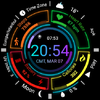
Neon Dashboard: Digital sport watch face with detailed health data for Wear OS.
No keywords tracked yet
We could not generate keyword insights for this app. Add more metadata or refresh the crawl to populate ASO keywords.
App Description
Neon Dashboard: Digital sport watch face with detailed health data for Wear OS.
Enhance your Wear OS experience with this modern, neon-styled digital watch face. Designed for those who love a futuristic dashboard look (HUD) and want all their vital health data at a glance.
This watch face features a vibrant, quad-sector layout that organizes your information perfectly, making it easy to read in any lighting condition. Perfect for sports, fitness activities, and daily use.
✨ MAIN FEATURES:
• Modern Digital Time: Large, legible font (12h/24h format based on phone settings).
• Comprehensive Health Data:
- Heart Rate Monitor (BPM) with visual indicator.
- Step Counter with progress bar.
- Calorie Burn Tracker.
• Battery Status: Clear percentage display with color-coded bar.
• Detailed Complications:
- Weather Info (Temp & Conditions).
- UV Index display.
- Moon Phase indicator.
- Date & Day display.
• Shortcuts: Quick access to essential apps (Music/Play, Alarm, Calendar).
• Always On Display (AOD): Battery-efficient mode that keeps key info visible.
• High Contrast Design: Neon colors on a deep black background for battery saving and style.
🎨 CUSTOMIZATION:
You can customize the complications to show the data that matters most to you (Weather, Barometer, Sunset/Sunrise, etc.) depending on your watch model.
📱 COMPATIBILITY:
This watch face is designed for Wear OS devices API Level 30+ (Wear OS 3.0 and above).
Compatible with: Samsung Galaxy Watch 4, 5, 6, 7, Ultra, Pixel Watch, and other Wear OS smartwatches.
---------------------------------------------------------
INSTALLATION NOTES:
1. Ensure the watch is properly connected to the phone via Bluetooth.
2. Install the app on your phone and tap on "Install on Watch".
3. Check your watch notification or play store on the watch to initiate installation.
4. If you face payment loop issues, try installing directly from the Play Store on the watch or use a web browser on a PC/Laptop.
---------------------------------------------------------
Developer: TMZ Visionary
Enjoy your new watch face!
This watch face features a vibrant, quad-sector layout that organizes your information perfectly, making it easy to read in any lighting condition. Perfect for sports, fitness activities, and daily use.
✨ MAIN FEATURES:
• Modern Digital Time: Large, legible font (12h/24h format based on phone settings).
• Comprehensive Health Data:
- Heart Rate Monitor (BPM) with visual indicator.
- Step Counter with progress bar.
- Calorie Burn Tracker.
• Battery Status: Clear percentage display with color-coded bar.
• Detailed Complications:
- Weather Info (Temp & Conditions).
- UV Index display.
- Moon Phase indicator.
- Date & Day display.
• Shortcuts: Quick access to essential apps (Music/Play, Alarm, Calendar).
• Always On Display (AOD): Battery-efficient mode that keeps key info visible.
• High Contrast Design: Neon colors on a deep black background for battery saving and style.
🎨 CUSTOMIZATION:
You can customize the complications to show the data that matters most to you (Weather, Barometer, Sunset/Sunrise, etc.) depending on your watch model.
📱 COMPATIBILITY:
This watch face is designed for Wear OS devices API Level 30+ (Wear OS 3.0 and above).
Compatible with: Samsung Galaxy Watch 4, 5, 6, 7, Ultra, Pixel Watch, and other Wear OS smartwatches.
---------------------------------------------------------
INSTALLATION NOTES:
1. Ensure the watch is properly connected to the phone via Bluetooth.
2. Install the app on your phone and tap on "Install on Watch".
3. Check your watch notification or play store on the watch to initiate installation.
4. If you face payment loop issues, try installing directly from the Play Store on the watch or use a web browser on a PC/Laptop.
---------------------------------------------------------
Developer: TMZ Visionary
Enjoy your new watch face!