T–Shirt Design: Custom T–Shirt

T–Shirt Design: Custom T–Shirt Summary
T–Shirt Design: Custom T–Shirt is a ad-supported, with in-app purchases Android app in Art And Design by MaveenLabStudio. Released in May 2023 (2 years ago). It has about 424.5K+ installs and 663 ratings with a 3.60★ (average) average. Based on AppGoblin estimates, it reaches roughly 2.9K monthly active users and generates around $<10K monthly revenue (33% IAP / 67% ads). Store metadata: updated Jan 26, 2026.
Recent activity: 81 installs this week (595 over 4 weeks) showing steady growth View trends →
Store info: Last updated on Google Play on Jan 26, 2026 .
3.6★
Ratings: 663
Screenshots



App Description
Custom T-shirt design app – make your own tees with text, logos & graphics
T–Shirt Design: Custom T–Shirt– Create Your Own Tees 👕✨
Looking for the fastest and most stylish T-shirt design app?
You’re in the right place! With T–Shirt Design: Custom T–Shirt, you can design unique custom tees in just minutes — no professional design skills required.
Express your creativity and show off your personal style with custom shirts for men, women, and kids. Whether it’s a casual everyday tee, a concert shirt, or a fun design for friends, this T-shirt design app makes it easy.
🌟 Why Choose T–Shirt Design: Custom T–Shirt?
👕 T-Shirt Design Maker:
Designing custom tees has never been easier! Create your own T-shirt mockups with colours, fonts, and images. Smooth and simple design tools for beginners.
T-Shirt Editor & Creator:
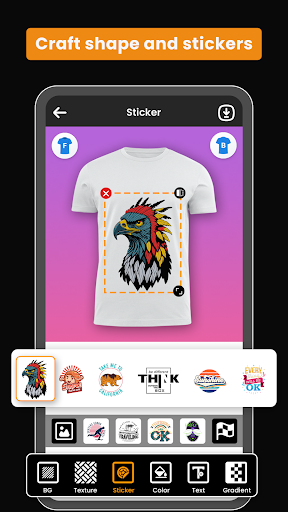
Personalize your T-shirt with stickers, logos, or your own graphics. Choose from a wide collection of T-shirt templates and designs, then edit them to make them yours.
Shirt Designer Tools:
Easily drop your favourite designs or photos onto your T-shirts. Perfect for casual tees, concert T-shirts, or fitted styles.
Upload & Customize:
Import your own artwork, or use built-in templates. Add stickers, logos, and graphics to the front or back of your T-shirt. Use your gallery or camera to add photos and backgrounds.
Custom Graphics & Layouts:
Arrange your design the way you want with simple layout tools. Choose from a wide range of T-shirt colours and get a realistic preview before printing.
T-Shirts for Everyone:
Create custom shirts for men, women, and kids. Add unique colours, text styles, textures, and artwork to match any event or personality.
Multiple Categories:
From printed T-shirts to graphic tees, trendy streetwear, or classic looks — explore endless design possibilities.
Text & Typography:
Add text in multiple fonts, colours, and effects. Create bold designs with 3D text, textures, and lettering.
Save & Share:
Save your T-shirt design on your device, edit it later, or share instantly on social media with friends. Great for showing off your work before printing!
Who Is It For?
Whether you’re a beginner just testing out ideas or a creative designer making professional custom tees, this T-shirt creator app makes it simple. Perfect for:
✔️ Personal use
✔️ Family & group events
✔️ School projects
How to Use:
1️: Install the T–Shirt Design: Custom T–Shirt app.
2️: Open the app and choose a T-shirt or template.
3️: Add your logo, text, or graphics.
4️: Adjust the font, size, colour, and layout.
5️: Save or share your design t shirt design.
6️: Now you can print your T-shirt easily anytime.
Get Started Today!
Designing fitted or casual T-shirts is easier than ever. No design skills needed — just pick, place, and preview your custom tee.
Download T–Shirt Design: Custom T–Shirt today and start creating your own custom T-shirts your way.
We’d love your feedback ❤️ Help us improve with your suggestions!