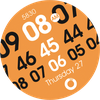
UsA Sequence Zero - USA161

ASO Keyword Dashboard
Tracking 79 keywords for UsA Sequence Zero - USA161 in Google Play
UsA Sequence Zero - USA161 tracks 79 keywords (1 keyword ranks; 78 need traction). Key metrics: 0% top-10 coverage, opportunity 70.1, difficulty 48.2, best rank 18.
Unique sequence number watch face for WearOS
Tracked keywords
79
1 ranked • 78 not ranking yet
Top 10 coverage
0%
Best rank 18 • Latest leader —
Avg opportunity
70.1
Top keyword: api
Avg difficulty
48.2
Lower scores indicate easier wins
Opportunity leaders
- 66.1
api
Opportunity: 74.0 • Difficulty: 42.6 • Rank —
Competitors: 405
- 61.8
scroll
Opportunity: 74.0 • Difficulty: 46.4 • Rank —
Competitors: 434
- 65.4
pixel
Opportunity: 74.0 • Difficulty: 46.8 • Rank —
Competitors: 722
- 64.5
purchasing
Opportunity: 74.0 • Difficulty: 41.7 • Rank —
Competitors: 615
- 61.4
galaxy watch
Opportunity: 74.0 • Difficulty: 40.9 • Rank —
Competitors: 30
Unranked opportunities
api
Opportunity: 74.0 • Difficulty: 42.6 • Competitors: 405
scroll
Opportunity: 74.0 • Difficulty: 46.4 • Competitors: 434
pixel
Opportunity: 74.0 • Difficulty: 46.8 • Competitors: 722
purchasing
Opportunity: 74.0 • Difficulty: 41.7 • Competitors: 615
galaxy watch
Opportunity: 74.0 • Difficulty: 40.9 • Competitors: 30
High competition keywords
time
Total apps: 382,569 • Major competitors: 17,693
Latest rank: — • Difficulty: 57.6
new
Total apps: 367,061 • Major competitors: 23,500
Latest rank: — • Difficulty: 58.6
find
Total apps: 310,056 • Major competitors: 17,818
Latest rank: — • Difficulty: 58.3
information
Total apps: 269,393 • Major competitors: 8,245
Latest rank: — • Difficulty: 54.8
using
Total apps: 220,824 • Major competitors: 12,059
Latest rank: — • Difficulty: 56.7
All tracked keywords
Includes opportunity, difficulty, rankings and competitor benchmarks
| Major Competitors | |||||||
|---|---|---|---|---|---|---|---|
| sequence | 73 | 100 | 36 | 57 4,050 competing apps Median installs: 1,792 Avg rating: 4.0 | 18 | 18 | 152 major competitor apps |
| new | 65 | 100 | 59 | 89 367,061 competing apps Median installs: 3,177 Avg rating: 4.0 | — | — | 23,500 major competitor apps |
| mode | 69 | 100 | 56 | 77 70,041 competing apps Median installs: 5,211 Avg rating: 4.0 | — | — | 5,832 major competitor apps |
| change | 68 | 100 | 52 | 79 91,182 competing apps Median installs: 4,808 Avg rating: 4.0 | — | — | 6,406 major competitor apps |
| right | 67 | 100 | 57 | 83 160,922 competing apps Median installs: 1,954 Avg rating: 4.0 | — | — | 8,892 major competitor apps |
| phone | 67 | 100 | 60 | 83 153,671 competing apps Median installs: 3,558 Avg rating: 4.0 | — | — | 9,548 major competitor apps |
| support | 67 | 100 | 55 | 83 173,065 competing apps Median installs: 1,490 Avg rating: 4.1 | — | — | 8,043 major competitor apps |
| live | 67 | 100 | 55 | 82 144,895 competing apps Median installs: 1,575 Avg rating: 4.1 | — | — | 7,027 major competitor apps |
| digital | 68 | 100 | 51 | 81 126,124 competing apps Median installs: 892 Avg rating: 4.0 | — | — | 4,643 major competitor apps |
| wear | 71 | 100 | 61 | 72 32,857 competing apps Median installs: 382 Avg rating: 4.1 | — | — | 871 major competitor apps |
| wearos | 72 | 100 | 32 | 53 2,069 competing apps Median installs: 166 Avg rating: 4.1 | — | — | 12 major competitor apps |
| date | 68 | 100 | 53 | 79 93,942 competing apps Median installs: 806 Avg rating: 4.1 | — | — | 2,944 major competitor apps |
| wear os | 72 | 100 | 60 | 70 24,480 competing apps Median installs: 294 Avg rating: 4.2 | — | — | 301 major competitor apps |
| simply | 69 | 100 | 49 | 78 83,514 competing apps Median installs: 1,692 Avg rating: 4.0 | — | — | 3,734 major competitor apps |
| information | 65 | 100 | 55 | 86 269,393 competing apps Median installs: 1,210 Avg rating: 4.0 | — | — | 8,245 major competitor apps |
| manage | 66 | 100 | 55 | 84 188,487 competing apps Median installs: 772 Avg rating: 3.9 | — | — | 7,372 major competitor apps |
| list | 69 | 100 | 52 | 78 83,118 competing apps Median installs: 2,559 Avg rating: 4.1 | — | — | 3,587 major competitor apps |
| using | 66 | 100 | 57 | 85 220,824 competing apps Median installs: 2,910 Avg rating: 3.9 | — | — | 12,059 major competitor apps |
| find | 65 | 100 | 58 | 87 310,056 competing apps Median installs: 2,793 Avg rating: 4.1 | — | — | 17,818 major competitor apps |
| menu | 71 | 100 | 52 | 73 40,750 competing apps Median installs: 707 Avg rating: 4.1 | — | — | 1,341 major competitor apps |
| option | 70 | 100 | 50 | 74 47,671 competing apps Median installs: 3,040 Avg rating: 4.1 | — | — | 2,540 major competitor apps |
| time | 64 | 100 | 58 | 89 382,569 competing apps Median installs: 1,506 Avg rating: 4.0 | — | — | 17,693 major competitor apps |
| api | 74 | 100 | 43 | 66 14,183 competing apps Median installs: 481 Avg rating: 4.1 | — | — | 405 major competitor apps |
| customizable | 71 | 100 | 49 | 73 41,393 competing apps Median installs: 1,400 Avg rating: 4.2 | — | — | 2,324 major competitor apps |
| account | 68 | 100 | 54 | 79 94,938 competing apps Median installs: 2,055 Avg rating: 3.9 | — | — | 5,001 major competitor apps |
App Description
Unique sequence number watch face for WearOS
This watch face requires Wear OS API 33+ (Wear OS 4 or newer). Compatible with Galaxy Watch 4/5/6/7/8 Series and newer, Pixel Watch series and other watch face with Wear OS 4 or newer.
Make sure you are purchasing using the same Google account registered on your watch. The installation should begin automatically on the watch after a few moments.
Features :
- Standout unique digital sequence design
- 12/24 hour digital sync with your phone settings
- Multi-color combination to choose
- 1 custom information and 2 app shortcuts
After the installation is completed on your watch, do these steps to open the watch face on your watch :
1. Open the watch face list on your watch (tap and hold the current watch face)
2. Scroll to the right and tap "add watch face"
3. Scroll down and find new installed watch face in the "downloaded" section
For WearOS 5 or newer, you can also simply tap "set/install" on the companion app, then tap set on the watch.
Tap and hold the watch face and go to the "customize" menu (or settings icon under the watch face) to change the styles and also manage the custom complication.
To change between 12 or 24-hour mode, go to your phone date and time settings and there is an option to use 24-hour mode or 12-hour mode. The watch will sync with your new settings after a few moments.
Join our Telegram group for live support and discussion
https://t.me/usadesignwatchface