Date in Status Bar HD

Date in Status Bar HD Summary
Date in Status Bar HD is a ad-supported Android app in Productivity by Wagwan Apps. Released in Dec 2012 (13 years ago). It has about 86.5K+ installs and 723 ratings with a 2.57★ (poor) average. Based on AppGoblin estimates, it reaches roughly 3.5K monthly active users and generates around $<10K monthly revenue (0% IAP / 100% ads). Store metadata: updated Dec 2, 2025.
Recent activity: 40 installs this week (139 over 4 weeks) showing below average growth View trends →
Store info: Last updated on Google Play on Dec 2, 2025 .
2.57★
Ratings: 723
Screenshots

App Description
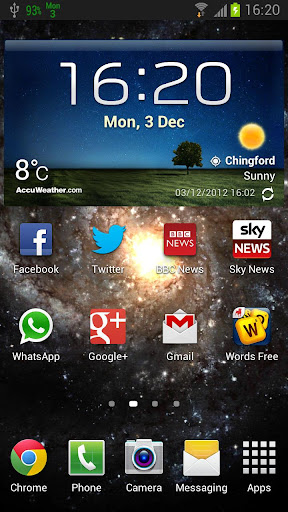
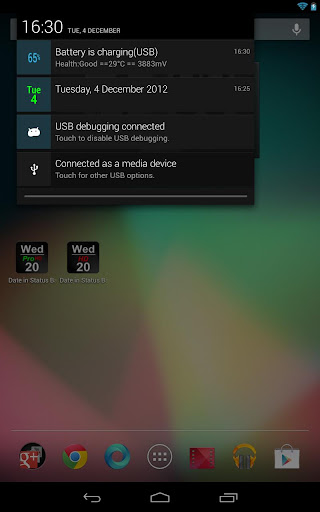
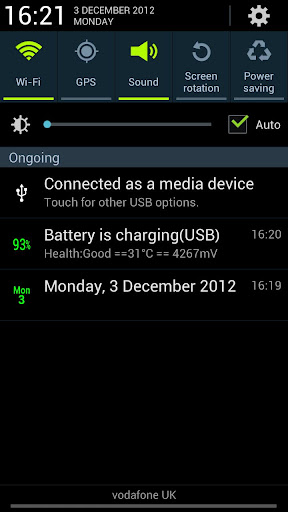
Displays the day of the week and Calendar day in your status bar
Displays the day of the week and Calendar day in your status bar for high resolution devices.
With Date in Status Bar HD Pro the icons will appear bigger than that standard version as they are specifically tailored for HD devices such as the Google Nexus devices, Samsung Galaxy S3 S4 and many more.
Features:
- Simple UI with easy to understand options. Remember Less is More.
- App auto start when phone is rebooted.
- Choose from a list of colours
Try them out.
- Display the full date, day of the year and week of the year in the notification drop
down
- Very small app with a small footprint. Virtually no battery drain
- Supports Android tablets.
Buy the pro version to support the dev, no adds and more colour options.
If you have a request please email us and we will do what we can to help
Extensive testing on the following devices/Versions:
Android 2.2.x
Android 2.3.x
Android 3.2 (Honey Comb Tablets)
Android 4.x
Limitations:
- In Android 3.0 or above, and Android 4.0 or above, the Android OS has
"automatic shrinking and dimming" for status bar notifications to focus on the main
activity. The
icons do remain at their full size and at full intensity in the notification
area when selected,
Please contact us to report any issues or to request a feature.