Analog Basic 20 Wear OS 4+
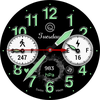

ASO Keyword Dashboard
Tracking 129 keywords for Analog Basic 20 Wear OS 4+ in Google Play
Analog Basic 20 Wear OS 4+ tracks 129 keywords (1 keyword ranks; 128 need traction). Key metrics: 0% top-10 coverage, opportunity 69.6, difficulty 49.9, best rank 86.
A Watchface for Wear OS with customization options to match your preferences.
Tracked keywords
129
1 ranked • 128 not ranking yet
Top 10 coverage
0%
Best rank 86 • Latest leader —
Avg opportunity
69.6
Top keyword: done
Avg difficulty
49.9
Lower scores indicate easier wins
Opportunity leaders
- 67.9
done
Opportunity: 73.0 • Difficulty: 54.9 • Rank —
Competitors: 937
- 67.5
alarm
Opportunity: 73.0 • Difficulty: 49.3 • Rank —
Competitors: 879
- 68.6
icon
Opportunity: 73.0 • Difficulty: 55.3 • Rank —
Competitors: 1,128
- 68.2
styles
Opportunity: 73.0 • Difficulty: 51.8 • Rank —
Competitors: 1,719
- 69.2
calendar
Opportunity: 72.0 • Difficulty: 64.3 • Rank —
Competitors: 992
Unranked opportunities
done
Opportunity: 73.0 • Difficulty: 54.9 • Competitors: 937
alarm
Opportunity: 73.0 • Difficulty: 49.3 • Competitors: 879
icon
Opportunity: 73.0 • Difficulty: 55.3 • Competitors: 1,128
styles
Opportunity: 73.0 • Difficulty: 51.8 • Competitors: 1,719
calendar
Opportunity: 72.0 • Difficulty: 64.3 • Competitors: 992
High competition keywords
time
Total apps: 170,577 • Major competitors: 19,592
Latest rank: — • Difficulty: 64.6
make
Total apps: 163,352 • Major competitors: 21,922
Latest rank: — • Difficulty: 65.0
play
Total apps: 113,236 • Major competitors: 19,366
Latest rank: — • Difficulty: 67.3
available
Total apps: 92,463 • Major competitors: 9,952
Latest rank: — • Difficulty: 66.4
start
Total apps: 88,254 • Major competitors: 11,840
Latest rank: — • Difficulty: 62.2
All tracked keywords
Includes opportunity, difficulty, rankings and competitor benchmarks
| Major Competitors | |||||||
|---|---|---|---|---|---|---|---|
| basic | 71 | 100 | 53 | 73 18,440 competing apps Median installs: 33,512 Avg rating: 2.8 | 86 | 86 | 1,756 major competitor apps |
| play | 65 | 100 | 67 | 86 113,236 competing apps Median installs: 62,750 Avg rating: 3.2 | — | — | 19,366 major competitor apps |
| calendar | 72 | 100 | 64 | 69 11,191 competing apps Median installs: 26,636 Avg rating: 3.0 | — | — | 992 major competitor apps |
| customization | 72 | 100 | 49 | 67 8,723 competing apps Median installs: 46,389 Avg rating: 3.1 | — | — | 1,137 major competitor apps |
| mode | 69 | 100 | 65 | 78 35,564 competing apps Median installs: 53,723 Avg rating: 3.1 | — | — | 5,505 major competitor apps |
| change | 68 | 100 | 55 | 80 48,309 competing apps Median installs: 42,177 Avg rating: 3.0 | — | — | 6,101 major competitor apps |
| reason | 71 | 100 | 39 | 59 3,004 competing apps Median installs: 29,720 Avg rating: 2.8 | — | — | 250 major competitor apps |
| try | 68 | 100 | 62 | 79 44,524 competing apps Median installs: 62,670 Avg rating: 3.2 | — | — | 7,600 major competitor apps |
| make | 64 | 100 | 65 | 89 163,352 competing apps Median installs: 42,108 Avg rating: 3.0 | — | — | 21,922 major competitor apps |
| phone | 67 | 100 | 69 | 83 75,756 competing apps Median installs: 37,780 Avg rating: 3.0 | — | — | 9,010 major competitor apps |
| connected | 70 | 100 | 56 | 74 22,704 competing apps Median installs: 25,700 Avg rating: 2.8 | — | — | 2,181 major competitor apps |
| users | 67 | 100 | 60 | 82 59,104 competing apps Median installs: 30,976 Avg rating: 2.8 | — | — | 6,026 major competitor apps |
| heart | 71 | 100 | 50 | 71 15,090 competing apps Median installs: 29,042 Avg rating: 2.9 | — | — | 1,461 major competitor apps |
| wear | 72 | 100 | 80 | 66 7,173 competing apps Median installs: 24,222 Avg rating: 3.2 | — | — | 839 major competitor apps |
| analog | 71 | 100 | 38 | 57 2,143 competing apps Median installs: 22,553 Avg rating: 3.4 | — | — | 183 major competitor apps |
| date | 69 | 100 | 60 | 77 31,688 competing apps Median installs: 26,732 Avg rating: 2.8 | — | — | 2,809 major competitor apps |
| sensor | 71 | 100 | 40 | 59 2,831 competing apps Median installs: 31,787 Avg rating: 2.8 | — | — | 319 major competitor apps |
| wear os | 71 | 100 | 76 | 60 3,443 competing apps Median installs: 13,088 Avg rating: 3.5 | — | — | 279 major competitor apps |
| image | 70 | 100 | 54 | 76 27,195 competing apps Median installs: 35,290 Avg rating: 2.8 | — | — | 3,073 major competitor apps |
| working | 71 | 100 | 56 | 73 18,347 competing apps Median installs: 30,163 Avg rating: 2.8 | — | — | 1,742 major competitor apps |
| avoid | 71 | 100 | 61 | 72 16,708 competing apps Median installs: 44,275 Avg rating: 2.9 | — | — | 2,344 major competitor apps |
| menu | 72 | 100 | 65 | 71 13,685 competing apps Median installs: 28,103 Avg rating: 3.0 | — | — | 1,278 major competitor apps |
| option | 70 | 100 | 53 | 75 23,307 competing apps Median installs: 32,883 Avg rating: 2.9 | — | — | 2,446 major competitor apps |
| time | 64 | 100 | 65 | 89 170,577 competing apps Median installs: 33,133 Avg rating: 2.9 | — | — | 19,592 major competitor apps |
| available | 66 | 100 | 66 | 85 92,463 competing apps Median installs: 34,120 Avg rating: 2.9 | — | — | 9,952 major competitor apps |
App Description
A Watchface for Wear OS with customization options to match your preferences.
a. This watch face for Wear Os 4+ contains a lot of options in customization menu.If for some reason Galaxy wearable app takes time to open customization options or force closes while you are trying to open it that is due to a bug in Galaxy Wearable app last update. Try 2 to 3 times while opening on Galaxy wearable app and customization menu will also open there as well.This has got nothing to do with the watch face.
b. An effort has be done to make a INSTALL GUIDE which is attached as an image with screen previews.It is the 1st image in previews for Newbie Android Wear OS Users or for those who don't know how to install the watch-face to your connected device. So it is requested to users to also make an effort and read it before posting cannot install statements.
c. DO NOT PAY TWICE FROM WATCH PLAY STORE . READ The Install Guide Image again. See 3 x methods 100 percent working to install both phone app and watch app . The install guide clearly says tap to open connected on connected watch is when you are installing it for the first time.
This watch face for Wear OS has following features:-
1. The watch face has an option to change Seconds Analog needle to 2 x types of movements Sweep and Normal select-able by user in customization menu.
2. The watch-face has cracked effect options x 2 . Both can be turned on or off from customization menu.
3. The watch face has Dim Mode available in customization menu both for Main and AoD Display separately in customization menu.
4. The watch-face has Outer Index Styles changeable both for Main and AoD separately in customization menu.
5. The watch face has also separate option to dim the outer index in customization menu.
6. Tap at Minute Index Number 4 to open watch phone app.
7. Tap at Minute Index Number 8 to open watch messages app.
8. Tap at Day text below OQ Logo to open watch alarm app.
9. Tap on OQ Logo to open watch settings menu.
10. Tap On heart icon or reading and then reading will start blinking and stop blinking when the sensor completes reading and then the reading will be updated to the fresh one.
11. Tap on Battery icon or text to open watch battery settings.
12. Tap on Date text to open calendar menu.