Analog Basic 31 WF Wear OS 4+

ASO Keyword Dashboard
Tracking 200 keywords for Analog Basic 31 WF Wear OS 4+ in Google Play
Analog Basic 31 WF Wear OS 4+ tracks 200 keywords (no keywords rank yet; 200 need traction). Key metrics: opportunity 69.4, difficulty 50.9.
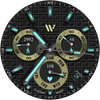
An Analog colorful Watchface with many cutomization & multi color styles.
Tracked keywords
200
0 ranked • 200 not ranking yet
Top 10 coverage
—
Best rank — • Latest leader —
Avg opportunity
69.4
Top keyword: wait
Avg difficulty
50.9
Lower scores indicate easier wins
Opportunity leaders
- 68.3
wait
Opportunity: 73.0 • Difficulty: 49.0 • Rank —
Competitors: 1,347
- 67.9
charge
Opportunity: 73.0 • Difficulty: 46.3 • Rank —
Competitors: 1,120
- 68.0
purchases
Opportunity: 73.0 • Difficulty: 62.6 • Rank —
Competitors: 1,674
- 68.5
steps
Opportunity: 73.0 • Difficulty: 46.7 • Rank —
Competitors: 1,066
- 68.6
written
Opportunity: 73.0 • Difficulty: 43.1 • Rank —
Competitors: 478
Unranked opportunities
wait
Opportunity: 73.0 • Difficulty: 49.0 • Competitors: 1,347
charge
Opportunity: 73.0 • Difficulty: 46.3 • Competitors: 1,120
purchases
Opportunity: 73.0 • Difficulty: 62.6 • Competitors: 1,674
steps
Opportunity: 73.0 • Difficulty: 46.7 • Competitors: 1,066
written
Opportunity: 73.0 • Difficulty: 43.1 • Competitors: 478
High competition keywords
new
Total apps: 193,474 • Major competitors: 25,823
Latest rank: — • Difficulty: 65.7
make
Total apps: 163,352 • Major competitors: 21,922
Latest rank: — • Difficulty: 65.0
experience
Total apps: 118,077 • Major competitors: 15,561
Latest rank: — • Difficulty: 62.8
without
Total apps: 113,596 • Major competitors: 12,654
Latest rank: — • Difficulty: 63.1
play
Total apps: 113,236 • Major competitors: 19,366
Latest rank: — • Difficulty: 67.3
All tracked keywords
Includes opportunity, difficulty, rankings and competitor benchmarks
| Major Competitors | |||||||
|---|---|---|---|---|---|---|---|
| play | 65 | 100 | 67 | 86 113,236 competing apps Median installs: 62,750 Avg rating: 3.2 | — | — | 19,366 major competitor apps |
| top | 68 | 100 | 65 | 80 46,866 competing apps Median installs: 46,978 Avg rating: 3.0 | — | — | 7,127 major competitor apps |
| new | 64 | 100 | 66 | 90 193,474 competing apps Median installs: 42,470 Avg rating: 3.0 | — | — | 25,823 major competitor apps |
| health | 70 | 100 | 52 | 75 23,713 competing apps Median installs: 25,526 Avg rating: 2.7 | — | — | 1,845 major competitor apps |
| calendar | 72 | 100 | 64 | 69 11,191 competing apps Median installs: 26,636 Avg rating: 3.0 | — | — | 992 major competitor apps |
| 69 | 100 | 53 | 77 32,694 competing apps Median installs: 29,240 Avg rating: 2.9 | — | — | 2,918 major competitor apps | |
| customization | 72 | 100 | 49 | 67 8,723 competing apps Median installs: 46,389 Avg rating: 3.1 | — | — | 1,137 major competitor apps |
| mode | 69 | 100 | 65 | 78 35,564 competing apps Median installs: 53,723 Avg rating: 3.1 | — | — | 5,505 major competitor apps |
| change | 68 | 100 | 55 | 80 48,309 competing apps Median installs: 42,177 Avg rating: 3.0 | — | — | 6,101 major competitor apps |
| source | 72 | 100 | 52 | 69 11,396 competing apps Median installs: 27,566 Avg rating: 2.9 | — | — | 959 major competitor apps |
| source code | 69 | 100 | 69 | 48 686 competing apps Median installs: 38,662 Avg rating: 3.4 | — | — | 64 major competitor apps |
| make | 64 | 100 | 65 | 89 163,352 competing apps Median installs: 42,108 Avg rating: 3.0 | — | — | 21,922 major competitor apps |
| via | 68 | 100 | 58 | 81 54,601 competing apps Median installs: 29,805 Avg rating: 2.7 | — | — | 5,243 major competitor apps |
| connected | 70 | 100 | 56 | 74 22,704 competing apps Median installs: 25,700 Avg rating: 2.8 | — | — | 2,181 major competitor apps |
| users | 67 | 100 | 60 | 82 59,104 competing apps Median installs: 30,976 Avg rating: 2.8 | — | — | 6,026 major competitor apps |
| experience | 65 | 100 | 63 | 87 118,077 competing apps Median installs: 39,819 Avg rating: 2.9 | — | — | 15,561 major competitor apps |
| graphical | 70 | 100 | 37 | 55 1,697 competing apps Median installs: 26,769 Avg rating: 2.7 | — | — | 132 major competitor apps |
| classic | 70 | 100 | 56 | 76 28,140 competing apps Median installs: 50,800 Avg rating: 3.3 | — | — | 4,499 major competitor apps |
| heart | 71 | 100 | 50 | 71 15,090 competing apps Median installs: 29,042 Avg rating: 2.9 | — | — | 1,461 major competitor apps |
| wear | 72 | 100 | 80 | 66 7,173 competing apps Median installs: 24,222 Avg rating: 3.2 | — | — | 839 major competitor apps |
| analog | 71 | 100 | 38 | 57 2,143 competing apps Median installs: 22,553 Avg rating: 3.4 | — | — | 183 major competitor apps |
| clock | 72 | 100 | 51 | 66 7,715 competing apps Median installs: 33,996 Avg rating: 3.3 | — | — | 796 major competitor apps |
| date | 69 | 100 | 60 | 77 31,688 competing apps Median installs: 26,732 Avg rating: 2.8 | — | — | 2,809 major competitor apps |
| wear os | 71 | 100 | 76 | 60 3,443 competing apps Median installs: 13,088 Avg rating: 3.5 | — | — | 279 major competitor apps |
| setting | 72 | 100 | 58 | 70 11,945 competing apps Median installs: 35,776 Avg rating: 2.9 | — | — | 1,320 major competitor apps |
App Description
An Analog colorful Watchface with many cutomization & multi color styles.
NOTICE: READ THIS ALWAYS BEFORE AND AFTER DOWNLOADING OUR WATCH FACE TO AVOID ANY SITUATION YOU DON'T LIKE.
=======================================================
This watch face for WEAR OS has been made in latest released Samsung Galaxy Watch face studio V 1.6.9 which is still evolving and has been tested on Samsung Watch 4 Classic , Samsung Watch 5 Pro, and Tic watch 5 Pro. It also supports all other wear OS 3+ devices. Some feature experience can be slightly different on Wear OS 3.5 & Below on other watches.
a. Visit this link to official Install Guide written by Tony Morelan. (Sr. Developer, Evangelist)For Wear OS Watch faces powered by Samsung Watch face Studio. It is very detailed and precise with graphical and image illustrations on How to install the watch face bundle part to your connected wear os watch.
link:-
https://developer.samsung.com/sdp/blog/en-us/2022/11/15/install-watch-faces-for-galaxy-watch5-and-one-ui-watch-45
b. A Big Thanks to Bredlix for source code of new helper app.
Link
https://github.com/bredlix/wf_companion_app
c. An effort also has been made to make a brief install guide as well (an image added with screen previews) .It is the last image in previews of this watch face for newbie android Wear OS users or those who do not know how to install the watch face to your connected device. So it is requested to also make an effort and read it before posting cannot install statements.
d. DO NOT PAY TWICE FROM WATCH PLAY STORE .If watch playstore shows watchface and asks to pay even after adding coupons or by just opening from inside Helper app. Wait for your purchases to be synced or if you do not want to wait you can always select direct install to watch method without even helper app. After this process even if you press pay on watch it will say ERROR still sync purchases and will not charge you again and install button will appear.Any issues just email on osmanqadir78@gmail.com. This is Google Playstore bug that prevails since last 2 and a half years ,beyond scope of this or any watch face made in Samsung Watch face Studio by Any developer and was never fixed.
The watch face has following features:-
1. Tap on date text to open watch calendar app.
2. Tap on logo below 12 o clock index bar to open watch settings app.
3. Tap inside Batter Chronometer to open watch battery settings.
4. Tap inside Day Of week Chronometer to open watch Samsung Health Heart rate dashboard.
5. Tap inside Steps Chronometer to open watch Samsung Steps dashboard.
6. Inner Index has 2 styles including default style.The default style is glowing type and second option is more fuller. Customizable via watch face customization menu.
7. Outer Index has 6 different styles including default. Last 3 x are same as 1st three But colored.
8. 5 x Background styles including default are available and customizable via long press and going into customization menu and select from there.
9. Dim mode is available for both Main and AoD display select-able via customization menu.
10. 4x different logo styles including default are available via customization menu.
11. Chronometers color by default is off. In ON position the chronometer rings color will be also change colors according to color style selected.
12. 5 x Customizable Complications are available to user in the customization menu.
15. Seconds Movement also has 3 options and can be changed as well from customization menu.3rd option turns off secs hand.
13. 30 x different color styles are available to suite your varying needs.
14. Shadow on top of watch face index can be turned on /off. Default setting is off.
DEVELOPER'S TELEGRAM GROUP
1. https://t.me/OQWatchface
2. https://t.me/OQWatchfaces