Ballozi GILAS Digital

ASO Keyword Dashboard
Tracking 159 keywords for Ballozi GILAS Digital in Google Play
Ballozi GILAS Digital tracks 159 keywords (no keywords rank yet; 159 need traction). Key metrics: opportunity 70.7, difficulty 44.5.
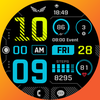
A bold sporty style digital watch face for Wear OS from Ballozi
Tracked keywords
159
0 ranked • 159 not ranking yet
Top 10 coverage
—
Best rank — • Latest leader —
Avg opportunity
70.7
Top keyword: counter
Avg difficulty
44.5
Lower scores indicate easier wins
Opportunity leaders
- 63.6
counter
Opportunity: 75.0 • Difficulty: 41.1 • Rank —
Competitors: 689
- 63.7
refer
Opportunity: 75.0 • Difficulty: 39.4 • Rank —
Competitors: 370
- 63.6
faces
Opportunity: 75.0 • Difficulty: 40.5 • Rank —
Competitors: 391
- 60.8
moon
Opportunity: 74.0 • Difficulty: 39.0 • Rank —
Competitors: 306
- 65.8
measure
Opportunity: 74.0 • Difficulty: 42.1 • Rank —
Competitors: 623
Unranked opportunities
counter
Opportunity: 75.0 • Difficulty: 41.1 • Competitors: 689
refer
Opportunity: 75.0 • Difficulty: 39.4 • Competitors: 370
faces
Opportunity: 75.0 • Difficulty: 40.5 • Competitors: 391
moon
Opportunity: 74.0 • Difficulty: 39.0 • Competitors: 306
measure
Opportunity: 74.0 • Difficulty: 42.1 • Competitors: 623
High competition keywords
time
Total apps: 382,929 • Major competitors: 17,710
Latest rank: — • Difficulty: 57.6
make
Total apps: 326,182 • Major competitors: 20,145
Latest rank: — • Difficulty: 57.5
find
Total apps: 309,306 • Major competitors: 17,804
Latest rank: — • Difficulty: 58.3
every
Total apps: 258,169 • Major competitors: 14,416
Latest rank: — • Difficulty: 55.6
choose
Total apps: 194,619 • Major competitors: 13,465
Latest rank: — • Difficulty: 55.3
All tracked keywords
Includes opportunity, difficulty, rankings and competitor benchmarks
| Major Competitors | |||||||
|---|---|---|---|---|---|---|---|
| 69 | 100 | 50 | 77 69,714 competing apps Median installs: 2,557 Avg rating: 4.0 | — | — | 3,089 major competitor apps | |
| customization | 73 | 100 | 45 | 68 17,858 competing apps Median installs: 4,232 Avg rating: 4.1 | — | — | 1,248 major competitor apps |
| right | 67 | 100 | 57 | 83 160,536 competing apps Median installs: 1,956 Avg rating: 4.0 | — | — | 8,880 major competitor apps |
| single | 69 | 100 | 51 | 78 76,030 competing apps Median installs: 2,322 Avg rating: 4.0 | — | — | 4,305 major competitor apps |
| make | 65 | 100 | 57 | 88 326,182 competing apps Median installs: 2,543 Avg rating: 4.0 | — | — | 20,145 major competitor apps |
| phone | 67 | 100 | 60 | 83 153,357 competing apps Median installs: 3,571 Avg rating: 4.0 | — | — | 9,542 major competitor apps |
| via | 68 | 100 | 53 | 81 115,711 competing apps Median installs: 1,833 Avg rating: 4.0 | — | — | 4,543 major competitor apps |
| connected | 69 | 100 | 50 | 78 74,667 competing apps Median installs: 648 Avg rating: 4.0 | — | — | 2,414 major competitor apps |
| support | 67 | 100 | 55 | 83 172,647 competing apps Median installs: 1,493 Avg rating: 4.1 | — | — | 8,042 major competitor apps |
| events | 69 | 100 | 50 | 78 78,890 competing apps Median installs: 684 Avg rating: 4.1 | — | — | 2,125 major competitor apps |
| digital | 68 | 100 | 51 | 81 125,764 competing apps Median installs: 892 Avg rating: 4.0 | — | — | 4,635 major competitor apps |
| heart | 70 | 100 | 47 | 74 42,949 competing apps Median installs: 1,027 Avg rating: 4.1 | — | — | 1,623 major competitor apps |
| wear | 71 | 100 | 61 | 72 32,797 competing apps Median installs: 382 Avg rating: 4.1 | — | — | 869 major competitor apps |
| clock | 73 | 100 | 46 | 68 19,120 competing apps Median installs: 1,470 Avg rating: 4.1 | — | — | 837 major competitor apps |
| date | 68 | 100 | 53 | 79 93,795 competing apps Median installs: 807 Avg rating: 4.1 | — | — | 2,942 major competitor apps |
| wear os | 72 | 100 | 60 | 70 24,439 competing apps Median installs: 294 Avg rating: 4.2 | — | — | 300 major competitor apps |
| moon | 74 | 100 | 39 | 61 6,614 competing apps Median installs: 1,524 Avg rating: 4.2 | — | — | 306 major competitor apps |
| list | 69 | 100 | 52 | 78 82,987 competing apps Median installs: 2,567 Avg rating: 4.1 | — | — | 3,584 major competitor apps |
| choose | 66 | 100 | 55 | 84 194,619 competing apps Median installs: 2,948 Avg rating: 4.0 | — | — | 13,465 major competitor apps |
| immediately | 72 | 100 | 43 | 69 22,175 competing apps Median installs: 3,330 Avg rating: 3.9 | — | — | 978 major competitor apps |
| find | 65 | 100 | 58 | 87 309,306 competing apps Median installs: 2,806 Avg rating: 4.1 | — | — | 17,804 major competitor apps |
| time | 64 | 100 | 58 | 89 382,929 competing apps Median installs: 1,508 Avg rating: 4.0 | — | — | 17,710 major competitor apps |
| connect | 67 | 100 | 55 | 81 130,306 competing apps Median installs: 968 Avg rating: 4.0 | — | — | 5,050 major competitor apps |
| customizable | 71 | 100 | 49 | 73 41,284 competing apps Median installs: 1,406 Avg rating: 4.2 | — | — | 2,323 major competitor apps |
| rate | 70 | 100 | 47 | 75 50,571 competing apps Median installs: 3,203 Avg rating: 4.1 | — | — | 2,296 major competitor apps |
App Description
A bold sporty style digital watch face for Wear OS from Ballozi
INSTALLATION OPTIONS:
1. Keep your watch connected to your phone.
2. Install in the phone. After installation, immediately check your watch face list in your watch by pressing and hold display then swipe to the very end and click Add watch face. There you can see the newly installed watch face and just activate it.
3. After installation, you can also check the following:
A. For Samsung watches, check your Galaxy Wearable app in your phone (install it if not yet installed). Under Watch faces > Downloaded, there you can see the newly installed watch face and then just apply it to connected watch.
B. For other smartwatch brands, for other Wear OS devices, please check the watch app installed in your phone that comes with your smartwatch brand and find the newly installed watch face in the watch face gallery or list.
4. Please also visit the link below showing many options how to install Wear OS watch face in your watch.
https://developer.samsung.com/sdp/blog/en-us/2022/11/15/install-watch-faces-for-galaxy-watch5-and-one-ui-watch-45
For support and request, you can email me at balloziwatchface@gmail.com
FEATURES:
- Digital clock switchable to 24h/12h via Phone Settings
- Steps counter with progress bar(target is set to 10000 steps)
- Battery subdial with red indicator at 15% and below
- Heart rate subdial
- Date and day of week
- Moon phase type
- 28x Theme colors
- 2x Editable Complication
- Events complication
- 5x Preset app shortcuts
- 2x Customizable app shortcuts
CUSTOMIZATION:
(Please refer to phone screenshot #3)
1. Press and hold display then hit "Customize".
2. Swipe left and right to choose what to customize.
3. Swipe up and down to choose options available.
4. Hit "OK".
PRESET APP SHORTCUTS
1. Settings
2. Battery Status
3. Calendar
4. Alarm
5. Phone
6. Messages
7. Measure heart rate
Measuring Heart Rate (Manual refresh). The Measuring Heart Rate shortcut takes independent measurement of heart rate and doesn't update the Wear OS heart rate app. This watch face displays the heart rate at the time of measurement and it may have different reading from the Wear OS app. To measure heart rate: Please make sure to wear your watch properly, screen turned on and stay still while measuring. Then single tap the shortcut to measure heart rate. Icon appears when measuring heart rate. Wait for a few seconds. Heart rate icon disappears once done. Heart rate will automatically measure every 10 minutes.
CUSTOMIZABLE APP SHORTCUTS
1. Press & hold display then Customize
3. Find Complication, single tap to set preferred app in the shortcuts.
Check out Ballozi's updates at:
Facebook page: https://www.facebook.com/ballozi.watchfaces/
Telegram group: https://t.me/Ballozi_Watch_Faces
Instagram: https://www.instagram.com/ballozi.watchfaces/
Youtube Channel: https://www.youtube.com/channel/UCkY2oGwe1Ava5J5ruuIoQAg
Pinterest: https://www.pinterest.ph/ballozi/
Compatible devices are: Samsung Galaxy Watch5 Pro, Samsung Watch4 Classic, Samsung Galaxy Watch5, Samsung Galaxy Watch4, Mobvoi TicWatch Pro 4 GPS, TicWatch Pro 4 Ultra GPS, Fossil Gen 6, Fossile Wear OS, Google Pixel Watch, Suunto 7, Mobvoi TicWatch Pro, Fossil Wear, Mobvoi TicWatch Pro, Fossil Gen 5e, (g-shock) Casio GSW-H1000, Mobvoi TicWatch E3, Mobvoi Ticwatch Pro 4G, Mobvoi TicWatch Pro 3, TAG Heuer Connected 2020, Fossil Gen 5 LTE, Movado, Connect 2.0, Mobvoi TicWatch E2/S2, Montblanc Summit 2+, Montblanc Summit, Motorola Moto 360, Fossil Sport, Hublot Big Bang e Gen 3, TAG Heuer Connected Calibre E4 42mm, Montblanc Summit Lite, Casio WSD-F21HR, Mobvoi TicWatch C2, Montblanc SUMMIT, Oppo OPPO Watch, Fossil Wear, Oppo OPPO Watch, TAG Heuer Connected Calibre E4 45mm
For support and request, you can email me at balloziwatchface@gmail.com