Ballozi RAD TROOPER Camouflage

ASO Keyword Dashboard
Tracking 124 keywords for Ballozi RAD TROOPER Camouflage in Google Play
Ballozi RAD TROOPER Camouflage tracks 124 keywords (no keywords rank yet; 124 need traction). Key metrics: opportunity 70.8, difficulty 45.5.
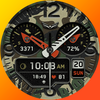
A modern camouflage inspired analog watch face for Wear OS created by BALLOZI
Tracked keywords
124
0 ranked • 124 not ranking yet
Top 10 coverage
—
Best rank — • Latest leader —
Avg opportunity
70.8
Top keyword: counter
Avg difficulty
45.5
Lower scores indicate easier wins
Opportunity leaders
- 63.6
counter
Opportunity: 75.0 • Difficulty: 41.1 • Rank —
Competitors: 686
- 63.6
faces
Opportunity: 75.0 • Difficulty: 40.5 • Rank —
Competitors: 392
- 62.5
analog
Opportunity: 74.0 • Difficulty: 38.5 • Rank —
Competitors: 190
- 65.2
hands
Opportunity: 74.0 • Difficulty: 42.3 • Rank —
Competitors: 652
- 65.4
round
Opportunity: 74.0 • Difficulty: 42.0 • Rank —
Competitors: 691
Unranked opportunities
counter
Opportunity: 75.0 • Difficulty: 41.1 • Competitors: 686
faces
Opportunity: 75.0 • Difficulty: 40.5 • Competitors: 392
analog
Opportunity: 74.0 • Difficulty: 38.5 • Competitors: 190
hands
Opportunity: 74.0 • Difficulty: 42.3 • Competitors: 652
round
Opportunity: 74.0 • Difficulty: 42.0 • Competitors: 691
High competition keywords
find
Total apps: 308,601 • Major competitors: 17,763
Latest rank: — • Difficulty: 58.4
choose
Total apps: 194,693 • Major competitors: 13,472
Latest rank: — • Difficulty: 55.3
support
Total apps: 172,186 • Major competitors: 8,020
Latest rank: — • Difficulty: 54.5
keep
Total apps: 169,685 • Major competitors: 8,941
Latest rank: — • Difficulty: 56.5
many
Total apps: 165,071 • Major competitors: 11,682
Latest rank: — • Difficulty: 55.8
All tracked keywords
Includes opportunity, difficulty, rankings and competitor benchmarks
| Major Competitors | |||||||
|---|---|---|---|---|---|---|---|
| 69 | 100 | 50 | 77 69,614 competing apps Median installs: 2,543 Avg rating: 4.0 | — | — | 3,084 major competitor apps | |
| right | 67 | 100 | 57 | 83 160,130 competing apps Median installs: 1,940 Avg rating: 4.0 | — | — | 8,862 major competitor apps |
| single | 69 | 100 | 51 | 78 75,740 competing apps Median installs: 2,300 Avg rating: 4.0 | — | — | 4,295 major competitor apps |
| try | 69 | 100 | 56 | 78 80,141 competing apps Median installs: 7,002 Avg rating: 4.0 | — | — | 7,902 major competitor apps |
| phone | 67 | 100 | 60 | 83 152,995 competing apps Median installs: 3,556 Avg rating: 4.0 | — | — | 9,507 major competitor apps |
| via | 68 | 100 | 53 | 81 115,754 competing apps Median installs: 1,817 Avg rating: 4.0 | — | — | 4,550 major competitor apps |
| connected | 69 | 100 | 50 | 78 74,490 competing apps Median installs: 637 Avg rating: 4.0 | — | — | 2,408 major competitor apps |
| support | 67 | 100 | 55 | 83 172,186 competing apps Median installs: 1,476 Avg rating: 4.1 | — | — | 8,020 major competitor apps |
| digital | 68 | 100 | 51 | 81 125,373 competing apps Median installs: 878 Avg rating: 4.0 | — | — | 4,621 major competitor apps |
| heart | 71 | 100 | 47 | 74 42,841 competing apps Median installs: 1,013 Avg rating: 4.1 | — | — | 1,618 major competitor apps |
| wear | 71 | 100 | 61 | 72 32,741 competing apps Median installs: 379 Avg rating: 4.1 | — | — | 868 major competitor apps |
| analog | 74 | 100 | 39 | 63 8,451 competing apps Median installs: 496 Avg rating: 4.2 | — | — | 190 major competitor apps |
| clock | 73 | 100 | 46 | 68 19,083 competing apps Median installs: 1,456 Avg rating: 4.1 | — | — | 836 major competitor apps |
| date | 68 | 100 | 53 | 79 93,615 competing apps Median installs: 797 Avg rating: 4.1 | — | — | 2,927 major competitor apps |
| wear os | 72 | 100 | 60 | 70 24,400 competing apps Median installs: 292 Avg rating: 4.2 | — | — | 300 major competitor apps |
| created | 70 | 100 | 48 | 76 55,629 competing apps Median installs: 1,988 Avg rating: 4.1 | — | — | 2,180 major competitor apps |
| list | 69 | 100 | 52 | 78 82,864 competing apps Median installs: 2,554 Avg rating: 4.1 | — | — | 3,582 major competitor apps |
| modern | 69 | 100 | 49 | 78 79,034 competing apps Median installs: 1,184 Avg rating: 4.1 | — | — | 3,596 major competitor apps |
| choose | 66 | 100 | 55 | 84 194,693 competing apps Median installs: 2,914 Avg rating: 4.0 | — | — | 13,472 major competitor apps |
| immediately | 72 | 100 | 43 | 69 22,186 competing apps Median installs: 3,320 Avg rating: 3.9 | — | — | 978 major competitor apps |
| find | 65 | 100 | 58 | 87 308,601 competing apps Median installs: 2,783 Avg rating: 4.1 | — | — | 17,763 major competitor apps |
| customizable | 71 | 100 | 49 | 73 41,168 competing apps Median installs: 1,386 Avg rating: 4.2 | — | — | 2,314 major competitor apps |
| rate | 70 | 100 | 47 | 75 50,469 competing apps Median installs: 3,193 Avg rating: 4.1 | — | — | 2,288 major competitor apps |
| swipe | 72 | 100 | 49 | 69 22,601 competing apps Median installs: 4,172 Avg rating: 4.1 | — | — | 1,658 major competitor apps |
| install | 70 | 100 | 49 | 76 59,328 competing apps Median installs: 3,188 Avg rating: 4.1 | — | — | 2,857 major competitor apps |
App Description
A modern camouflage inspired analog watch face for Wear OS created by BALLOZI
INSTALLATION OPTIONS:
1. Keep your watch connected to your phone.
2. Install in the phone. After installation, immediately check your watch face list in your watch by pressing and hold display then swipe to the very end and click Add watch face. There you can see the newly installed watch face and just activate it.
3. After installation, you can also check the following:
A. For Samsung watches, check your Galaxy Wearable app in your phone (install it if not yet installed). Under Watch faces > Downloaded, there you can see the newly installed watch face and then just apply it to connected watch.
B. For other smartwatch brands, for other Wear OS devices, please check the watch app installed in your phone that comes with your smartwatch brand and find the newly installed watch face in the watch face gallery or list.
4. Please also visit the link below showing many options how to install Wear OS watch face in your watch.
https://developer.samsung.com/sdp/blog/en-us/2022/11/15/install-watch-faces-for-galaxy-watch5-and-one-ui-watch-45
For support and request, you can email me at balloziwatchface@gmail.com
FEATURES:
- Digital clock switchable to 12H/24H format via phone settings
- Battery percent and progress bar with red indicator at 15% and below
- Steps counter and subdial
- Date & day of week
- 10x Colors for watch hands & pointers (customizable separately)
-10x Camouflage background
- 2x Editable complications
- 4x Preset app shortcuts
CUSTOMIZATION:
1. Press and hold display then hit "Customize".
2. Swipe left and right to choose what to customize.
3. Swipe up and down to choose options available.
4. Hit "OK".
PRESET APP SHORTCUTS:
1.Battery status
2. Calendar
3. Alarm
4. Heart rate
Note:
If Heart Rate is 0, you probably missed the Allow permission
in the first installation. Please try solutions below:
1. Please do this two (2) times - switch to another watch face and switch back to this face to enable the permission
2. You can also enable permissions in the Settings> Apps> Permission> find this watch face.
3. Also this can be triggered by a single tap to measure the heart rate. Some of my watch faces are still in Manual Refresh
Check out Ballozi's updates at:
Telegram group: https://t.me/Ballozi_Watch_Faces
Facebook page: https://www.facebook.com/ballozi.watchfaces/
Instagram: https://www.instagram.com/ballozi.watchfaces/
Youtube Channel: https://www.youtube.com/@BalloziWatchFaces
Pinterest: https://www.pinterest.ph/ballozi/
For support and request, you can email me at balloziwatchface@gmail.com