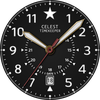
CELEST5437 Military Watch
ASO Keyword Dashboard
Tracking 123 keywords for CELEST5437 Military Watch in Google Play

CELEST5437 Military Watch tracks 123 keywords (no keywords rank yet; 123 need traction). Key metrics: opportunity 70.9, difficulty 47.5.
Sleek and elegant classic watch face from CELEST Watches
Tracked keywords
123
0 ranked • 123 not ranking yet
Top 10 coverage
—
Best rank — • Latest leader —
Avg opportunity
70.9
Top keyword: presence
Avg difficulty
47.5
Lower scores indicate easier wins
Opportunity leaders
- 63.7
presence
Opportunity: 75.0 • Difficulty: 39.6 • Rank —
Competitors: 296
- 65.3
hands
Opportunity: 74.0 • Difficulty: 42.4 • Rank —
Competitors: 659
- 63.9
hide
Opportunity: 74.0 • Difficulty: 52.1 • Rank —
Competitors: 1,336
- 63.6
iconic
Opportunity: 74.0 • Difficulty: 44.9 • Rank —
Competitors: 757
- 59.3
trouble
Opportunity: 74.0 • Difficulty: 41.0 • Rank —
Competitors: 391
Unranked opportunities
presence
Opportunity: 75.0 • Difficulty: 39.6 • Competitors: 296
hands
Opportunity: 74.0 • Difficulty: 42.4 • Competitors: 659
hide
Opportunity: 74.0 • Difficulty: 52.1 • Competitors: 1,336
iconic
Opportunity: 74.0 • Difficulty: 44.9 • Competitors: 757
trouble
Opportunity: 74.0 • Difficulty: 41.0 • Competitors: 391
High competition keywords
find
Total apps: 305,380 • Major competitors: 17,623
Latest rank: — • Difficulty: 58.5
help
Total apps: 280,325 • Major competitors: 15,533
Latest rank: — • Difficulty: 58.5
designed
Total apps: 262,333 • Major competitors: 8,505
Latest rank: — • Difficulty: 53.7
best
Total apps: 253,664 • Major competitors: 18,428
Latest rank: — • Difficulty: 57.5
play
Total apps: 205,447 • Major competitors: 20,225
Latest rank: — • Difficulty: 60.0
All tracked keywords
Includes opportunity, difficulty, rankings and competitor benchmarks
| Major Competitors | |||||||
|---|---|---|---|---|---|---|---|
| play | 66 | 100 | 60 | 85 205,447 competing apps Median installs: 7,468 Avg rating: 2.8 | — | — | 20,225 major competitor apps |
| best | 66 | 100 | 57 | 86 253,664 competing apps Median installs: 4,154 Avg rating: 2.6 | — | — | 18,428 major competitor apps |
| follow | 69 | 100 | 52 | 78 81,990 competing apps Median installs: 1,667 Avg rating: 2.5 | — | — | 4,379 major competitor apps |
| discounts | 72 | 100 | 44 | 69 21,595 competing apps Median installs: 1,259 Avg rating: 2.2 | — | — | 958 major competitor apps |
| order | 67 | 100 | 52 | 82 140,997 competing apps Median installs: 579 Avg rating: 2.3 | — | — | 4,309 major competitor apps |
| try | 69 | 100 | 55 | 78 79,402 competing apps Median installs: 7,236 Avg rating: 2.8 | — | — | 7,859 major competitor apps |
| device | 68 | 100 | 60 | 80 107,235 competing apps Median installs: 3,441 Avg rating: 2.5 | — | — | 6,762 major competitor apps |
| phone | 67 | 100 | 60 | 83 151,651 competing apps Median installs: 3,620 Avg rating: 2.6 | — | — | 9,447 major competitor apps |
| connected | 69 | 100 | 50 | 78 73,481 competing apps Median installs: 654 Avg rating: 2.2 | — | — | 2,371 major competitor apps |
| exclusive | 69 | 100 | 54 | 78 82,826 competing apps Median installs: 1,728 Avg rating: 2.6 | — | — | 4,813 major competitor apps |
| contact | 67 | 100 | 54 | 82 137,656 competing apps Median installs: 1,871 Avg rating: 2.4 | — | — | 6,275 major competitor apps |
| section | 71 | 100 | 46 | 72 32,538 competing apps Median installs: 1,254 Avg rating: 2.2 | — | — | 1,123 major competitor apps |
| classic | 70 | 100 | 51 | 76 60,726 competing apps Median installs: 3,587 Avg rating: 2.8 | — | — | 4,806 major competitor apps |
| wear | 71 | 100 | 61 | 72 32,418 competing apps Median installs: 372 Avg rating: 1.9 | — | — | 871 major competitor apps |
| date | 68 | 100 | 53 | 79 92,629 competing apps Median installs: 822 Avg rating: 2.2 | — | — | 2,908 major competitor apps |
| design | 68 | 100 | 52 | 80 98,733 competing apps Median installs: 2,016 Avg rating: 2.4 | — | — | 4,871 major competitor apps |
| wear os | 72 | 100 | 60 | 70 24,149 competing apps Median installs: 285 Avg rating: 1.7 | — | — | 298 major competitor apps |
| designed | 65 | 100 | 54 | 86 262,333 competing apps Median installs: 867 Avg rating: 2.2 | — | — | 8,505 major competitor apps |
| find | 65 | 100 | 59 | 87 305,380 competing apps Median installs: 2,878 Avg rating: 2.6 | — | — | 17,623 major competitor apps |
| menu | 71 | 100 | 52 | 74 41,163 competing apps Median installs: 659 Avg rating: 2.4 | — | — | 1,323 major competitor apps |
| option | 70 | 100 | 49 | 74 47,276 competing apps Median installs: 3,087 Avg rating: 2.5 | — | — | 2,524 major competitor apps |
| complication | 73 | 100 | 64 | 58 4,423 competing apps Median installs: 369 Avg rating: 1.8 | — | — | 34 major competitor apps |
| help | 65 | 100 | 59 | 87 280,325 competing apps Median installs: 2,101 Avg rating: 2.5 | — | — | 15,533 major competitor apps |
| note | 71 | 100 | 48 | 72 31,796 competing apps Median installs: 4,326 Avg rating: 2.7 | — | — | 1,675 major competitor apps |
| touch | 69 | 100 | 52 | 76 62,785 competing apps Median installs: 1,924 Avg rating: 2.6 | — | — | 3,728 major competitor apps |
App Description
Sleek and elegant classic watch face from CELEST Watches
ABOUT THIS DESIGN ↴
Command attention with this bold and functional military-inspired watch face. Designed for those who appreciate rugged style and precision, this timepiece boasts a commanding presence with its large, luminous numerals and bold hands. The iconic star motif adds a touch of military heritage, while the clear date window keeps you informed at a glance.
INSTALLATION GUIDE ↴
Having trouble installing your watch face from the Google Play Store? Follow these steps for a smooth setup:
✅ Watch Face Installed on Your Phone but Not on Your Watch?
This happens because the Play Store may install a companion app instead. To install directly on your watch:
1. Use the Play Store on Your Watch – Open Google Play on your smartwatch, search for the watch face name, and install it directly.
2. Use the Play Store Dropdown Menu – On your phone, tap the small triangular icon next to the "Install" button (https://i.imgur.com/boSIZ5k.png). Then, select your watch as the target device (https://i.imgur.com/HsZD0Xo.jpeg).
3. Try a Web Browser – Open the Play Store in a web browser on your PC, Mac, or laptop to manually select your watch (https://i.imgur.com/Rq6NGAC.png).
✅ Still Not Showing?
If the watch face doesn’t appear on your watch, open your watch's companion app on your phone (for Samsung devices, this is the Galaxy Wearable app):
- Navigate to the Downloaded section under watch faces.
- Find the watch face and tap to install it (https://i.imgur.com/Zi79PFr.png).
✅ Need More Help?
If you're still experiencing issues, contact us at info@celest-watches.com, and we'll help you resolve it quickly.
CUSTOMIZATION OPTIONS ↴
- Option 1: Background color (9 options)
- Option 2: Branding color (white, black or hidden)
- Option 3: Hour and minute hands color (gold or silver)
- Option 4: Seconds hand color (6 options)
- Option 5: One optional circular complication (works best on dark backgrounds)
Please note that in order to use the optional complication, it is advised to hide the branding.
EXPLORE MORE & GET DISCOUNTS ↴
📌 Full Catalog: https://celest-watches.com/product-category/compatibility/wear-os/
📌 Exclusive Discounts for Wear OS: https://celest-watches.com/product-category/availability/on-sale-on-google-play/
STAY CONNECTED ↴
📸 Instagram: https://www.instagram.com/celestwatches/
📘 Facebook: https://www.facebook.com/celeswatchfaces
🐦 Twitter/X: https://twitter.com/CelestWatches
🎭 Threads: https://www.threads.net/@celestwatches
📌 Pinterest: https://pinterest.com/celestwatches/
🎵 TikTok: https://www.tiktok.com/@celestwatches
📝 Tumblr: https://www.tumblr.com/blog/celestwatches
📢 Telegram: https://t.me/celestwatcheswearos
🎁 Donate: https://buymeacoffee.com/celestwatches
