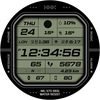
HMKWatch Digital 257

ASO Keyword Dashboard
Tracking 92 keywords for HMKWatch Digital 257 in Google Play
HMKWatch Digital 257 tracks 92 keywords (no keywords rank yet; 92 need traction). Key metrics: opportunity 70.6, difficulty 48.0.
Comfortable and clear digital watch face.
Tracked keywords
92
0 ranked • 92 not ranking yet
Top 10 coverage
—
Best rank — • Latest leader —
Avg opportunity
70.6
Top keyword: applied
Avg difficulty
48.0
Lower scores indicate easier wins
Opportunity leaders
- 63.0
applied
Opportunity: 74.0 • Difficulty: 41.9 • Rank —
Competitors: 432
- 65.4
release
Opportunity: 74.0 • Difficulty: 47.4 • Rank —
Competitors: 841
- 65.0
frequently
Opportunity: 74.0 • Difficulty: 47.7 • Rank —
Competitors: 666
- 64.1
browser
Opportunity: 74.0 • Difficulty: 55.4 • Rank —
Competitors: 811
- 62.2
pc
Opportunity: 74.0 • Difficulty: 46.7 • Rank —
Competitors: 551
Unranked opportunities
applied
Opportunity: 74.0 • Difficulty: 41.9 • Competitors: 432
release
Opportunity: 74.0 • Difficulty: 47.4 • Competitors: 841
frequently
Opportunity: 74.0 • Difficulty: 47.7 • Competitors: 666
browser
Opportunity: 74.0 • Difficulty: 55.4 • Competitors: 811
pc
Opportunity: 74.0 • Difficulty: 46.7 • Competitors: 551
High competition keywords
new
Total apps: 375,249 • Major competitors: 23,968
Latest rank: — • Difficulty: 58.7
free
Total apps: 315,041 • Major competitors: 24,095
Latest rank: — • Difficulty: 58.7
find
Total apps: 302,834 • Major competitors: 17,561
Latest rank: — • Difficulty: 58.5
phone
Total apps: 150,575 • Major competitors: 9,405
Latest rank: — • Difficulty: 59.6
add
Total apps: 143,786 • Major competitors: 9,163
Latest rank: — • Difficulty: 56.7
All tracked keywords
Includes opportunity, difficulty, rankings and competitor benchmarks
| Major Competitors | |||||||
|---|---|---|---|---|---|---|---|
| free | 65 | 100 | 59 | 88 315,041 competing apps Median installs: 5,777 Avg rating: 2.7 | — | — | 24,095 major competitor apps |
| new | 64 | 100 | 59 | 89 375,249 competing apps Median installs: 2,984 Avg rating: 2.6 | — | — | 23,968 major competitor apps |
| health | 69 | 100 | 49 | 77 68,509 competing apps Median installs: 768 Avg rating: 2.1 | — | — | 1,946 major competitor apps |
| 69 | 100 | 50 | 77 68,769 competing apps Median installs: 2,554 Avg rating: 2.5 | — | — | 3,062 major competitor apps | |
| follow | 69 | 100 | 52 | 78 80,947 competing apps Median installs: 1,611 Avg rating: 2.5 | — | — | 4,331 major competitor apps |
| device | 68 | 100 | 60 | 80 106,231 competing apps Median installs: 3,375 Avg rating: 2.5 | — | — | 6,738 major competitor apps |
| phone | 67 | 100 | 60 | 83 150,575 competing apps Median installs: 3,560 Avg rating: 2.6 | — | — | 9,405 major competitor apps |
| digital | 68 | 100 | 51 | 81 121,785 competing apps Median installs: 871 Avg rating: 2.2 | — | — | 4,516 major competitor apps |
| heart | 71 | 100 | 47 | 74 41,838 competing apps Median installs: 1,006 Avg rating: 2.2 | — | — | 1,581 major competitor apps |
| wear | 71 | 100 | 61 | 72 32,202 competing apps Median installs: 374 Avg rating: 1.9 | — | — | 870 major competitor apps |
| wear os | 72 | 100 | 60 | 70 23,972 competing apps Median installs: 286 Avg rating: 1.7 | — | — | 297 major competitor apps |
| used | 68 | 100 | 55 | 81 117,205 competing apps Median installs: 3,092 Avg rating: 2.4 | — | — | 5,232 major competitor apps |
| payment | 69 | 100 | 50 | 78 80,275 competing apps Median installs: 989 Avg rating: 2.2 | — | — | 3,428 major competitor apps |
| find | 65 | 100 | 58 | 87 302,834 competing apps Median installs: 2,786 Avg rating: 2.6 | — | — | 17,561 major competitor apps |
| complication | 73 | 100 | 64 | 58 4,386 competing apps Median installs: 364 Avg rating: 1.8 | — | — | 34 major competitor apps |
| rate | 70 | 100 | 47 | 75 49,611 competing apps Median installs: 3,222 Avg rating: 2.2 | — | — | 2,253 major competitor apps |
| install | 70 | 100 | 49 | 76 58,562 competing apps Median installs: 3,207 Avg rating: 2.5 | — | — | 2,834 major competitor apps |
| store | 69 | 100 | 54 | 78 80,347 competing apps Median installs: 1,667 Avg rating: 2.4 | — | — | 4,205 major competitor apps |
| watch | 68 | 100 | 57 | 80 102,148 competing apps Median installs: 1,190 Avg rating: 2.3 | — | — | 5,666 major competitor apps |
| search | 67 | 100 | 58 | 82 129,628 competing apps Median installs: 3,393 Avg rating: 2.5 | — | — | 6,838 major competitor apps |
| services | 68 | 100 | 55 | 80 102,466 competing apps Median installs: 1,035 Avg rating: 2.1 | — | — | 4,246 major competitor apps |
| small | 70 | 100 | 49 | 76 56,437 competing apps Median installs: 2,177 Avg rating: 2.4 | — | — | 2,887 major competitor apps |
| smart | 68 | 100 | 55 | 81 117,736 competing apps Median installs: 1,777 Avg rating: 2.4 | — | — | 6,294 major competitor apps |
| news | 69 | 100 | 50 | 78 80,584 competing apps Median installs: 1,143 Avg rating: 2.3 | — | — | 2,338 major competitor apps |
| click | 69 | 100 | 50 | 77 66,332 competing apps Median installs: 4,351 Avg rating: 2.6 | — | — | 3,990 major competitor apps |
App Description
Comfortable and clear digital watch face.
* Please install additional apps by referring to 'About this app'.
=======================================================
[How to install]
Make sure your watch is selected first before you press the payment button.
Press the small black triangle next to the Payment button to select the watch.
If you don't follow the above method, you can use Chrome or Samsung browser on your PC or smartphone.
After entering the store with a web browser, click Install on another device to install it on the watch.
After the release of Watch 5, a new UI was applied to Watch 4.
The newly installed watchface can be found in the following ways.
1. Press and hold the watch screen to enter the 'Frequently Used Watch Face List'.
2. Turn it to the rightmost and press 'Add watchface'.
3. Then, enter the 'Installed Watchface List'.
4. Find and select the watch face you purchased.
=======================================================
[Additional installation app]
1. Smart phone battery app (Free app)
Please install the additional app of the link below on the watch and smartphone, and set up the complication.
If the link does not open, please search for the 'Phone Battery Complication' app and install it.
https://play.google.com/store/apps/details?id=com.weartools.phonebattcomp
2. Complications Suite - Wear OS (Free app)
https://play.google.com/store/apps/details?id=com.weartools.weekdayutccomp
3. Heart Rate Complication (Paid app)
https://play.google.com/store/apps/details?id=com.weartools.heartratecomp
4. Health Services Complications (Paid app)
https://play.google.com/store/apps/details?id=com.weartools.hscomplications
All credits goes to original app creator:
amoledwatchfaces - https://play.google.com/store/apps/dev?id=5591589606735981545
=======================================================
Get new news from my Instagram.
www.instagram.com/hmkwatch
https://hmkwatch.tistory.com/
Please send me an email if you have any errors or suggestions.
hmkwatch@gmail.com