NXV50 Kaaba Digital Watch face

902 installs
Ratings not yet available
10 monthly active users
Revenue not available
Install Trends
Weekly +2.00
SteadyMonthly +7.00
SteadyNXV50 Kaaba Digital Watch face Summary
NXV50 Kaaba Digital Watch face is a mobile Android app in Personalization by NXV Watch Face. Released in Aug 2021 (4 years ago). It has about 902+ installs Based on AppGoblin estimates, it reaches roughly 10 monthly active users . Store metadata: updated Sep 20, 2025.
Recent activity: 2.00 installs this week (7.00 over 4 weeks) showing steady growth View trends →
Store info: Last updated on Google Play on Sep 20, 2025 .
0★
Ratings: 0
Screenshots


App Description
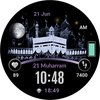
Kaaba themed digital watch face with islamic calendar and style options.
If you need help with installation please visit:
<a href="https://www.google.com/url?q=https%3A%2F%2Fnxvwatchface.com%2Fhelp&sa=D&sntz=1&usg=AOvVaw2e2g-l0hqR-0cYNIDzyzUM">https://nxvwatchface.com/help</a>
<p></p><b>[For Wear OS devices]</b>
Digital Islamic themed watch face with <span>the following features:</span>
<span>• </span><span>Kaaba and arc color customization option </span><span>(tap and hold center of screen for color customization options)</span>
<span>• H</span><span>eart rate and calendar shortcuts (see screenshot)</span>
<span>• 12/24 hour time</span>
<span>• Steps counter</span>
<span>•</span><span> </span><span>Islamic calendar date</span>
<span>• S</span><span>unrise/sunset times (please note this time is not prayer time)</span>
<span>• Battery display bar</span>
<span>• </span><span>Actual moon phase</span>
<span>• Heart rate display (tap on heart icon for manual measurement)</span>
<b>Steps for correct installation.</b>
<span>Always make sure your watch is paired to your phone when installing. </span>
<span>Pairing with Wi-Fi works best. You must also use the same Gmail account for Play store purchase and watch device.</span>
<span>When it says "installing soon" please wait at least 5 minutes then check your watch to see if installation is complete.</span>
<span>Another option is to install directly from your watch. </span>
<span>Go to Play store app on your watch and search the watch face name </span><span>"NXV50"</span><span> then try to install directly from your watch.</span>
<span> </span>
<span>Please note you will only get charged once even if you attempt to download again if you are using same Gmail account.</span>
<span>
Visit web page for more watch faces here:</span>
<a href="https://www.google.com/url?q=https%3A%2F%2Fnxvwatchface.com%2Fwear-os-watches&sa=D&sntz=1&usg=AOvVaw1tLCQ_ZN3-EvbjD9ClPGwc">https://nxvwatchface.com/wear-os-watches</a>
<p><font color="red">Installation issues are not developer related, please before leaving negative rating contact us via email so we can help you.</font></p><span>Email: nxvwatchface@gmail.com</span>
<b>For sunrise, sunset to work correctly:</b>
1. Turn on location on phone and watch
2. Go to your compass app in watch and under settings make sure "use current location" is on.
<i>* Kaaba image is licensed through Adobe Sto