ORB-04 Quadratic

ASO Keyword Dashboard
Tracking 169 keywords for ORB-04 Quadratic in Google Play
ORB-04 Quadratic tracks 169 keywords (no keywords rank yet; 169 need traction). Key metrics: opportunity 71.1, difficulty 44.3.
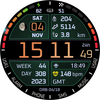
A colourful information-rich watchface for Wear OS
Tracked keywords
169
0 ranked • 169 not ranking yet
Top 10 coverage
—
Best rank — • Latest leader —
Avg opportunity
71.1
Top keyword: divided
Avg difficulty
44.3
Lower scores indicate easier wins
Opportunity leaders
- 63.7
divided
Opportunity: 75.0 • Difficulty: 39.1 • Rank —
Competitors: 355
- 60.8
moon
Opportunity: 74.0 • Difficulty: 39.0 • Rank —
Competitors: 306
- 62.6
configure
Opportunity: 74.0 • Difficulty: 46.4 • Rank —
Competitors: 393
- 65.8
green
Opportunity: 74.0 • Difficulty: 43.4 • Rank —
Competitors: 744
- 60.7
changed
Opportunity: 74.0 • Difficulty: 38.6 • Rank —
Competitors: 352
Unranked opportunities
divided
Opportunity: 75.0 • Difficulty: 39.1 • Competitors: 355
moon
Opportunity: 74.0 • Difficulty: 39.0 • Competitors: 306
configure
Opportunity: 74.0 • Difficulty: 46.4 • Competitors: 393
green
Opportunity: 74.0 • Difficulty: 43.4 • Competitors: 744
changed
Opportunity: 74.0 • Difficulty: 38.6 • Competitors: 352
High competition keywords
time
Total apps: 382,569 • Major competitors: 17,693
Latest rank: — • Difficulty: 57.6
new
Total apps: 367,061 • Major competitors: 23,500
Latest rank: — • Difficulty: 58.6
easy
Total apps: 326,152 • Major competitors: 16,133
Latest rank: — • Difficulty: 56.2
information
Total apps: 269,393 • Major competitors: 8,245
Latest rank: — • Difficulty: 54.8
available
Total apps: 201,883 • Major competitors: 10,535
Latest rank: — • Difficulty: 58.5
All tracked keywords
Includes opportunity, difficulty, rankings and competitor benchmarks
| Major Competitors | |||||||
|---|---|---|---|---|---|---|---|
| new | 65 | 100 | 59 | 89 367,061 competing apps Median installs: 3,177 Avg rating: 4.0 | — | — | 23,500 major competitor apps |
| fitness | 71 | 100 | 46 | 73 40,539 competing apps Median installs: 235 Avg rating: 4.1 | — | — | 808 major competitor apps |
| health | 69 | 100 | 49 | 77 70,189 competing apps Median installs: 785 Avg rating: 4.0 | — | — | 1,983 major competitor apps |
| calendar | 71 | 100 | 51 | 72 35,497 competing apps Median installs: 739 Avg rating: 4.2 | — | — | 1,049 major competitor apps |
| changes | 72 | 100 | 45 | 71 27,669 competing apps Median installs: 1,433 Avg rating: 4.0 | — | — | 1,088 major competitor apps |
| source | 72 | 100 | 47 | 70 26,078 competing apps Median installs: 2,293 Avg rating: 4.1 | — | — | 1,021 major competitor apps |
| version | 70 | 100 | 54 | 76 57,194 competing apps Median installs: 4,924 Avg rating: 4.0 | — | — | 3,391 major competitor apps |
| easy | 65 | 100 | 56 | 88 326,152 competing apps Median installs: 2,543 Avg rating: 4.0 | — | — | 16,133 major competitor apps |
| phone | 67 | 100 | 60 | 83 153,671 competing apps Median installs: 3,558 Avg rating: 4.0 | — | — | 9,548 major competitor apps |
| via | 68 | 100 | 53 | 81 115,591 competing apps Median installs: 1,831 Avg rating: 4.0 | — | — | 4,539 major competitor apps |
| choosing | 73 | 100 | 44 | 68 19,110 competing apps Median installs: 3,518 Avg rating: 4.1 | — | — | 1,218 major competitor apps |
| step | 69 | 100 | 51 | 78 85,373 competing apps Median installs: 1,490 Avg rating: 4.0 | — | — | 4,194 major competitor apps |
| users | 67 | 100 | 53 | 82 135,419 competing apps Median installs: 1,431 Avg rating: 3.9 | — | — | 5,423 major competitor apps |
| language | 69 | 100 | 53 | 76 62,620 competing apps Median installs: 3,022 Avg rating: 4.2 | — | — | 2,701 major competitor apps |
| contact | 67 | 100 | 54 | 82 139,493 competing apps Median installs: 1,836 Avg rating: 4.0 | — | — | 6,378 major competitor apps |
| heart | 70 | 100 | 47 | 74 43,067 competing apps Median installs: 1,026 Avg rating: 4.1 | — | — | 1,625 major competitor apps |
| wear | 71 | 100 | 61 | 72 32,857 competing apps Median installs: 382 Avg rating: 4.1 | — | — | 871 major competitor apps |
| date | 68 | 100 | 53 | 79 93,942 competing apps Median installs: 806 Avg rating: 4.1 | — | — | 2,944 major competitor apps |
| wear os | 72 | 100 | 60 | 70 24,480 competing apps Median installs: 294 Avg rating: 4.2 | — | — | 301 major competitor apps |
| moon | 74 | 100 | 39 | 61 6,640 competing apps Median installs: 1,506 Avg rating: 4.2 | — | — | 306 major competitor apps |
| information | 65 | 100 | 55 | 86 269,393 competing apps Median installs: 1,210 Avg rating: 4.0 | — | — | 8,245 major competitor apps |
| used | 68 | 100 | 54 | 81 115,656 competing apps Median installs: 3,163 Avg rating: 4.0 | — | — | 5,072 major competitor apps |
| menu | 71 | 100 | 52 | 73 40,750 competing apps Median installs: 707 Avg rating: 4.1 | — | — | 1,341 major competitor apps |
| time | 64 | 100 | 58 | 89 382,569 competing apps Median installs: 1,506 Avg rating: 4.0 | — | — | 17,693 major competitor apps |
| available | 66 | 100 | 58 | 84 201,883 competing apps Median installs: 2,603 Avg rating: 4.0 | — | — | 10,535 major competitor apps |
App Description
A colourful information-rich watchface for Wear OS
Features:
Quadrant 1 (Upper right):
- Steps-Calorie count (approx number of calories burnt due to step exercise)
- Step count
- Approximate distance travelled (displays miles if language is English UK, or English US, otherwise km)
- 8-segment LED gauge measuring step goal percent
- Tap quadrant 1 to select/open your chosen health app, e.g. Samsung Health.
Quadrant 2 (Lower right):
- An information window which is customisable by the user and displays items such as the current weather, sunset/sunrise times and so on. To configure the data displayed, long-press the watch face, tap ‘Customise’ then tap the info window outline and select the data source from the menu.
- Heart rate (bpm) with four colour zones:
- blue (<=50 bpm)
- green (51-120 bpm)
- amber (121-170 bpm)
- red (>170 bpm)
- Time Zone code, e.g. GMT, PST
- Three peripheral app shortcuts - Music, SMS and one user-definable shortcut (USR2)
Quadrant 3 (Lower left):
- Week Number (of calendar year)
- Day Number (of calendar year)
- Year
- Three peripheral app shortcuts - Phone, Alarm and one user-definable shortcut (USR1)
Quadrant 4 (Upper left):
- Date (Weekday, Day of month, Month name)
- Moon Phase
- 8-segment LED gauge measuring battery charge level
- Tapping quadrant 4 causes the Calendar app to open
Time:
- Hours, minutes and seconds in 12h or 24h format dependent on phone settings
- Glowing second hand around face perimeter
Customisations:
Long press the watch face and select ‘Customise’:
Time and Gauge Colours – 10 options
Background Colours – 10 options
Complication – set app shortcuts and info window content
Notes:
- User-definable shortcuts Health App, USR1 and USR2 can be initially set by tapping the field and choosing the application to be opened. To change, long press the watch face, select Customise, tap the relevant field and select the new app.
Support:
If you have any questions about this watch face you can contact support@orburis.com and we will review and respond.
Functionality Notes:
- Step Goal: For users of devices running Wear OS 3.x, this is fixed at 6000 steps. For Wear OS 4 or later devices, the step goal is sync’d with the wearer’s health app.
- At present, calorie data is unavailable as a system value so the calorie count on this watch (calories used whilst walking) is approximated as No-of-steps x 0.04.
- At present, distance is unavailable as a system value so distance is an approximated as: 1km = 1312 steps, 1 mile = 2100 steps.
- Preset app shortcuts operate as long as the appropriate app is installed
What’s new in this version?
A number of small changes in this release:
1. Included a workaround to display the font correctly on some Wear OS 4 watch devices, where the first part of each data field was being cut off.
2. Changed the colour selection method to be via the Customisation menu rather than by tapping the screen.
3. Changed the step goal to sync with the health-app on Wear OS 4 watches. On devices running previous versions of Wear OS the goal is set by the system at 6000 steps.
Keep up to date with Orburis:
Instagram: https://www.instagram.com/orburis.watch/
Facebook: https://www.facebook.com/orburiswatch/
Web: https://www.orburis.com
Developer Page: https://play.google.com/store/apps/dev?id=5545664337440686414
======
ORB-04 uses the following open source fonts:
Oxanium, copyright 2019 The Oxanium Project Authors (https://github.com/sevmeyer/oxanium)
Oxanium is licensed under the SIL Open Font License, Version 1.1. This license is available with a FAQ at http://scripts.sil.org/OFL
======