ORB-06 Ringmeister

ASO Keyword Dashboard
Tracking 148 keywords for ORB-06 Ringmeister in Google Play
ORB-06 Ringmeister tracks 148 keywords (no keywords rank yet; 148 need traction). Key metrics: opportunity 71.2, difficulty 44.5.
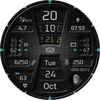
A stylish digital watch face for Wear OS featuring rotating rings
Tracked keywords
148
0 ranked • 148 not ranking yet
Top 10 coverage
—
Best rank — • Latest leader —
Avg opportunity
71.2
Top keyword: moon
Avg difficulty
44.5
Lower scores indicate easier wins
Opportunity leaders
- 60.8
moon
Opportunity: 74.0 • Difficulty: 39.0 • Rank —
Competitors: 306
- 62.6
configure
Opportunity: 74.0 • Difficulty: 46.4 • Rank —
Competitors: 393
- 65.8
green
Opportunity: 74.0 • Difficulty: 43.4 • Rank —
Competitors: 744
- 60.7
changed
Opportunity: 74.0 • Difficulty: 38.6 • Rank —
Competitors: 352
- 64.0
concept
Opportunity: 74.0 • Difficulty: 40.1 • Rank —
Competitors: 401
Unranked opportunities
moon
Opportunity: 74.0 • Difficulty: 39.0 • Competitors: 306
configure
Opportunity: 74.0 • Difficulty: 46.4 • Competitors: 393
green
Opportunity: 74.0 • Difficulty: 43.4 • Competitors: 744
changed
Opportunity: 74.0 • Difficulty: 38.6 • Competitors: 352
concept
Opportunity: 74.0 • Difficulty: 40.1 • Competitors: 401
High competition keywords
new
Total apps: 367,256 • Major competitors: 23,494
Latest rank: — • Difficulty: 58.6
information
Total apps: 269,001 • Major competitors: 8,241
Latest rank: — • Difficulty: 54.8
available
Total apps: 201,519 • Major competitors: 10,529
Latest rank: — • Difficulty: 58.5
real
Total apps: 184,515 • Major competitors: 13,323
Latest rank: — • Difficulty: 56.7
data
Total apps: 183,286 • Major competitors: 7,233
Latest rank: — • Difficulty: 56.5
All tracked keywords
Includes opportunity, difficulty, rankings and competitor benchmarks
| Major Competitors | |||||||
|---|---|---|---|---|---|---|---|
| new | 65 | 100 | 59 | 89 367,256 competing apps Median installs: 3,172 Avg rating: 4.0 | — | — | 23,494 major competitor apps |
| level | 68 | 100 | 54 | 80 110,938 competing apps Median installs: 2,238 Avg rating: 4.0 | — | — | 7,016 major competitor apps |
| health | 69 | 100 | 49 | 77 70,080 competing apps Median installs: 785 Avg rating: 4.0 | — | — | 1,981 major competitor apps |
| change | 68 | 100 | 52 | 79 91,059 competing apps Median installs: 4,829 Avg rating: 4.0 | — | — | 6,404 major competitor apps |
| changes | 72 | 100 | 45 | 71 27,682 competing apps Median installs: 1,430 Avg rating: 4.0 | — | — | 1,088 major competitor apps |
| source | 72 | 100 | 47 | 70 26,037 competing apps Median installs: 2,299 Avg rating: 4.1 | — | — | 1,019 major competitor apps |
| version | 70 | 100 | 54 | 76 57,148 competing apps Median installs: 4,940 Avg rating: 4.0 | — | — | 3,389 major competitor apps |
| via | 68 | 100 | 53 | 81 115,654 competing apps Median installs: 1,830 Avg rating: 4.0 | — | — | 4,538 major competitor apps |
| step | 69 | 100 | 51 | 78 85,085 competing apps Median installs: 1,491 Avg rating: 4.0 | — | — | 4,187 major competitor apps |
| language | 69 | 100 | 53 | 76 62,486 competing apps Median installs: 3,038 Avg rating: 4.2 | — | — | 2,702 major competitor apps |
| contact | 67 | 100 | 54 | 82 139,315 competing apps Median installs: 1,838 Avg rating: 4.0 | — | — | 6,374 major competitor apps |
| section | 71 | 100 | 46 | 72 32,871 competing apps Median installs: 1,239 Avg rating: 4.1 | — | — | 1,128 major competitor apps |
| digital | 68 | 100 | 51 | 81 125,838 competing apps Median installs: 892 Avg rating: 4.0 | — | — | 4,638 major competitor apps |
| heart | 70 | 100 | 47 | 74 42,973 competing apps Median installs: 1,027 Avg rating: 4.1 | — | — | 1,623 major competitor apps |
| wear | 71 | 100 | 61 | 72 32,802 competing apps Median installs: 382 Avg rating: 4.1 | — | — | 870 major competitor apps |
| ring | 73 | 100 | 39 | 59 4,734 competing apps Median installs: 3,888 Avg rating: 3.9 | — | — | 375 major competitor apps |
| date | 68 | 100 | 53 | 79 93,815 competing apps Median installs: 807 Avg rating: 4.1 | — | — | 2,941 major competitor apps |
| wear os | 72 | 100 | 60 | 70 24,443 competing apps Median installs: 294 Avg rating: 4.2 | — | — | 301 major competitor apps |
| moon | 74 | 100 | 39 | 61 6,616 competing apps Median installs: 1,518 Avg rating: 4.2 | — | — | 306 major competitor apps |
| information | 65 | 100 | 55 | 86 269,001 competing apps Median installs: 1,211 Avg rating: 4.0 | — | — | 8,241 major competitor apps |
| menu | 71 | 100 | 52 | 73 40,710 competing apps Median installs: 707 Avg rating: 4.1 | — | — | 1,341 major competitor apps |
| available | 66 | 100 | 58 | 84 201,519 competing apps Median installs: 2,612 Avg rating: 4.0 | — | — | 10,529 major competitor apps |
| goal | 70 | 100 | 47 | 74 43,587 competing apps Median installs: 1,298 Avg rating: 4.1 | — | — | 1,939 major competitor apps |
| rate | 70 | 100 | 47 | 75 50,592 competing apps Median installs: 3,202 Avg rating: 4.1 | — | — | 2,294 major competitor apps |
| watch | 68 | 100 | 57 | 80 105,502 competing apps Median installs: 1,232 Avg rating: 4.0 | — | — | 5,803 major competitor apps |
App Description
A stylish digital watch face for Wear OS featuring rotating rings
Items marked with an asterisk (*) have associated additional notes in the Functionality Notes section below.
Key Features...
Face Colour:
There are 10 colour options for the main face-plate which can be selected via the ‘Customise’ menu accessible by long-pressing the watch face.
Time:
- 12/24h formats
- Rings displaying hours, minutes and seconds
- Seconds ring ticks in real time.
- The minute and hour hand ‘click over’ with the second hand in the last second of the minute or hour respectively.
Date:
- Day of the week
- Month
- Day-of-the-month
Health data:
- Step count
- Steps goal ring: 0 – 100%*
- Step-calories*
- Distance travelled (km/mi)*
- Heart rate and heart zone information
- Zone 1 - < 80 bpm
- Zone 2 - 80-149 bpm
- Zone 3 - >= 150 bpm
Watch Data:
- Battery charge level ring: 0 – 100%
- Battery read-out changes to amber (<=30%) and then red (<= 15%) as charge decreases
- Battery icon turns red at or below 15% charge
- Steps goal icon turns green when steps goal reaches 100%
Other:
- Moon phase display
- Customisable info window can display weather, barometer, sunrise/sunset times etc. See Customisation section below for how to configure this.
- Always on Display
App Shortcuts:
Two preset shortcut buttons (see pictures) for:
- Battery Status
- Schedule
One customisable app shortcut. See Customisation section below for how to configure this.
Customisation:
- Long-press the watch face and select ‘Customise’ to:
- Set the colour of the face-plate
- Select the information to be displayed in the info window.
- Set/change the app to be opened by the button situated over the steps count and step-goal ring.
The following multilingual capability is included for month and day-of-week fields:
Supported Languages: Albanian, Belarusian, Bulgarian, Croatian, Czech, Danish, Dutch, English (default), Estonian, French, German, Greek, Hungarian, Icelandic, Italian, Japanese, Latvian, Macedonian, Malay, Maltese, Polish, Portuguese, Romanian, Russian, Serbian, Slovenian, Slovakian, Spanish, Swedish, Turkish, Ukrainian.
*Functionality Notes:
- Step Goal: For Wear OS 4.x or later devices, the step goal is sync’d with the wearer’s health app. For earlier versions of Wear OS, step goal is fixed at 6,000 steps.
- At present, calorie data is unavailable as a system value so the steps-calorie count on this watch is approximated as No-of-steps x 0.04.
- At present, distance is unavailable as a system value so distance is an approximated as: 1km = 1312 steps, 1 mile = 2100 steps.
- Distance is displayed in miles if language is English GB, or English US, otherwise km.
What’s new in this version?
1. Included a workaround to display the font correctly on some Wear OS 4 watch devices, where the first part of each data display was being cut off.
2. Changed the colour selection method to be via the Customisation menu rather than by tapping the screen (10 colours).
3. Changed the step goal to sync with the health-app on Wear OS 4 watches. (See functionality notes).
Support:
If you have any questions about this watch face you can contact support@orburis.com and we will review and respond.
Keep up to date with Orburis:
Instagram: https://www.instagram.com/orburis.watch/
Facebook: https://www.facebook.com/orburiswatch/
Web: http://www.orburis.com
======
ORB-06 uses the following open source fonts:
Oxanium, copyright 2019 The Oxanium Project Authors (https://github.com/sevmeyer/oxanium)
Oxanium is licensed under the SIL Open Font License, Version 1.1. This license is available with a FAQ at http://scripts.sil.org/OFL
======