ORB-08 - The Driver WatchFace

ASO Keyword Dashboard
Tracking 151 keywords for ORB-08 - The Driver WatchFace in Google Play
ORB-08 - The Driver WatchFace tracks 151 keywords (no keywords rank yet; 151 need traction). Key metrics: opportunity 71.3, difficulty 44.4.
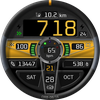
A car dashboard themed watch with animation for Wear OS
Tracked keywords
151
0 ranked • 151 not ranking yet
Top 10 coverage
—
Best rank — • Latest leader —
Avg opportunity
71.3
Top keyword: animation
Avg difficulty
44.4
Lower scores indicate easier wins
Opportunity leaders
- 63.7
animation
Opportunity: 75.0 • Difficulty: 43.4 • Rank —
Competitors: 916
- 65.8
moves
Opportunity: 74.0 • Difficulty: 45.0 • Rank —
Competitors: 926
- 63.1
wheel
Opportunity: 74.0 • Difficulty: 44.7 • Rank —
Competitors: 1,144
- 60.7
changed
Opportunity: 74.0 • Difficulty: 38.6 • Rank —
Competitors: 352
- 60.5
meter
Opportunity: 74.0 • Difficulty: 38.0 • Rank —
Competitors: 289
Unranked opportunities
animation
Opportunity: 75.0 • Difficulty: 43.4 • Competitors: 916
moves
Opportunity: 74.0 • Difficulty: 45.0 • Competitors: 926
wheel
Opportunity: 74.0 • Difficulty: 44.7 • Competitors: 1,144
changed
Opportunity: 74.0 • Difficulty: 38.6 • Competitors: 352
meter
Opportunity: 74.0 • Difficulty: 38.0 • Competitors: 289
High competition keywords
time
Total apps: 382,753 • Major competitors: 17,684
Latest rank: — • Difficulty: 57.6
new
Total apps: 367,256 • Major competitors: 23,494
Latest rank: — • Difficulty: 58.6
information
Total apps: 269,001 • Major competitors: 8,241
Latest rank: — • Difficulty: 54.8
available
Total apps: 201,519 • Major competitors: 10,529
Latest rank: — • Difficulty: 58.5
offers
Total apps: 194,394 • Major competitors: 8,265
Latest rank: — • Difficulty: 53.8
All tracked keywords
Includes opportunity, difficulty, rankings and competitor benchmarks
| Major Competitors | |||||||
|---|---|---|---|---|---|---|---|
| top | 69 | 100 | 56 | 79 87,564 competing apps Median installs: 3,218 Avg rating: 4.0 | — | — | 6,230 major competitor apps |
| new | 65 | 100 | 59 | 89 367,256 competing apps Median installs: 3,172 Avg rating: 4.0 | — | — | 23,494 major competitor apps |
| health | 69 | 100 | 49 | 77 70,080 competing apps Median installs: 785 Avg rating: 4.0 | — | — | 1,981 major competitor apps |
| mode | 69 | 100 | 56 | 77 69,871 competing apps Median installs: 5,244 Avg rating: 4.0 | — | — | 5,824 major competitor apps |
| software | 71 | 100 | 49 | 72 31,622 competing apps Median installs: 1,588 Avg rating: 3.8 | — | — | 1,135 major competitor apps |
| source | 72 | 100 | 47 | 70 26,037 competing apps Median installs: 2,299 Avg rating: 4.1 | — | — | 1,019 major competitor apps |
| version | 70 | 100 | 54 | 76 57,148 competing apps Median installs: 4,940 Avg rating: 4.0 | — | — | 3,389 major competitor apps |
| step | 69 | 100 | 51 | 78 85,085 competing apps Median installs: 1,491 Avg rating: 4.0 | — | — | 4,187 major competitor apps |
| support | 67 | 100 | 55 | 83 172,702 competing apps Median installs: 1,491 Avg rating: 4.1 | — | — | 8,041 major competitor apps |
| contact | 67 | 100 | 54 | 82 139,315 competing apps Median installs: 1,838 Avg rating: 4.0 | — | — | 6,374 major competitor apps |
| section | 71 | 100 | 46 | 72 32,871 competing apps Median installs: 1,239 Avg rating: 4.1 | — | — | 1,128 major competitor apps |
| digital | 68 | 100 | 51 | 81 125,838 competing apps Median installs: 892 Avg rating: 4.0 | — | — | 4,638 major competitor apps |
| heart | 70 | 100 | 47 | 74 42,973 competing apps Median installs: 1,027 Avg rating: 4.1 | — | — | 1,623 major competitor apps |
| wear | 71 | 100 | 61 | 72 32,802 competing apps Median installs: 382 Avg rating: 4.1 | — | — | 870 major competitor apps |
| clock | 73 | 100 | 46 | 68 19,131 competing apps Median installs: 1,474 Avg rating: 4.1 | — | — | 837 major competitor apps |
| date | 68 | 100 | 53 | 79 93,815 competing apps Median installs: 807 Avg rating: 4.1 | — | — | 2,941 major competitor apps |
| wear os | 72 | 100 | 60 | 70 24,443 competing apps Median installs: 294 Avg rating: 4.2 | — | — | 301 major competitor apps |
| information | 65 | 100 | 55 | 86 269,001 competing apps Median installs: 1,211 Avg rating: 4.0 | — | — | 8,241 major competitor apps |
| time | 64 | 100 | 58 | 89 382,753 competing apps Median installs: 1,505 Avg rating: 4.0 | — | — | 17,684 major competitor apps |
| available | 66 | 100 | 58 | 84 201,519 competing apps Median installs: 2,612 Avg rating: 4.0 | — | — | 10,529 major competitor apps |
| goal | 70 | 100 | 47 | 74 43,587 competing apps Median installs: 1,298 Avg rating: 4.1 | — | — | 1,939 major competitor apps |
| various | 67 | 100 | 53 | 82 139,337 competing apps Median installs: 3,301 Avg rating: 4.0 | — | — | 8,665 major competitor apps |
| watch | 68 | 100 | 57 | 80 105,502 competing apps Median installs: 1,232 Avg rating: 4.0 | — | — | 5,803 major competitor apps |
| car | 70 | 100 | 51 | 74 45,831 competing apps Median installs: 5,675 Avg rating: 3.8 | — | — | 4,379 major competitor apps |
| schedule | 70 | 100 | 48 | 76 57,459 competing apps Median installs: 529 Avg rating: 4.0 | — | — | 1,449 major competitor apps |
App Description
A car dashboard themed watch with animation for Wear OS
The colour of the time digits and the dashboard highlight strip can each be independently changed.
Items marked with ‘*’ have additional detail in the “Functionality Notes” section below.
Features:
Steering Wheel:
- Steering wheel rotates as the wearer pivots their arm.
Centre Dash Strip Colour / Clock Colour:
- Each has 10 options, selectable by long-pressing the watch face and tapping on “Customise”, and swiping to “Centre Dash Strip” and “Clock Colour” adjustment screens.
Time:
- 12/24h formats
- AM/PM/24h time mode indicator
- Digital seconds field
Date:
- Day of the week
- Month
- Day-of-the-month
Health Data:
- Step Count
- Distance travelled (km/mi)*
- Steps Calorie Count (kcals)*
- Steps Goal%* display and 5-segment LED meter - Segments light at 20/40/60/80/100%
- Steps Goal reached info lamp lights at 100%
- Heart rate* and heart zone information (5 zones), bpm:
- Zone 1 - <= 60
- Zone 2 - 61-100
- Zone 3 - 101-140
- Zone 4 - 141-170
- Zone 5 - >170
Watch Data:
- Battery status display and 5-segment LED meter - Segments light at 0/16/40/60/80%
- Low battery warning lamp (red), lights at <=15%
- On-charge info lamp (green), lights when watch is charging
Always on Display:
- A version of the display, dimmed to preserve battery life, is displayed.
Multilingual support for day-of-the-week and month fields:
Albanian, Belarusian, Bulgarian, Croatian, Czech, Danish, Dutch, English (Default), Estonian, French, German, Greek, Hungarian, Icelandic, Italian, Japanese, Latvian, Malayan, Maltese, Macedonian, Polish, Portuguese, Romanian, Russian, Serbian, Slovenian, Slovakian, Spanish, Swedish, Turkish, Ukrainian.
App Shortcuts:
- Preset shortcut buttons for:
- Battery Status (by tapping the battery % gauge)
- Schedule (by tapping the date fields)
- Configurable shortcut – typically for health app (over the step count field)
*Functionality Notes:
- Step Goal: For Wear OS 4.x or later devices, the step goal is sync’d with the wearer’s health app. For earlier versions of Wear OS, step goal is fixed at 6,000 steps.
- At present, distance is unavailable as a system value so distance is an approximated as: 1km = 1312 steps, 1 mile = 2100 steps.
- At present, calorie data is unavailable as a system value so the step-calorie count on this watch is approximated as No-of-steps x 0.04.
- The watch displays distance in miles when the locale is set to en_GB or en_US, otherwise kilometres.
- In some languages part of the day-of-the-week field can be truncated due to space constraints.
What’s new in this version?
1. Included a workaround to display the font correctly on some Wear OS 4 watch devices.
2. Changed the step goal to sync with the health-app on Wear OS 4 watches. (See functionality notes).
3. Removed ‘Measure Heart Rate’ button (not supported)
Enjoy the joy of driving on your watch with Orburis.
Support:
If you have any questions about this watch face you can contact support@orburis.com and we will review and respond.
Keep up to date with Orburis:
Instagram: https://www.instagram.com/orburis.watch/
Facebook: https://www.facebook.com/orburiswatch/
Web: http://www.orburis.com
======
ORB-08 uses the following open source fonts:
Oxanium, copyright 2019 The Oxanium Project Authors (https://github.com/sevmeyer/oxanium)
DSEG7-Classic-MINI,Copyright (c) 2017, keshikan (http://www.keshikan.net),
with Reserved Font Name "DSEG".
Both Oxanium and DSEG Font Software are licensed under the SIL Open Font License, Version 1.1. This license is available with a FAQ at http://scripts.sil.org/OFL
======